General Information
69
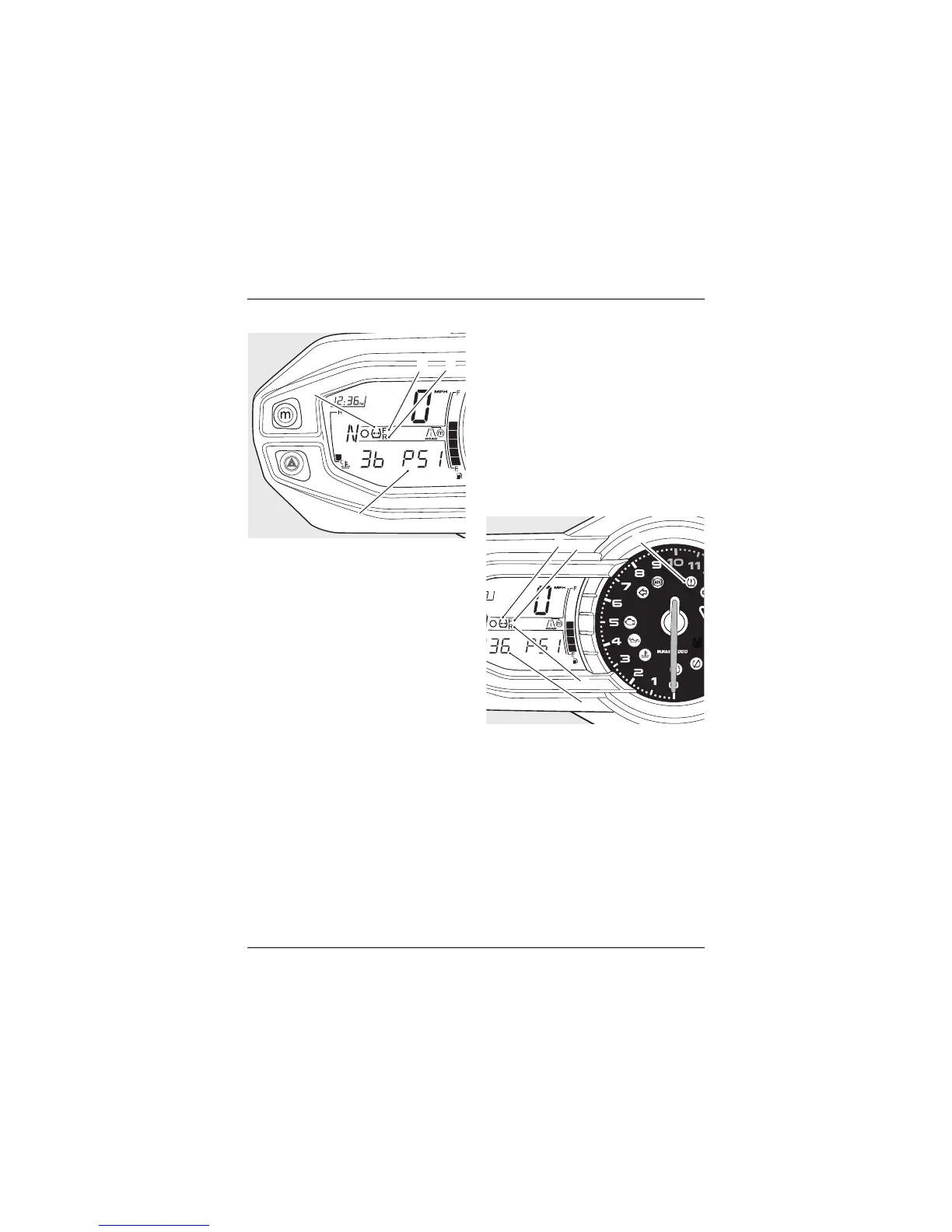
TPMS System Display
1. TPMS symbol
2. Tyre pressure display
3. Front tyre, identified
4. Rear tyre, identified
The tyre pressure display is accessed via
the Information Menu (see page 37).
When the front or rear tyre pressure
display has been selected, —— PSI or bAr
will be visible in the display screen until
the motorcycle is travelling at a speed
greater than 12 mph (20 km/h) and the
tyre pressure signal is received.
Once the tyre pressure signal has been
received, the pressure of the selected
tyre will be displayed.
To exit the tyre pressure display, press
and release the SCROLL button to view
another Information Menu item.
Alternatively, press and release the SET
button to select a trip meter.
TPMS Sensor Batteries
When the battery voltage in a pressure
sensor is low, lo bAtt will be displayed for
eight seconds and the TPMS symbol will
indicate which wheel sensor has the low
battery voltage. If the batteries are
completely flat, only dashes will be
visible in the display screen, the red
TPMS warning light will be on and the
TPMS symbol will flash continuously.
Contact your authorised Triumph dealer
to have the sensor replaced and the new
serial number recorded in the spaces
provided on page 68.
1. TPMS symbol
2. Tyre pressure display
3. Front tyre, identified
4. Rear tyre, identified
5. TPMS warning light
TPMS Symbol
With the ignition switch turned to the
ON position, if the TPMS symbol flashes
for 10 seconds and then remains on,
there is a fault with the TPMS system.
Contact your authorised Triumph dealer
to have the fault rectified.






 To Next Page