INSTALLATION
OVERVIEW
WARRANTY
MAINTENANCE
OPERATION
19
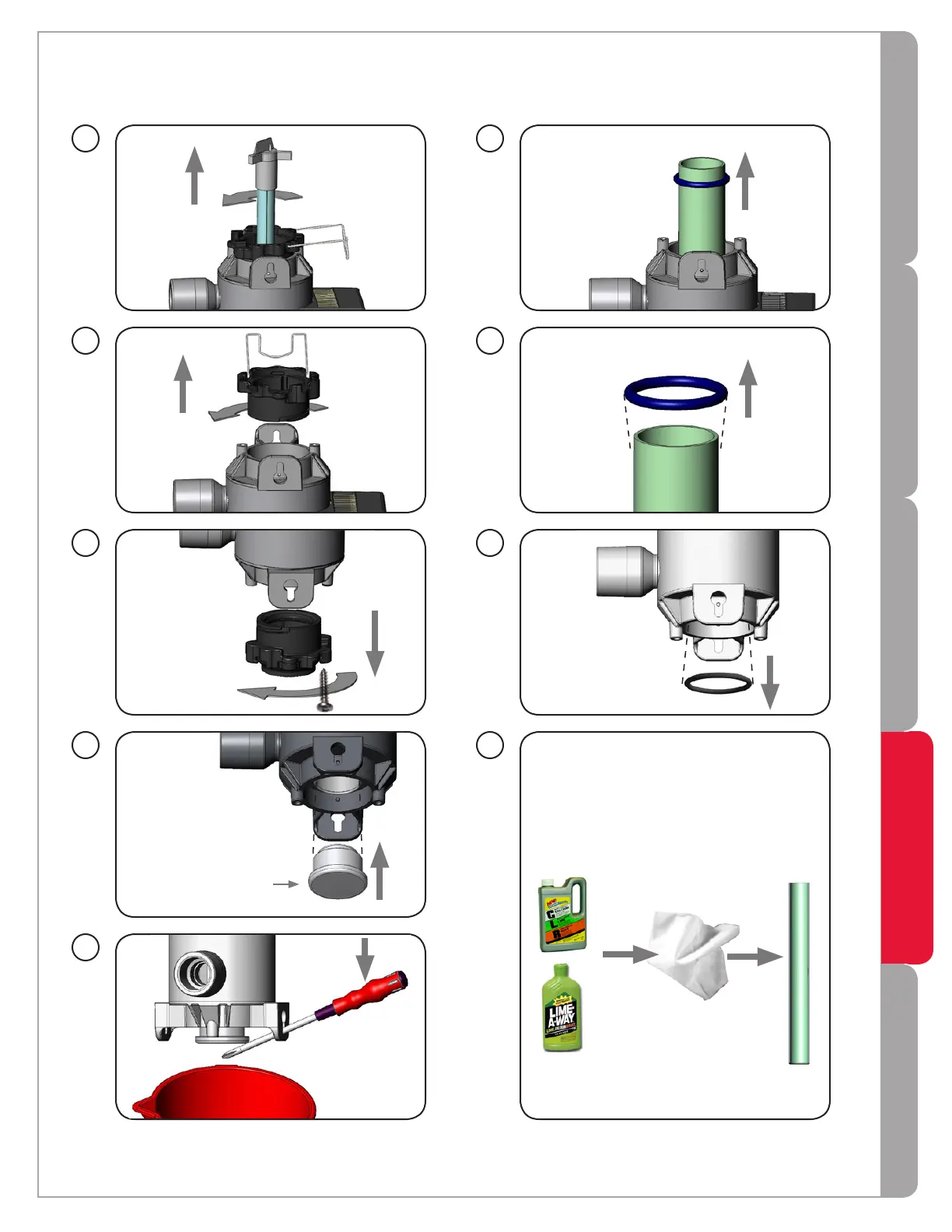
Ensure cloth used to clean the sleeve is
soft, lint-free, and contains no chemicals
(no clean-wipes). Sleevemustbereplaced
ifitcannotbecompletelycleanedorifit
appearsscratchedorcracked.
13
1
2
1
12
2
1
11
Do not touch
glass with bare
hands.
2
16
Remove sleeve.
Water will
escape - have
bucket under
chamber.
14
Sleeve removal tool
Insert sleeve
removal tool
into bottom
of sleeve
15
Pry sleeve
upward until it
comes loose.
Some water
will escape.
18
Remove O-ring
from bottom of
chamber.
Remove
O-ring
from top
of sleeve.
17
1
1
Remove
screw.
3
19



 To Next Page