Operating manual – Infrared camera
B - 8
04. BASIC FUNCTIONS
Using the LCD Monitor
If you wish to use the LCD monitor for shooting, play-
ing back thermal images and adjusting menu settings,
follow the instruction below.
1. Open the LCD dis-
play in the di-
rection of the ar-
row.
2 . Aim the IR camera
at a subject.
•Forabettertem-
peratur measu-
rement, please
do make the
subject in cen-
ter of the image
that is shown on
the LCD monitor.
•TheLCDwillshutoffwhenclosed.
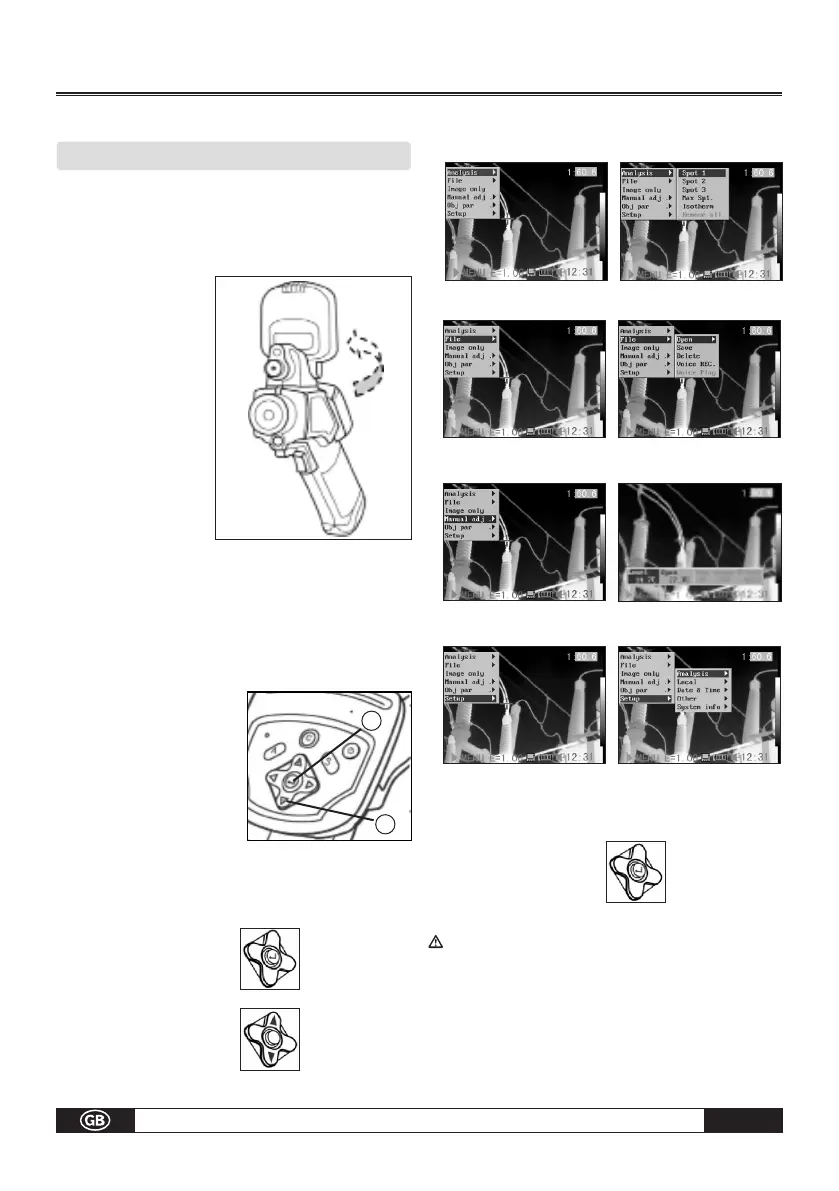
Selecting Menus and Settings
You can select the settings by pressing the MENU/KEY key.
1.
Press the MENU / ENTER
key.
(1).
2. Press the 3Left, Right
4 or
Up, Down
arrow (2) on the omni
selector.
3. Press the MENU/
ENTER button (1).
Example
1. Press the MENU/
ENTER key.
2. Select a function item
using.
Analysis Menu
File Menu
File Menu
Setup Menu
4. Confirm settings the
Menu/Enter Key.
Displayed menu items will vary according to
the operation and setting contents!
1
2
3
3



 To Next Page
 Loading...