13 EN
Operating manual – local air conditioner PAC 2010 E / PAC 2610 E
Info
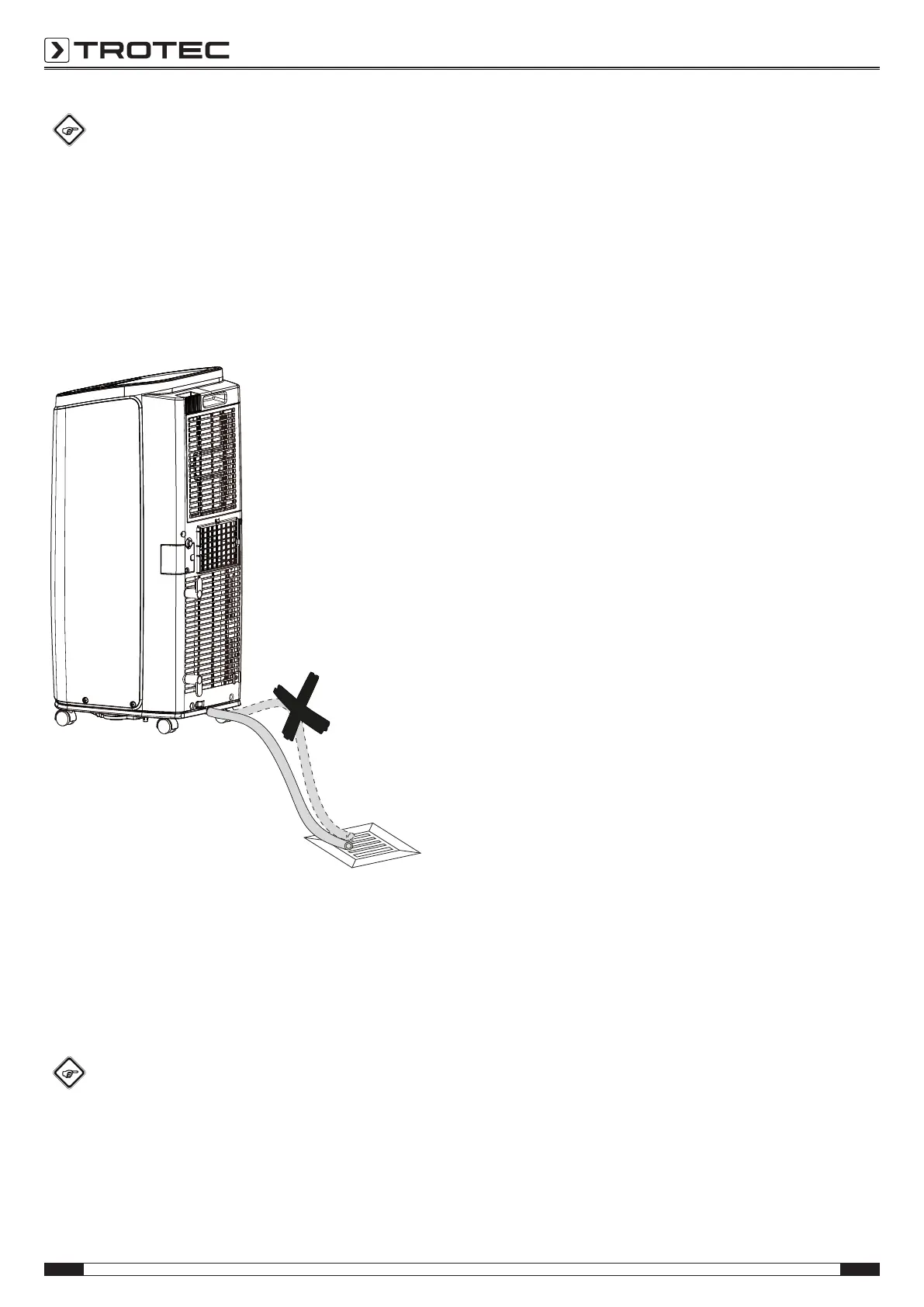
If during assembly you mounted the condensation
drain hose at the bottom, you can let the condensate
drain off there.
1. Remove the rubber stopper from the condensation drain
hose.
2. Detach the condensation drain hose from the retaining clip
and guide the hose to a drain or collection container. To
ensure that the condensate can run off, the hose must not
be kinked, nor should it have to overcome an uphill incline
towards the drain.
Ventilation
In ventilation mode the room air is circulated, it will neither be
cooled nor dehumidified.
The automatic stage depends on the current room temperature
and the set target temperature. The fan speed increases with a
high room temperature. The fan speed decreases in case of a
low room temperature.
Info
Remove the exhaust air hose during ventilation.
1. Press the Mode button(16) until the operating mode LED
Fan(15) is illuminated.
2. Press the Fan button(22) to set the fan stage.
ð The fan stage LED(23) for the selected fan stage will be
illuminated.
Setting the timer
The timer has two modes of operation:
• automatic switch-on upon expiry of a preset number of
hours
• automatic switch-off upon expiry of a preset number of
hours
The timer can be programmed in increments of 0.5hours (0.5
to 10h) or in increments of 1hour (11 to 24h).
The function can be set in all operating modes and also during
stand-by.
Notice
Do not leave the operating device unattended in a
freely accessible room with an activated timer.
Automatic switch-on
ü The device is switched off.
1. Press the Timer button(18) to activate the timer.
ð The Timer LED(17) flashes.
ð The segment display(13) indicates the number of hours
until automatic switch-on (default: 0.5).
2. Press the plus/ minus arrow buttons(12, 14) until the
desired number of hours until automatic switch-on has
been set.
ð The number of hours is indicated on the segment
display(13) for approx.5s.
3. Press the Timer button(18) to confirm the desired number
of hours until automatic switch-on.
ð The segment display(13) switches off. The Timer
LED(17) is illuminated.
ð After the predefined time, the device switches itself on.
4. Press the Timer button(18) again to deactivate the timer.
Notes regarding automatic switch-on:
• If the device is disconnected from the power supply, all
settings for automatic switch-on are deleted.
• Manually switching the device on disables the automatic
switch-on function.
• Pressing the Timer button(18) again deactivates the timer.






 To Next Page