EN 11
dehumidifier TTK 96 E / TTK 127 E
Note
You can deactivate automatic switch-on and switch-off
by setting the respective number of hours back to 0 or
by manually switching the device on or off.
If error codeP2 is indicated on the segment
display(20), the timer is also disabled.
A full condensation tank can cause the device to be
switched off before the set number of hours until
automatic switch-off have elapsed.
Automatic switch-on and automatic switch-off may be enabled
at the same time. The LEDs On(19) and Off(18) on the control
panel will then be illuminated simultaneously.
Memory function
In case of brief power failures the device memorizes the
programmed nominal value for humidity. The pre-programmed
start and stop times for automatic operation are not saved.
Auto stop function
If the water tank is full, not inserted correctly or the set humidity
level has been reached, the device stops automatically.
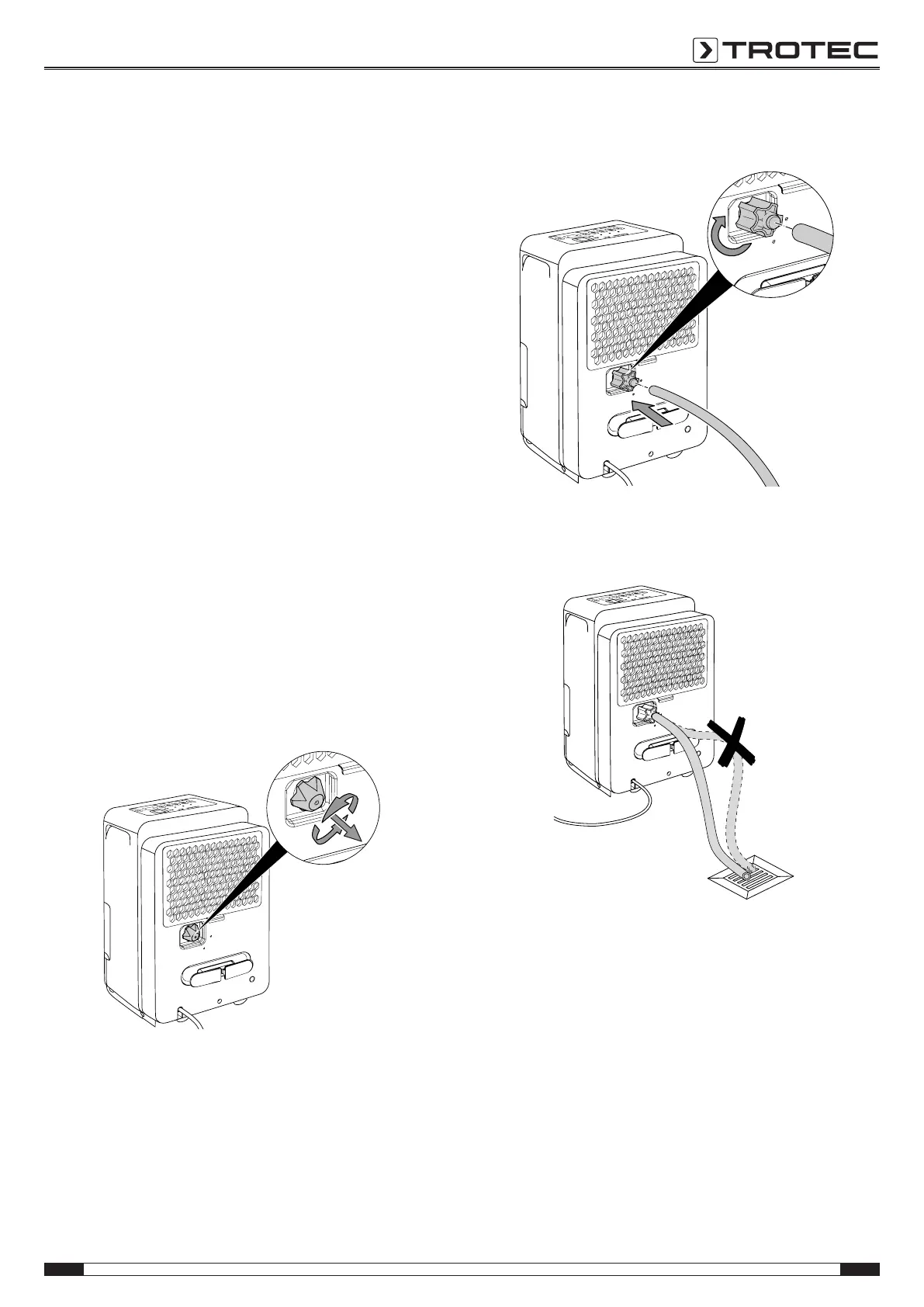
Operation with hose attached to the condensation
connection
For continuous operation or unattended dehumidification, please
connect the supplied condensation drain hose to the device.
ü The supplied hose is ready for use.
ü The supplied hose adapter is ready for use.
ü The device is switched off.
1. Unscrew the sealing cap from the connection(5). Keep the
screws safe for later use.
2. Screw the hose adapter(9) onto the connection.
3. Push one end of the hose onto the hose adapter.
4. Guide the other hose end to a suitable drain or sufficiently
dimensioned collection container. Please note that the
hose must not be kinked.
Remove the hose if you want to collect the condensate in the
condensation tank again. Allow the hose to dry prior to storage.
The hose can be connected in any operating mode for
continuous operation.
Automatic defrost
At low ambient temperatures, ice may form at the evaporator
during dehumidification. The device will then carry out an
automatic defrost. Dehumidification is briefly interrupted during
defrosting. The fan keeps running.
The duration of the defrost process can vary. Do not switch off
the device during automatic defrost. Do not remove the mains
plug from the mains socket.



 To Next Page