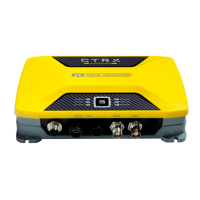
AIS-CTRX Class B AIS Transponder Manual
PROGRAMMING THE TRANSPONDER
Field Programmer
Before the AIS-CTRX can be used it requires ‘personalisation’.
This is done via the AIS-CTRX field programmer package which is supplied as an accessory.
This software is designed to be installed on a PC and to use the data lead provided as standard with
the AIS-CTRX unit. If the PC being used for programming does not have a 9-pin serial port then a
commercially available USB to serial adaptor may be required. This connects between the supplied
data lead and the PC.
The Field Programmer software has password controlled access with three levels: Operator, Dealer
and Engineer. Using the operator function only allows reading of unit information. Using the Dealer
function allows editing of unit data, and using the Engineer function provides all the access of the
Dealer function with the additional feature of allowing upgrading of embedded software.
The programming process operates as follows:
• A data record is created for an individual AIS-CTRX.
• If required this data record is then edited.
• The data record is saved to a data base.
• The AIS-CTRX unit is then programmed.
• If required the programming can then be checked by ‘reading’ the AIS-CTRX.
The AIS-CTRX personalisation data required is the ship’s MMSI, the ship’s name, its dimensions,
position reference, type and call sign. The Date Entry function is accessible via the dealer and
engineer passwords and personalisation data can be created as follows:
Direct Entry
By entering the ship’s MMSI, the ship’s name, its dimensions, position reference, type and call sign
directly into the programming software.
Read Existing Data
By reading an already programmed MMSI, ship’s name, its dimensions, position reference, type and
call sign.
Read Database
By reading from a previously created record in the data base the ship’s MMSI, the ship’s name, its
dimensions, position reference, type and call sign.
Other features:
Help
There is a context based Help file which explains what each data entry field means and what sort of
data is expected. Help is accessible via the dealer and engineer passwords.
Print
The programmer will print out the information ‘Read’ from or ‘Written’ to an AIS-CTRX Class B unit.
1.1E 21 LD2103


 To Next Page