CHAPTER 4: T9 TOUCHSCREEN CONSOLE OPERATION
Truetness.com / 800.426.6570 / 636.272.7100 23 of 29
ADVANCED CONSOLE FUNCTIONS:
Utilities Menu:
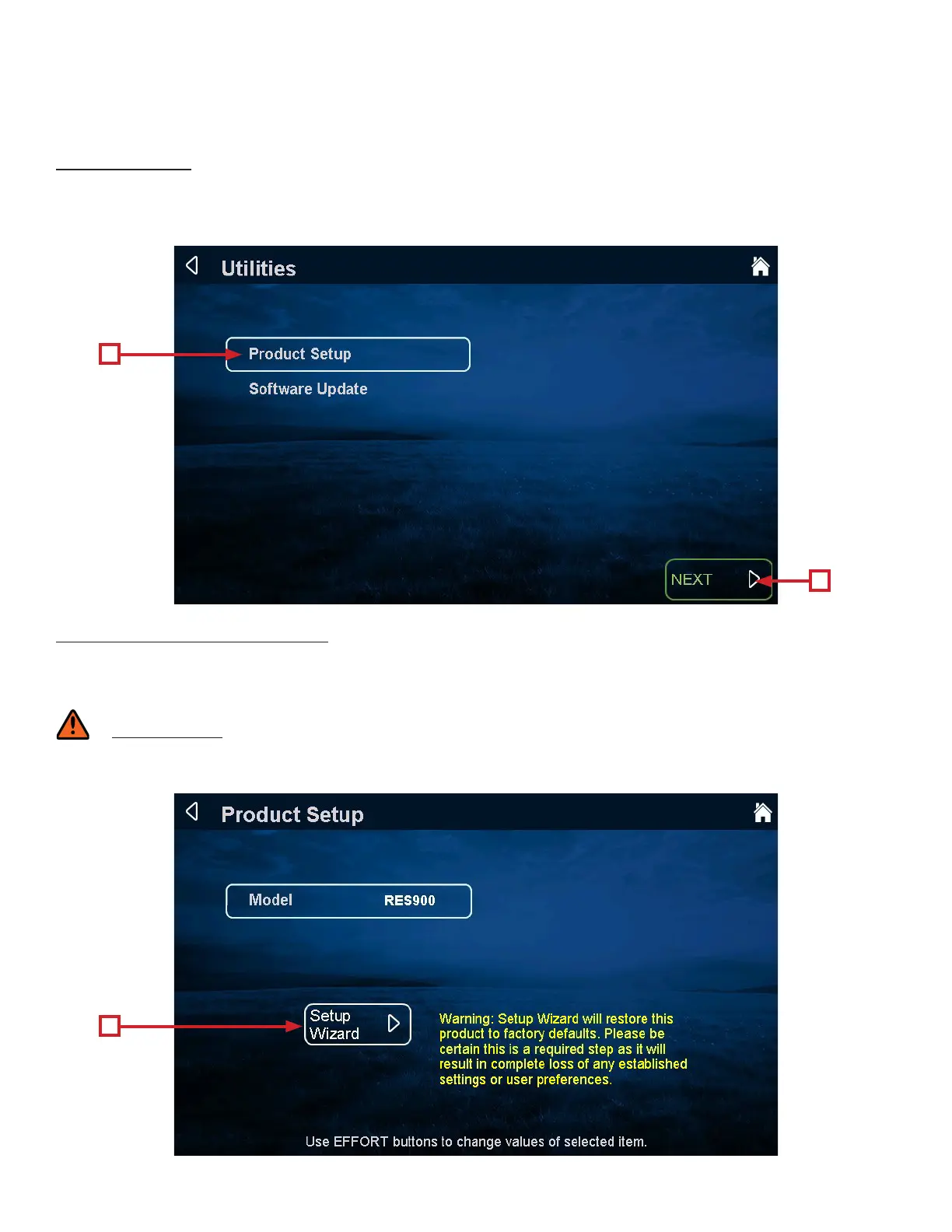
e utilities menu contains multiple screens that allow the technician to change various console settings. Settings are
broken down into two categories - “Product Setup” and “Soware Setup”. To adjust settings, touch and highlight a category
(A) and then touch the “Next” button (B) to start the process.
Utilities Menu - Product Setup:
e product setup screen allows for adjustments to be made to the model conguration, TRUE’s recommendation is to
only use the Setup Wizard to adjust these attributes. Aer touching the Setup Wizard Selection button (A), simply follow
the on screen instructions to complete the setup procedure.
WARNING:
Misconguration of the console may cause damage to the unit and void the manufacturer warranty. If necessary, please
contact TRUE Fitness Technical Support at 800-883-8783 for assistance.
A
A
B


 To Next Page