CHAPTER 4: T9 TOUCHSCREEN CONSOLE OPERATION
Truetness.com / 800.426.6570 / 636.272.7100 27 of 29
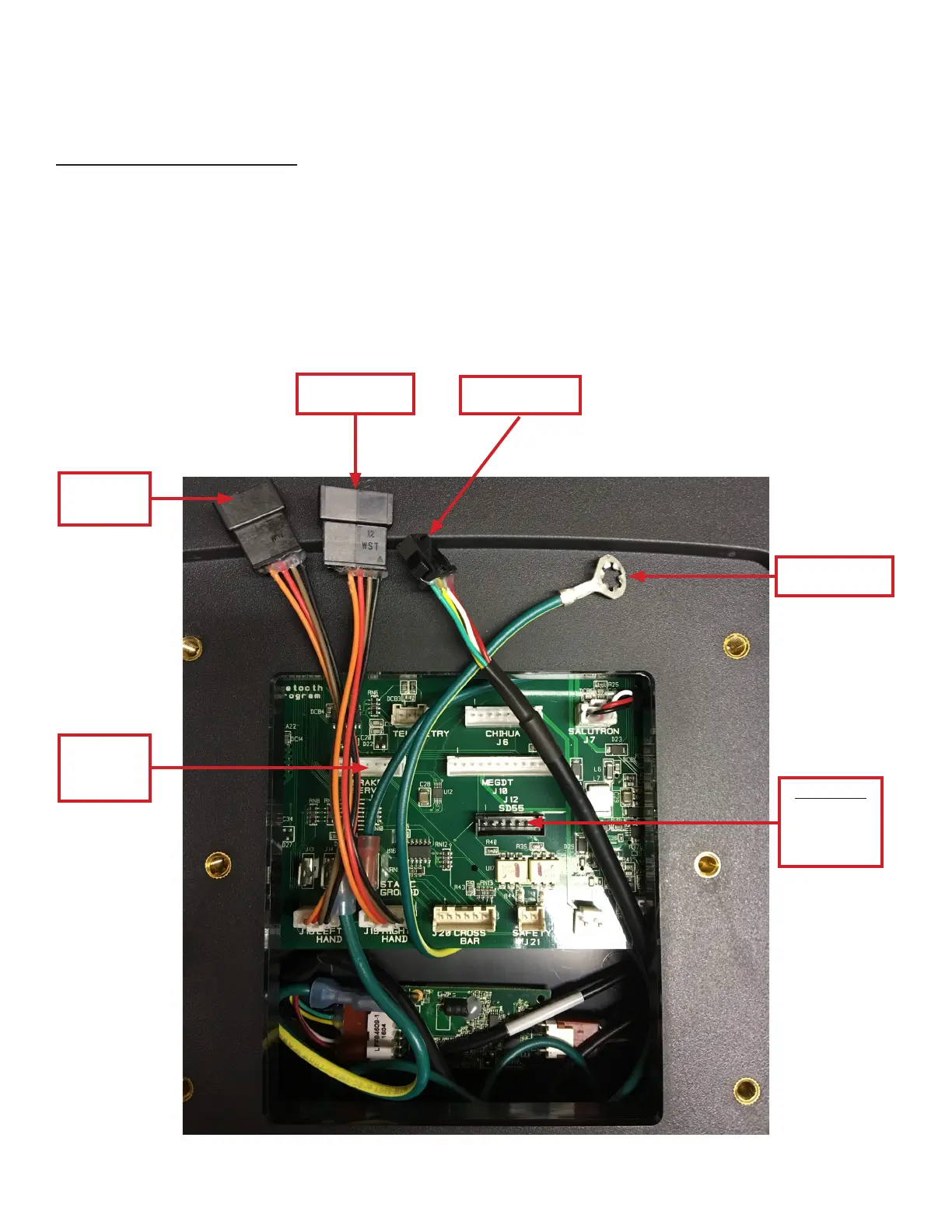
Ground Wire
Ring Terminal
DO NOT
insert
SD55 black
7-pin
connector
CONSOLE ASSEMBLY:
Console Wire Connections:
Connect the 4-pin, 6-pin, 5-pin, and brake servo white 7-pin connectors to the corresponding front mast cables as shown
below. Connect the ground wire ring terminal to the pre-installed, grounded screw on the front console mast ensuring the
grounded screw secures the ground wire ring terminal to the front console mast. Ensure all ground wires are connected.
Note: Refer to the respective unit manual included with your unit for console mast and rear console cover assembly.
Note: e T9 touchscreen console requires the provided 12V, 3A power adaptor to operate.
Note: Ethernet cable connection is not available on the T9 touchscreen console.
Connect to
5-pin
connector
Insert brake
servo white
7-pin
connector
Connect to
6-pin connector
Connect to
4-pin connector


 To Next Page