CHAPTER 4: T9 TOUCHSCREEN CONSOLE OPERATION
Truetness.com / 800.426.6570 / 636.272.7100 15 of 29
TOUCHSCREEN NAVIGATION:
Home Screen:
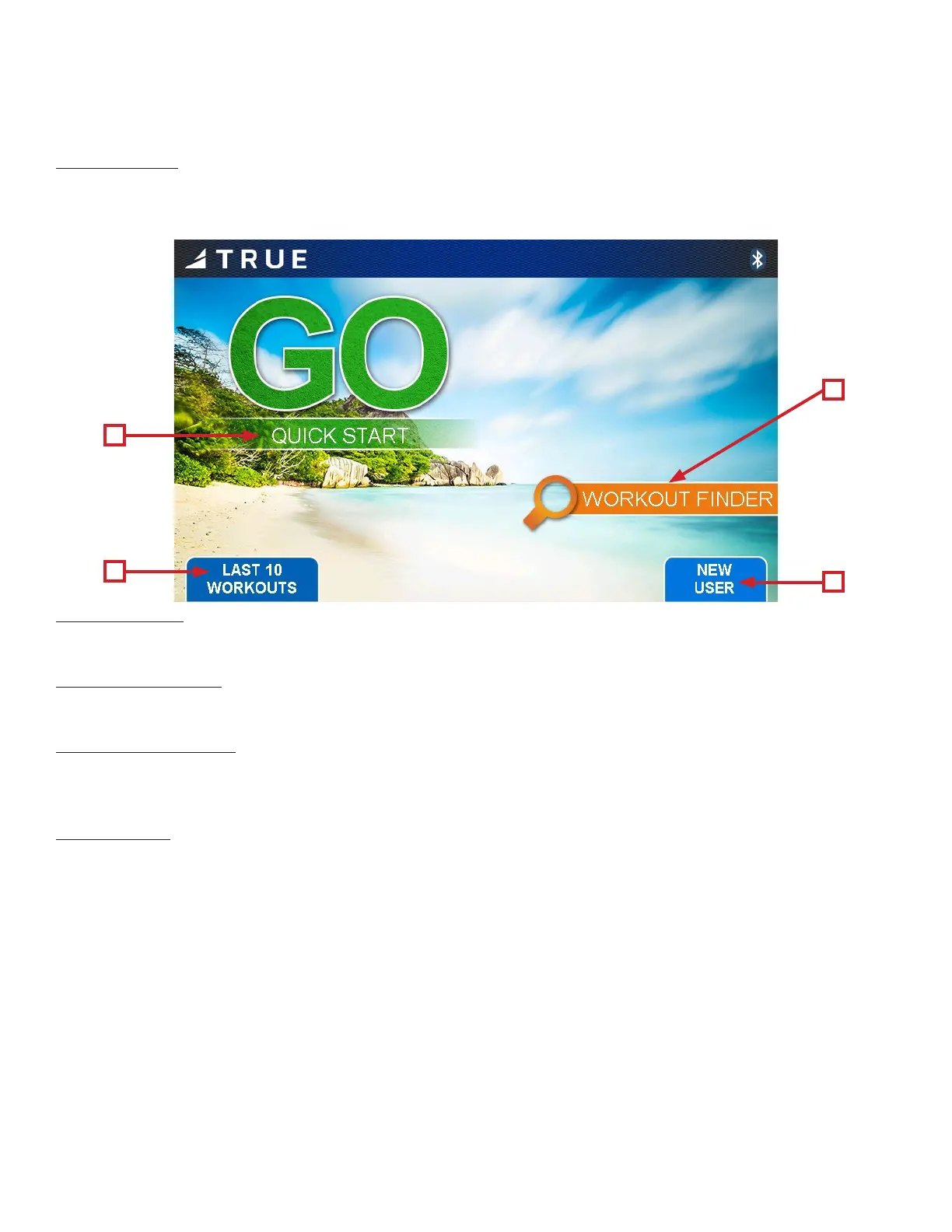
e Home Screen is displayed on the console when there is no workout in progress. From this screen the user is able to
select from various options to begin a workout.
A
C
D
B
A) Quick Start
Starts a Quick Start workout where the user controls all settings until the workout is ended.
B) Workout Finder
Displays preset workouts categorized by goal focus categories.
C) Last 10 Workouts
Displays the last ten (10) workouts (latest rst) for the user to select. Shows the type of workout and the time duration set
up for it.
D) New User
Allows the user to set up or edit a personal prole for use during a workout. Records user Name, Age and Weight. It also
gives the new user the option of selecting a Saved Workout, nding a new workout or connecting (pairing) to an external
device such as a Mobile App., Heart Rate Monitor or Music Player.


 To Next Page