CHAPTER 4: T9 TOUCHSCREEN CONSOLE OPERATION
Truetness.com / 800.426.6570 / 636.272.7100 16 of 29
TOUCHSCREEN NAVIGATION:
Selecting a Preset Workout:
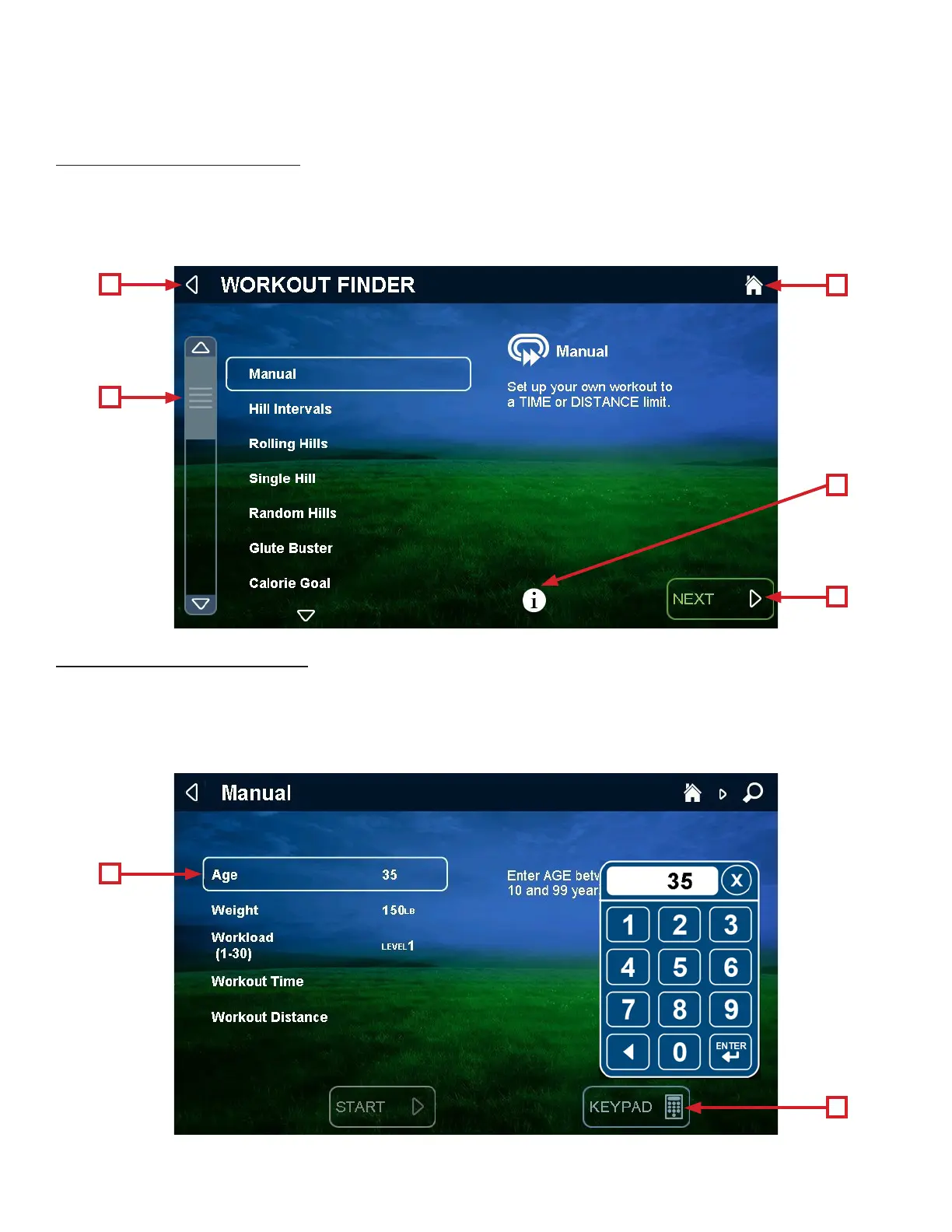
Access preset workouts by touching Workout Finder on the home screen. View the workouts by using the scroll bar (A) to
sweep up and down the selection list, highlight the desired workout, and touch Next (B) to select it.
Touching the “i” (E) button will display a menu that allows the user to highlight related types of workouts in the list. Note:
Touch the back arrow (C) to return to the previous screen. Touch the “Home” (D) icon to return to the Home screen.
Workout Data Entry Screen:
is screen allows users to input their personal information or workout goals prior to beginning a workout. To set a value,
touch and highlight the value you wish to change (A) touch the Keypad button (B) to display the keypad and type in the
desired value on the keypad.
Note: Workout Data Entry Screens vary by program selection.
A
A
C
B
B
D
E


 To Next Page