CHAPTER 4: T9 TOUCHSCREEN CONSOLE OPERATION
Truetness.com / 800.426.6570 / 636.272.7100 17 of 29
TOUCHSCREEN NAVIGATION:
Workout Data Screens:
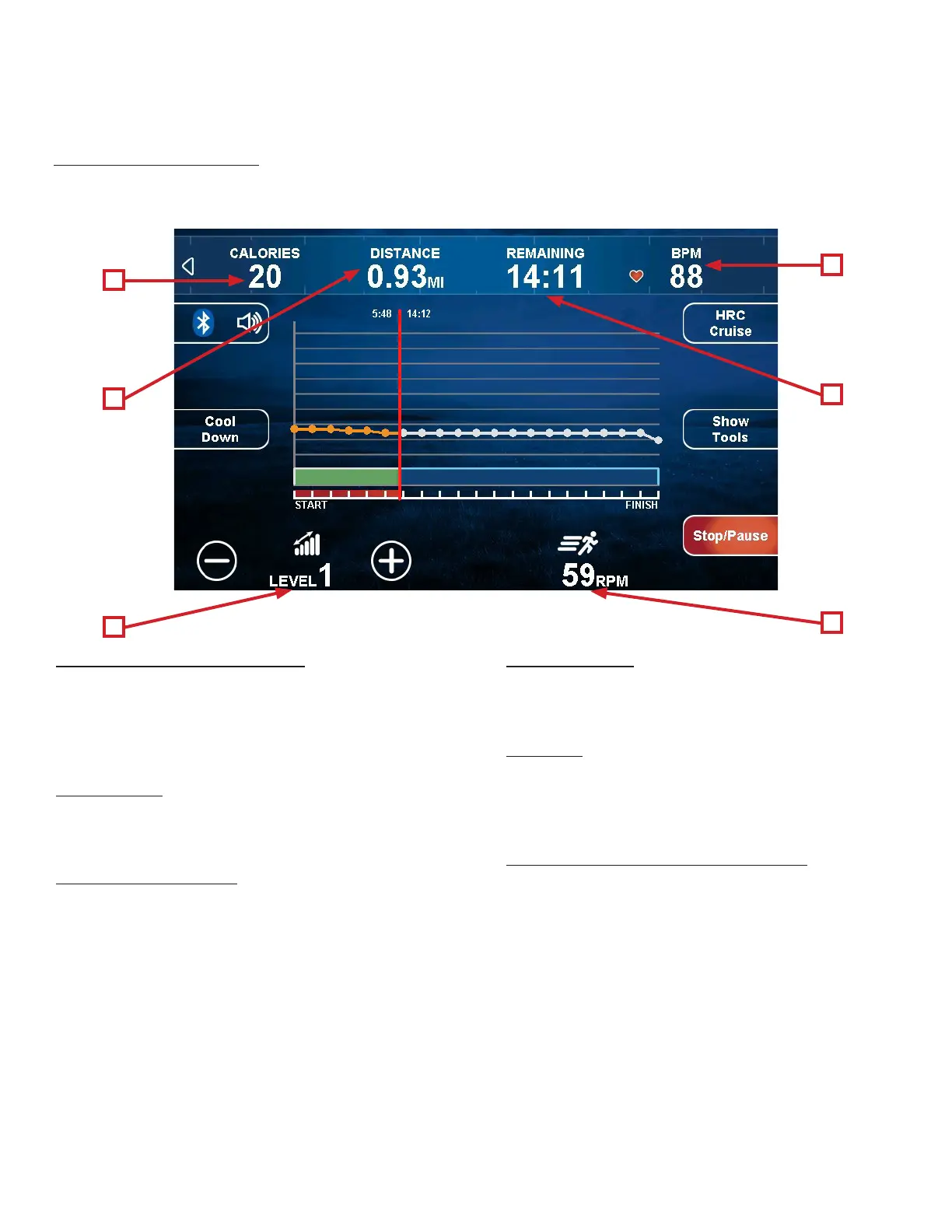
During any workout, a Workout Data Screen will be displayed to give the user a comprehensive visual overview of their
current workout data.
A) Calories / METS Display:
During the workout, this display will alternately
show the calories burned and the METS (Metabolic
Equivalent) calculation up to the current moment of the
workout.
B) Distance:
Displays the virtual distance traveled up to the current
moment of the workout.
C) Time/Remaining:
During the workout, this display will alternately
show the time elapsed in the workout and the time
remaining before the workout ends. (Note: is eld
will not populate during a Quick Start or Manual
workout.)
D) Heart Rate:
Shows the user’s heart rate in a digital beats per minute
(BPM) readout.
E) Level:
Displays the resistance of the pedals in terms of pedaling
up an incline. Touching the “-” and “+” buttons allows
the user to decrease or increase the resistance.
F) RPM (Revolutions Per Minute):
Shows the speed the user is maintaining in terms of the
number of revolutions of the pedals per minute.
A
E
B
D
C
F


 To Next Page