CHAPTER 4: T9 TOUCHSCREEN CONSOLE OPERATION
Truetness.com / 800.426.6570 / 636.272.7100 24 of 29
ADVANCED CONSOLE FUNCTIONS:
Utilities Menu - Soware Update:
TRUE may periodically release soware updates to ensure users enjoy the best workout experience available. Due to the
complex nature of this procedure, it is recommended that any soware update be completed by a TRUE certied service
professional.
Options Menu:
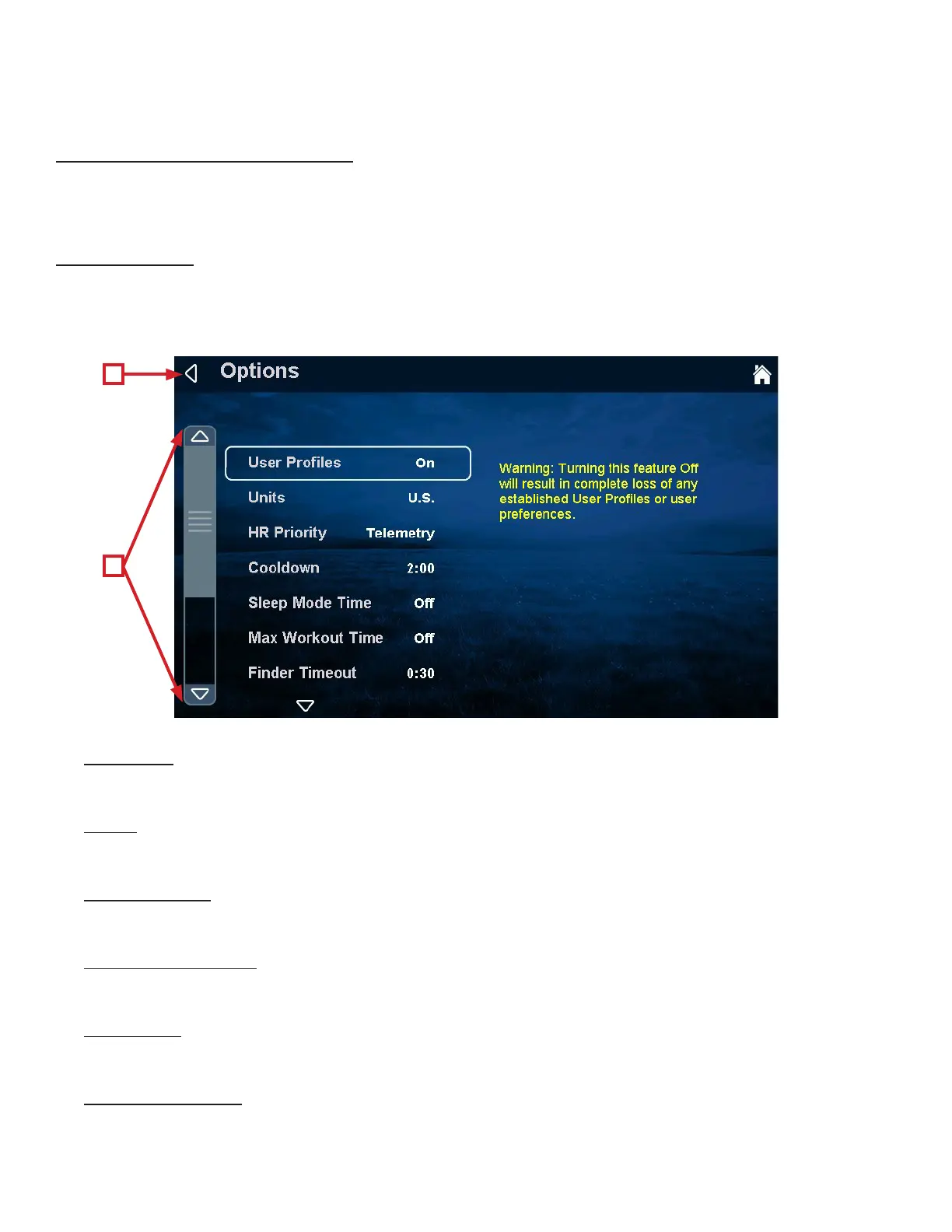
e options menu contains 13 Settings with various options available for each. To navigate the options menu, use the scroll
selection buttons (A) to highlight the option to be changed and use the Workload keys to adjust the options. Once the
changes are complete, press the back selection button (B) and the changes will be automatically saved.
Language:
Select a default Language for the unit. All settings and workout data will be displayed in that language.
Units:
Choose how the workout data is displayed by default.
Save Workout:
Turns the saved workout feature on or o.
Heart Rate Priority:
Determines the order in which the unit reads heart rate data.
Cooldown:
Adjusts the length of the cooldown time at the end of a workout.
Sleep Mode Time:
e amount of time the unit can be idle before entering sleep mode. By choosing the “O” setting, the unit will remain
powered.
B
A


 To Next Page