CHAPTER 4: T9 TOUCHSCREEN CONSOLE OPERATION
Truetness.com / 800.426.6570 / 636.272.7100 18 of 29
TOUCHSCREEN NAVIGATION:
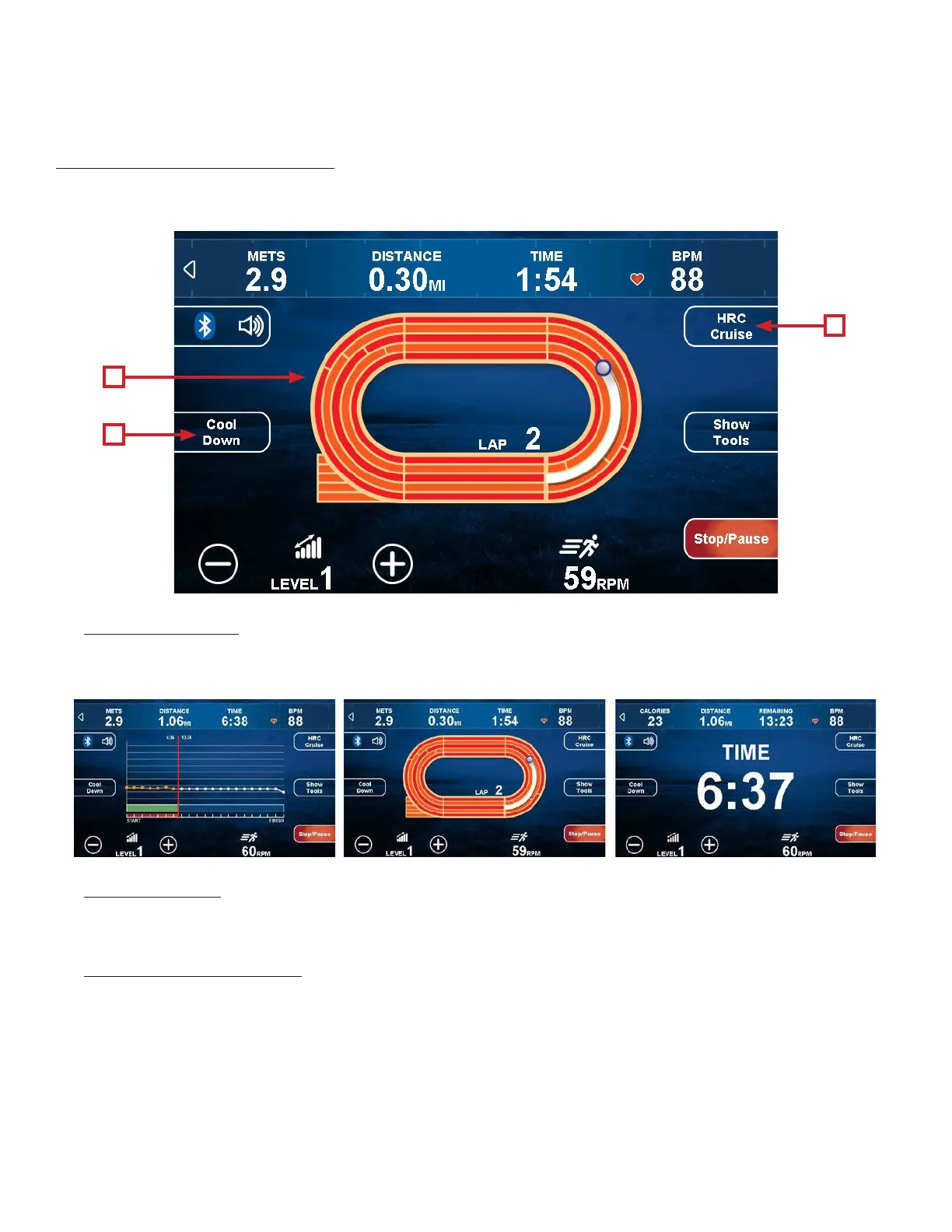
Workout Data Screen Controls:
e Workout Data Screens contain various controls that allow users to adjust workout settings and to customize their
overall workout experience.
A) Change View:
ere are three Workout Data Screen views available. Switch between the screens by touching the center of the display.
B) Cool Down:
Touching this button allows the user to end their current workout with a two minute low intensity cool down period.
When Cool Down is activated the unit is in manual mode and the user directly controls all settings.
C) HRC Cruise Control:
Engages Heart Rate Control to allow the equipment to maintain the user’s current heart rate through automatic
workload adjustments (when the user is utilizing heart rate monitoring).
A
B
C
Linear Graphic Time ElapsedLap Track


 To Next Page