Trust Ami Mouse Wireless 200
6
6. Use
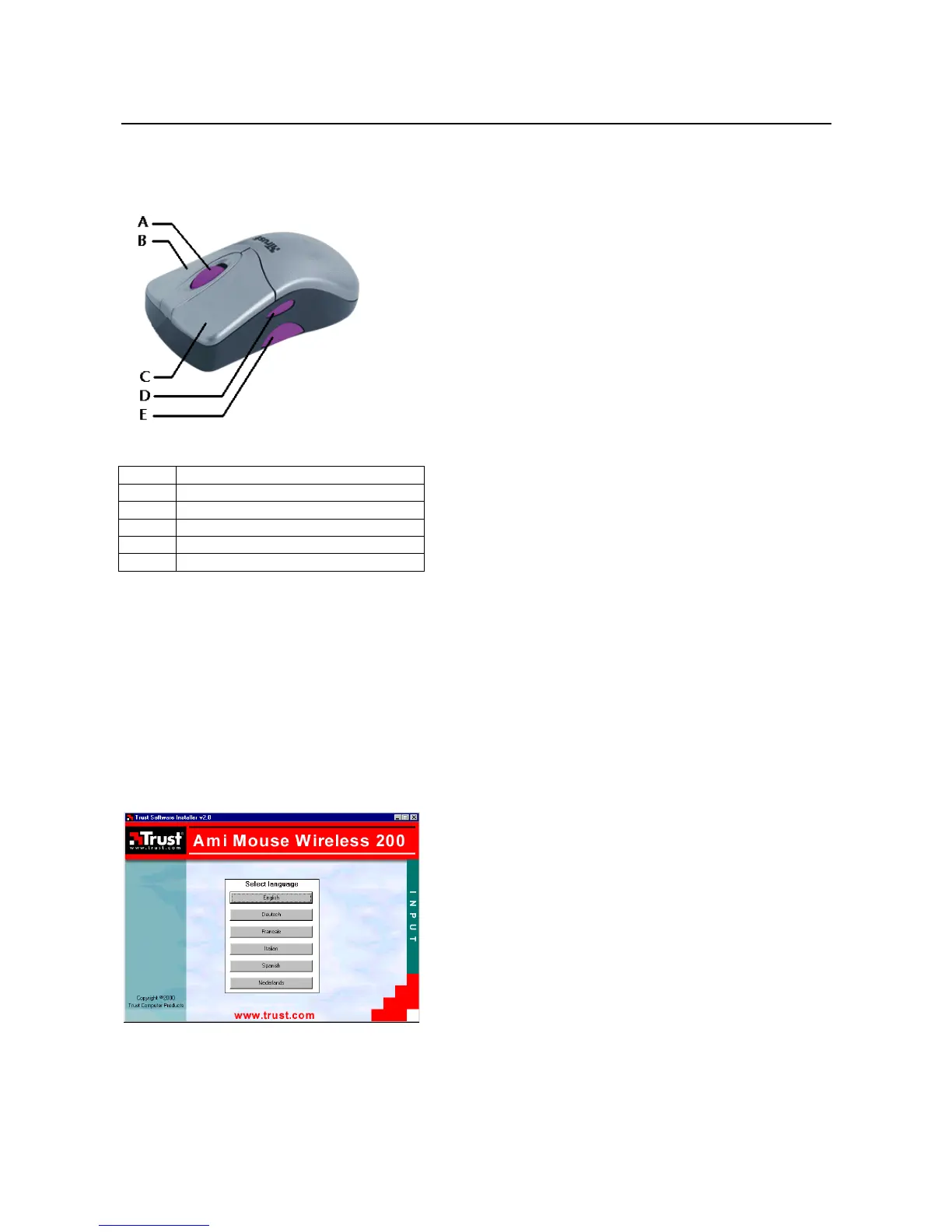
Figure 5: Position of the buttons
Button Function
A Scroll wheel + third mouse button
B Right mouse button
C Left mouse button
D Fourth mouse button
E Fifth mouse button
Table 1: Description of figure 5
7. Installation
Close all programs before installing the driver.
7.1 Trust Software Installer
Follow the points given below to start the Trust Installer:
1. Turn on the computer and start Windows.
If you are using Windows NT or 2000, log on as 'Administrator'.
2. Insert the CD-ROM into your CD-ROM drive.
3. Select 'Run' from the Start menu.
4. In the command line, type [D:\SETUP.EXE] and click on 'OK'. Figure 6 will appear.
Figure 6: Trust Software Installer
5. Select the language you wish to use. Figure 7 will appear.



 To Next Page