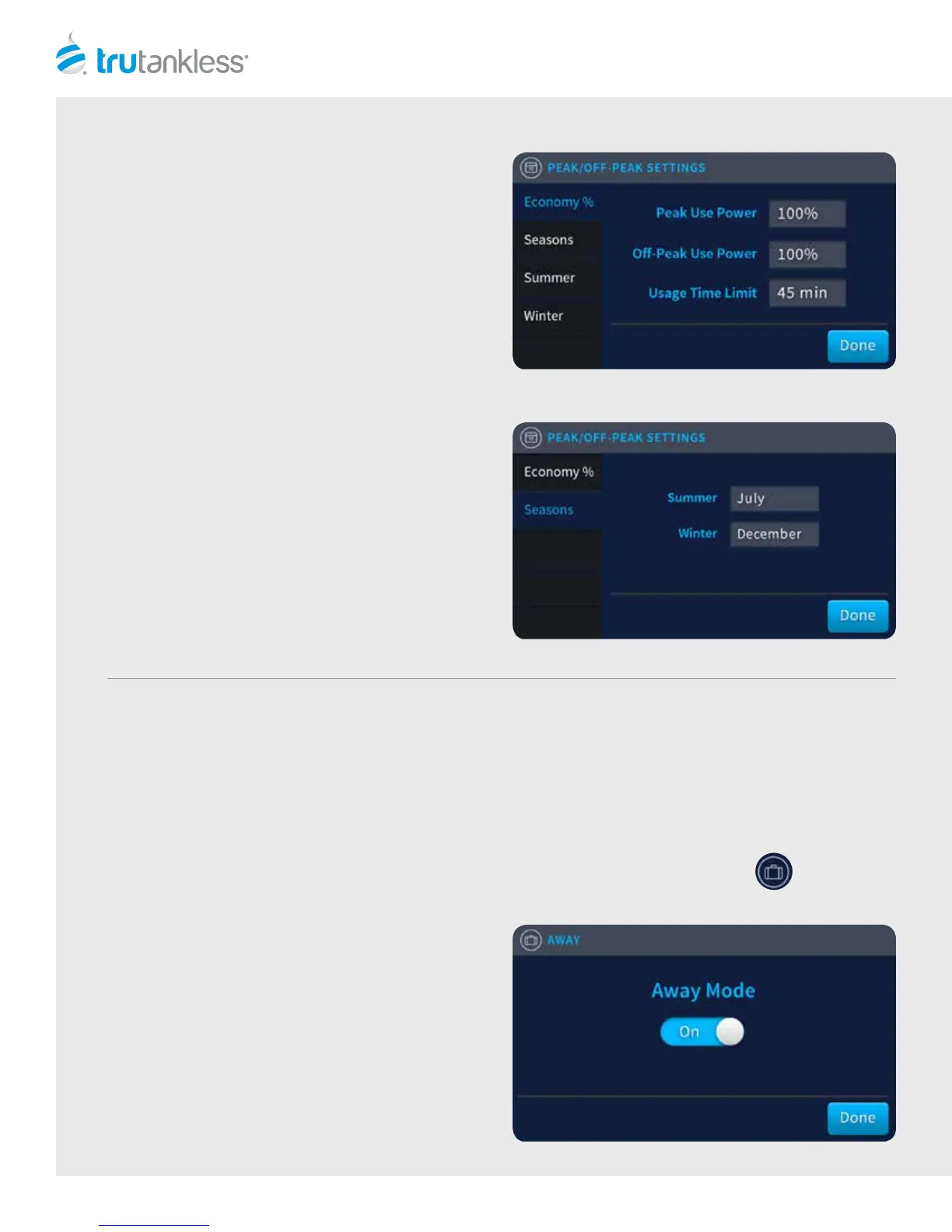
ECONOMY %
To set the power percentage that will be allowed during
peak and o-peak times, touch the “Peak Use Power”
and/or “O-Peak Use Power” fields to bring up a drop
down menu and scroll to the desired percentage. The
characters will become highlighted and larger when they
are selected.
To define the times of day that Peak Use Power setting
will be in eect, tap “Peak Times” in the Le Navigation
bar to bring up the Peak Times window.
PEAK TIMES
The Peak times window allows you to set up to two (2)
peak use times daily. To set the start and stop times,
touch the “Begin” and “O” screens to bring up drop
down menus and scroll to the desired times. The
characters will become highlighted and larger when they
are selected.
Tap “Done” to return to the Home screen.
AWAY
Tap the “Away Mode” switch to toggle between
On and O.
Tap “Done” to return to the Home screen.
AWAY SCREEN
Putting your trutankless unit in Away Mode tells the unit that it should not expect water to flow through it while the
mode is ON. The unit will send alerts to the Bollente Monitoring Service if it detects a flow of water, an indication that
there might be some unusual or inappropriate activity (such as, a pipe has burst or someone le a hot water tap on.)
The homeowner can make appropriate decisions if this alert is sent to them.
From the Home screen, tap the Suitcase icon in the Right Navigation Bar to access the Away screen.
8



 To Next Page