A
A
B
B
I
I
J
J
H
H
G
G
F
F
E
E
D
D
C
C
PROGRAMMING YOUR
TRUTANKLESS® WATER HEATER
Your licensed contractor may have already set some basic system parameters, like date, time, and display units, at the
time of installation. You can verify these settings to ensure the best performance from your trutankless water heater.
The LCD screen is the interface for all your programming needs. The default screen is the Home screen, from where all the
programming features can be accessed.
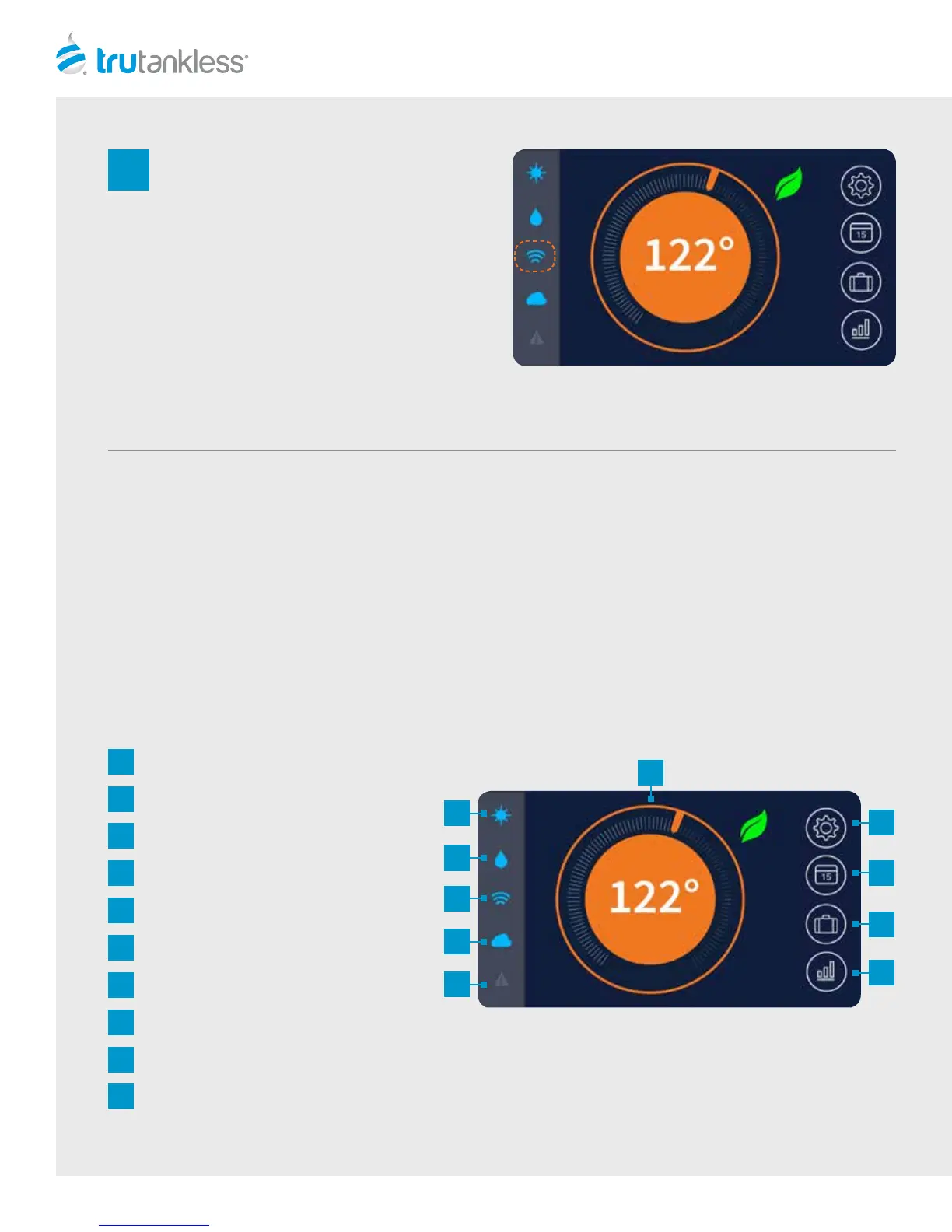
Temperature Controller
Power Indicator
Water Flow Indicator
Wi-Fi Connection Indicator
Monitoring Service Indicator
Alert Indicator
Settings Screen
Peak/O-Peak Screen
Away Screen
Data Screen
4
6
Your unit is online. You can return to the Home
Screen by tapping “Done” button in the lower
right corner of the screen.
NOTE: You can also verify your connection to
your Wi-Fi network at a glance by viewing the
Status icons on the le of the Home Screen. If the
connection is valid, the Wi-Fi icon will glow blue.
If the unit has failed to connect, the icon will be
dimmed. If necessary, repeat the Wi-Fi setup
steps.



 To Next Page