INSTALLATION AND OPERATION GUIDE
3
5
4
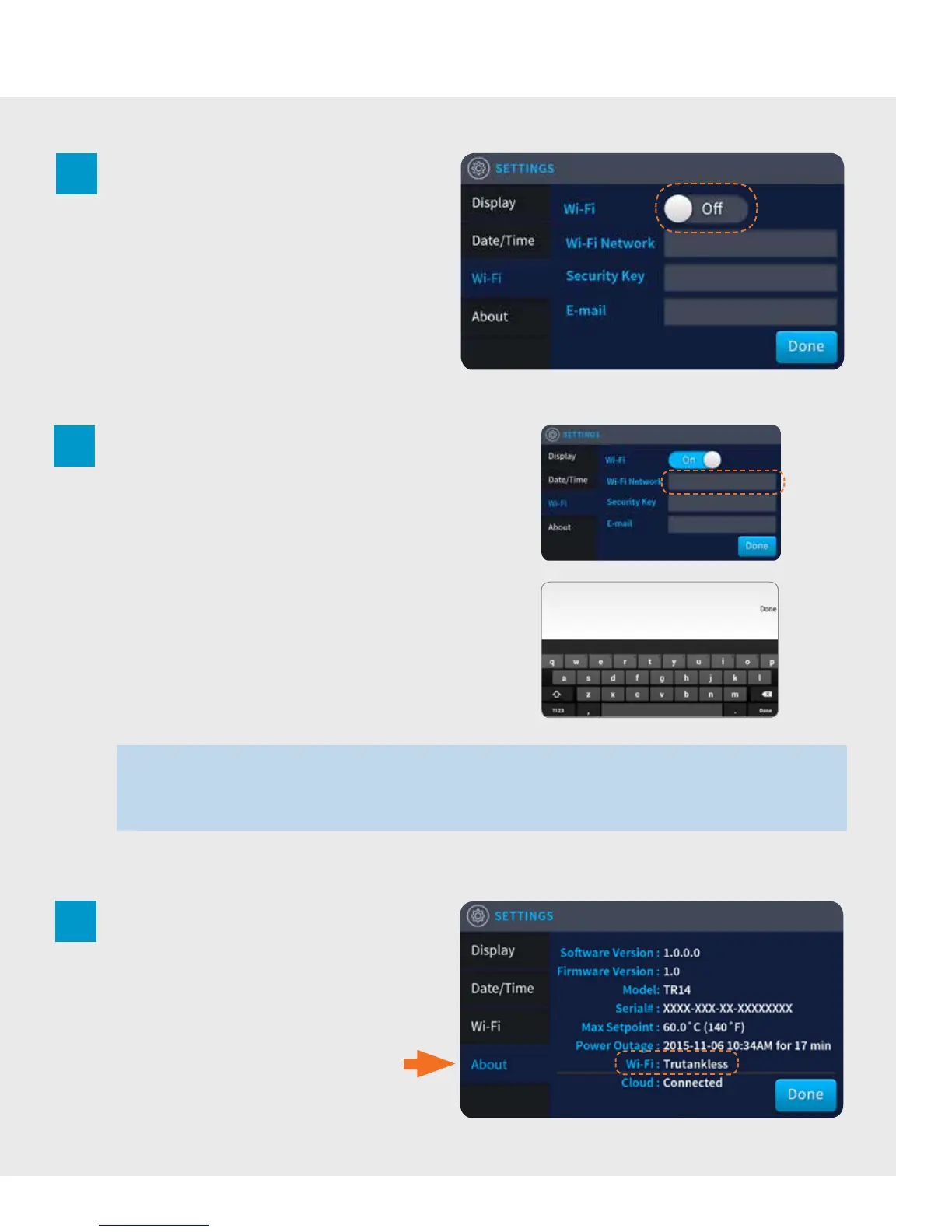
Tap the Wi-Fi switch to toggle it to “On”.
To confirm that the Wi-Fi connection has been
made, tap “About” from the Le Navigation
Menu. Your connection status to a Wi-Fi Network
will be displayed at the bottom.
Tap Wi-Fi from the Le Navigation Menu to open
the Wi-Fi control panel.
Tap the “Wi-Fi Network” field to bring up the
keyboard and enter the name of your wireless
network.
Tap the “Security Key”field to bring up
the keyboard and enter your Wi-Fi network
password.
Tap the “E-Mail”field to bring up
the keyboard and enter the E-Mail you wish to
register.
Tap “Done” when complete.
NOTE: The trutankless interface does not automatically oer a pre-populated menu of Wi-Fi networks from which to choose from.
You must key in your Wi-Fi network name precisely as it is designated. Any mistakes or omissions in the entry of the network name,
including upper/lower case, special characters, and so forth, for which fails to match the exact network name will prevent the unit from
recognizing your Wi-Fi network and the connection will not be made.
3


 To Next Page