INSTALLATION AND OPERATION GUIDE
PEAK/OFF-PEAK SCREEN
One of the most valuable features of the trutankless Water Heater is its Energy Saving Programming functionality. The
unit has the ability to control the amount of energy used to heat the water flowing through the unit. The owner can
control the amount of power utilized during “Peak” and “O-Peak” hours as set by the local utility company.
From the Home screen, tap the Calendar icon in the Right Navigation Bar to access the Peak/O Peak Setting screen.
By default, the Economy window is visible at the top level.
If COMFORT mode is desired, both the Peak and O-peak Use Power settings should be set at 100%. If a more energy
eicient mode is desired, simply change the Use Power percentages down to a maximum desired level for Peak and O-
Peak times. By programming these modes based on weekday and weekend schedules, you can take advantage of the
discount hours the utility companies oer. Use the following options to enable Energy Savings Programming.
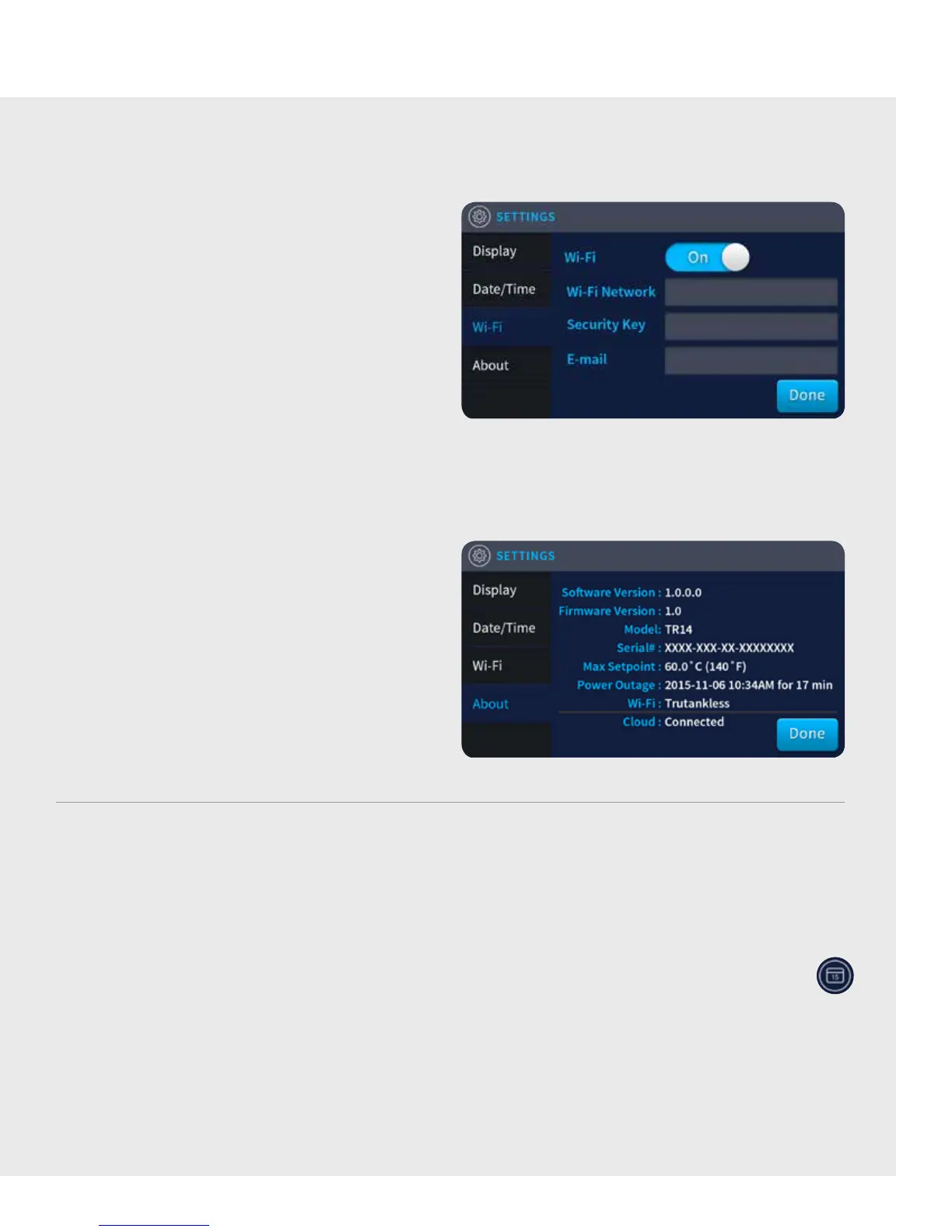
Wi-Fi
From the Settings screen, tap “Wi-Fi” in the le
Navigation menu to bring up the Wi-Fi window.
Tap the ‘Wi-Fi button’ to toggle between on and o to
enable/disable Wi-Fi connection.
Tap the ‘Wi-Fi Network’ field to bring up a keyboard to
key in the name of a wireless network. Tap the Done key
when finished.
Tap the “Security Key” field to bring up a keyboard to key
in the password of the designated wireless network.
Tap the “Done” key when finished.
NOTE: For more information about making a
Wi-Fi connection, see “CONNECTING THE UNIT
TO THE INTERNET” section on page 2.
ABOUT
From the Settings screen, tap “About” in the le
Navigation menu.
The About window has no interactive controls but
contains pertinent information specifically to that
trutankless unit and how that unit is configured.
This information may be important when
communicating with a service professional.
Tap “Done” to return to the Home screen.
7


 To Next Page