11
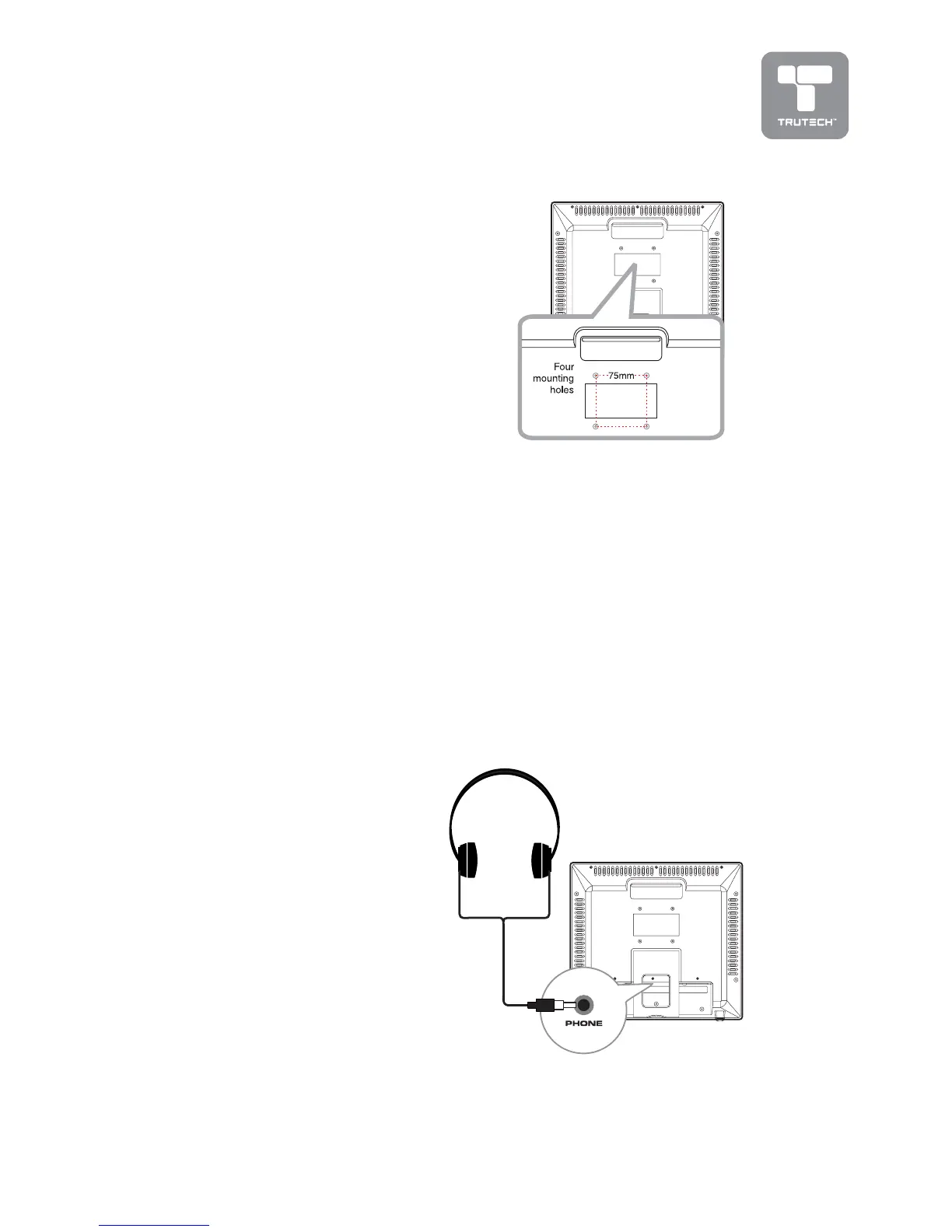
• Turn down the volume before connecting headphones to the unit, then
adjust the volume to your desired level.
• When headphones are connected, no sound will come from the front
speakers.
Note:Note:
Note:Note:
Note:
• Avoid listening to sound at high levels for prolonged periods of time. This
may be harmful to you and may cause hearing loss.
USING HEADPHONEUSING HEADPHONE
USING HEADPHONEUSING HEADPHONE
USING HEADPHONE
Earphones / Headphones
(1/8” [3.5mm] diameter plug)
INSTINST
INSTINST
INST
ALLAALLA
ALLAALLA
ALLA
TIONTION
TIONTION
TION
MOUNTING ON THE WMOUNTING ON THE W
MOUNTING ON THE WMOUNTING ON THE W
MOUNTING ON THE W
ALLALL
ALLALL
ALL
This unit is designed to work with standard
wall-mounting kits (sold separately). To
mount, you must purchase a wall-mounting
kit and install the unit according to the
directions included with the kit.


 To Next Page