7
1)1)
1)1)
1)
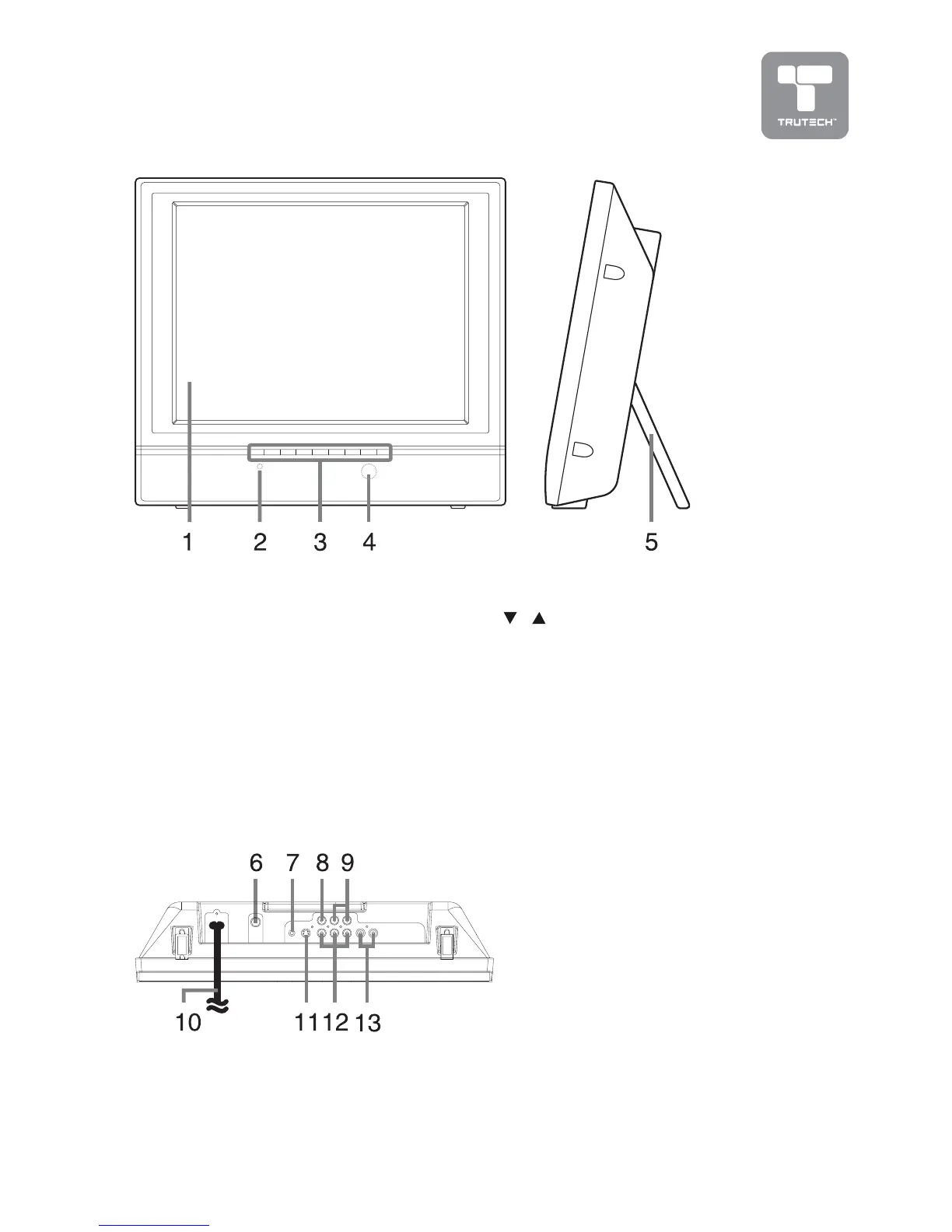
Color LCD ScreenColor LCD Screen
Color LCD ScreenColor LCD Screen
Color LCD Screen
2)2)
2)2)
2)
STANDBY STANDBY
STANDBY STANDBY
STANDBY indicator
Indicates whether the unit is ON
or in STANDBY (OFF) mode.
Light On: The unit is in STANDBY
(OFF).
Light Off: The unit is turned ON.
3)3)
3)3)
3)
STANDBY/ON buttonSTANDBY/ON button
STANDBY/ON buttonSTANDBY/ON button
STANDBY/ON button
Turn on/off the LCD TV.
MENU buttonMENU button
MENU buttonMENU button
MENU button
Enter the Setup menu.
FUNCTION buttonFUNCTION button
FUNCTION buttonFUNCTION button
FUNCTION button
Select AV1, AV2 or TV.
//
//
/
buttons buttons
buttons buttons
buttons
Select a channel.
- VOL + controls- VOL + controls
- VOL + controls- VOL + controls
- VOL + controls
Adjust the volume level.
4)4)
4)4)
4)
Remote Control SensorRemote Control Sensor
Remote Control SensorRemote Control Sensor
Remote Control Sensor
5)5)
5)5)
5)
Retractable StandRetractable Stand
Retractable StandRetractable Stand
Retractable Stand
Pull out for tabletop use, and
push in to mount unit on a wall.
UNIT REFERENCE GUIDE
6)6)
6)6)
6)
ANT-IN terminal - CoaxialANT-IN terminal - Coaxial
ANT-IN terminal - CoaxialANT-IN terminal - Coaxial
ANT-IN terminal - Coaxial
TV antenna inputTV antenna input
TV antenna inputTV antenna input
TV antenna input
7)7)
7)7)
7)
Headphone jackHeadphone jack
Headphone jackHeadphone jack
Headphone jack
8)8)
8)8)
8)
AV1 Video Input JackAV1 Video Input Jack
AV1 Video Input JackAV1 Video Input Jack
AV1 Video Input Jack
9)9)
9)9)
9)
AV1 Audio Input JacksAV1 Audio Input Jacks
AV1 Audio Input JacksAV1 Audio Input Jacks
AV1 Audio Input Jacks
(Left / Right)(Left / Right)
(Left / Right)(Left / Right)
(Left / Right)
10)10)
10)10)
10)
Power CordPower Cord
Power CordPower Cord
Power Cord
11)11)
11)11)
11)
AV1 S-Video InputAV1 S-Video Input
AV1 S-Video InputAV1 S-Video Input
AV1 S-Video Input
12)12)
12)12)
12)
AV2 Component VideoAV2 Component Video
AV2 Component VideoAV2 Component Video
AV2 Component Video
Inputs (Y/PB/PR)Inputs (Y/PB/PR)
Inputs (Y/PB/PR)Inputs (Y/PB/PR)
Inputs (Y/PB/PR)
13)13)
13)13)
13)
AV2 Audio Input JacksAV2 Audio Input Jacks
AV2 Audio Input JacksAV2 Audio Input Jacks
AV2 Audio Input Jacks
(Left/Right)


 To Next Page