13
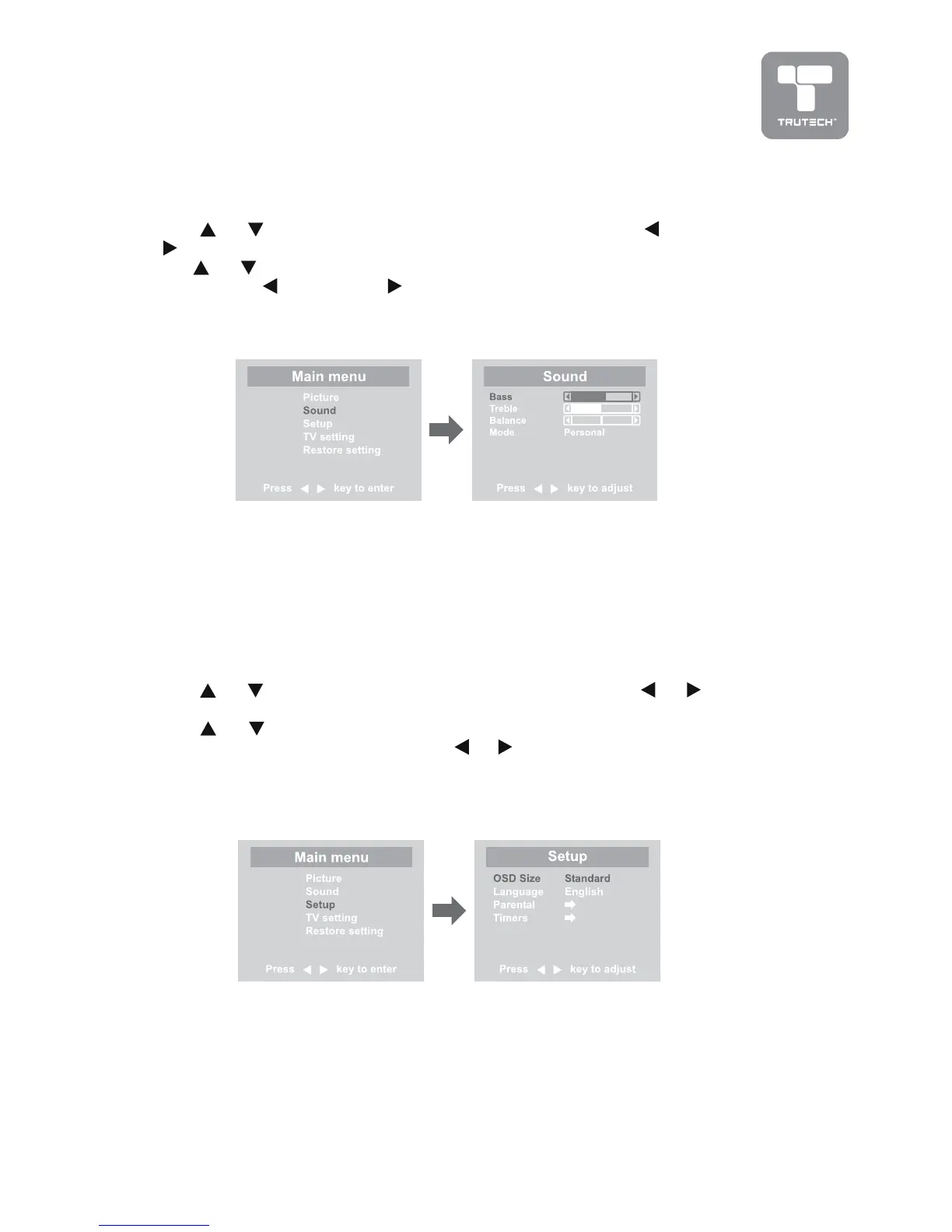
SOUND MENUSOUND MENU
SOUND MENUSOUND MENU
SOUND MENU
1.1.
1.1.
1. Press the
MENUMENU
MENUMENU
MENU button.
2.2.
2.2.
2. Use
or button to select the
Sound menuSound menu
Sound menuSound menu
Sound menu, then press and use the
button to confirm the setting.
3.3.
3.3.
3. Use
or button to select the options
(Bass, T(Bass, T
(Bass, T(Bass, T
(Bass, T
rr
rr
r
eble, Balance, Mode) eble, Balance, Mode)
eble, Balance, Mode) eble, Balance, Mode)
eble, Balance, Mode) to
be adjusted
and use the button to adjust each individual setting.
4.4.
4.4.
4. Repeats step 3 to adjust other settings.
5.5.
5.5.
5. To exit the MAIN MENU and return to the normal screen, press the
EXITEXIT
EXITEXIT
EXIT
button on remote control.
Note:Note:
Note:Note:
Note:
Experiment with difExperiment with dif
Experiment with difExperiment with dif
Experiment with dif
ferfer
ferfer
fer
ent sound settings until you find the settings you prent sound settings until you find the settings you pr
ent sound settings until you find the settings you prent sound settings until you find the settings you pr
ent sound settings until you find the settings you pr
eferefer
eferefer
efer
..
..
.
•
BassBass
BassBass
Bass : Adjust the bass range.
•
TT
TT
T
rr
rr
r
ebleeble
ebleeble
eble : Adjust the treble range.
•
BalanceBalance
BalanceBalance
Balance : Adjust the balance level toward the left or right speakers.
•
ModeMode
ModeMode
Mode : Select from preset sound settings (Personal, Voice, Music, Theater)
to match the type of show you are watching.
SETUP MENUSETUP MENU
SETUP MENUSETUP MENU
SETUP MENU
1.1.
1.1.
1. Press the
MENUMENU
MENUMENU
MENU button.
2.2.
2.2.
2. Use
or button to select the
Setup menuSetup menu
Setup menuSetup menu
Setup menu, then press or button
to confirm the setting.
3.3.
3.3.
3. Use
or button to select the options
(OSD Size, Language, Par(OSD Size, Language, Par
(OSD Size, Language, Par(OSD Size, Language, Par
(OSD Size, Language, Par
ental,ental,
ental,ental,
ental,
TT
TT
T
imers) imers)
imers) imers)
imers) to be adjusted, then use the
or buttons to adjust the individual
settings.
4.4.
4.4.
4. Repeats step 3 to adjust other settings.
5.5.
5.5.
5. To exit the MAIN MENU and return to the normal screen, press the
EXITEXIT
EXITEXIT
EXIT
button on remote control.
Notes:Notes:
Notes:Notes:
Notes:
•
OSD Size OSD Size
OSD Size OSD Size
OSD Size : Select the screen size you prefer.
•
LanguageLanguage
LanguageLanguage
Language : Select from English / Français / Español.
•
ParPar
ParPar
Par
ental ental
ental ental
ental : Sets the parental controls. Refer to the section titled “PARENTAL
SETTING” for instructions.
•
TT
TT
T
imersimers
imersimers
imers : Select the Sleep timer / Reminder timer mode.
TV SETUP


 To Next Page