6
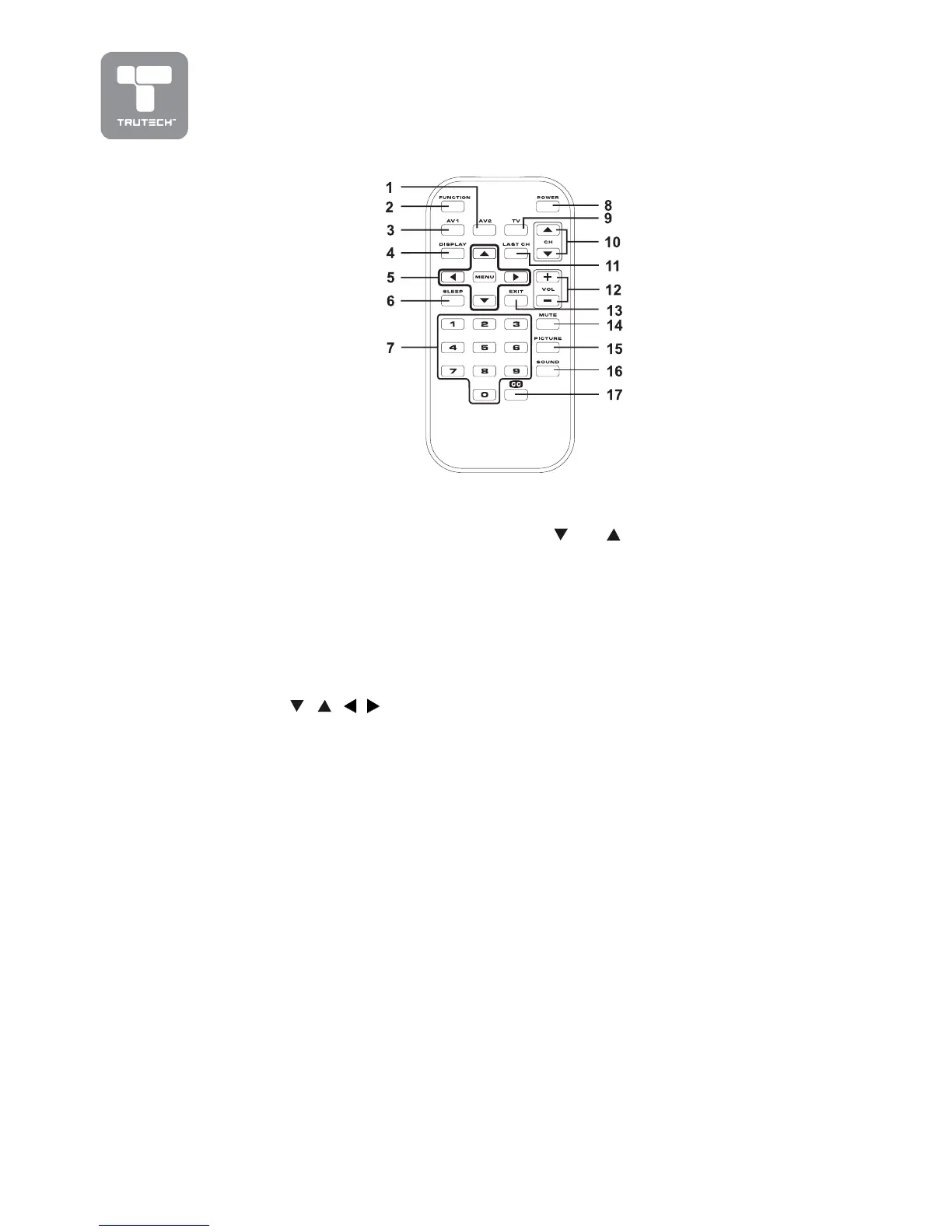
REMOTE CONTROL REFERENCE GUIDE
1)1)
1)1)
1)
AV2 buttonAV2 button
AV2 buttonAV2 button
AV2 button
Directly selects AV2 input.
2)2)
2)2)
2)
FUNCTION buttonFUNCTION button
FUNCTION buttonFUNCTION button
FUNCTION button
Toggle between TV/AV1/
AV2.
3)3)
3)3)
3)
AV1 buttonAV1 button
AV1 buttonAV1 button
AV1 button
Directly selects AV1 input.
4)4)
4)4)
4)
DISPLAY buttonDISPLAY button
DISPLAY buttonDISPLAY button
DISPLAY button
Press to show which input
you are watching (TV/AV1/
AV2 ).
5)5)
5)5)
5)
Cursor (Cursor (
Cursor (Cursor (
Cursor (
, ,
, ,
,
, ,
, ,
,
, ,
, ,
,
) buttons ) buttons
) buttons ) buttons
) buttons
Press to highlight selections
on a menu screen and make
adjust certain settings.
MENU buttonMENU button
MENU buttonMENU button
MENU button
Press to display the on-screen
menu.
6)6)
6)6)
6)
SLEEP buttonSLEEP button
SLEEP buttonSLEEP button
SLEEP button
Sets the SLEEP timer. The
unit will remain ON for the
time that is set, and will
automatically shut off after.
7)7)
7)7)
7)
Number (0 - 9) buttonsNumber (0 - 9) buttons
Number (0 - 9) buttonsNumber (0 - 9) buttons
Number (0 - 9) buttons
Use to change the TV
channels.
8)8)
8)8)
8)
POWER buttonPOWER button
POWER buttonPOWER button
POWER button
Turns the unit ON and puts
the unit into STANDBY mode.
9)9)
9)9)
9)
TV buttonTV button
TV buttonTV button
TV button
Press to select TV channel mode.
10)10)
10)10)
10)
CH CH
CH CH
CH
button button
button button
button
Move up or down through the TV
channels.
11)11)
11)11)
11)
LAST CH buttonLAST CH button
LAST CH buttonLAST CH button
LAST CH button
Press to switch repeatedly
between the last two channels
displayed.
12)12)
12)12)
12)
+ VOLUME - button+ VOLUME - button
+ VOLUME - button+ VOLUME - button
+ VOLUME - button
Press to adjust the volume level.
13)13)
13)13)
13)
EXIT buttonEXIT button
EXIT buttonEXIT button
EXIT button
Press to exit the menu and return
directly to normal viewing.
14)14)
14)14)
14)
MUTE buttonMUTE button
MUTE buttonMUTE button
MUTE button
Press to turn off the sound.
15)15)
15)15)
15)
PICTURE buttonPICTURE button
PICTURE buttonPICTURE button
PICTURE button
Select from preset screen display
settings to match the type of
show you are watching (Standard,
Personal, Movie, Dynamic, &
Soft).
16)16)
16)16)
16)
SOUND buttonSOUND button
SOUND buttonSOUND button
SOUND button
Select from preset sound settings
(Personal, Voice, Music, Theater)
to match the type of show you are
watching.
17)17)
17)17)
17)
CC buttonCC button
CC buttonCC button
CC button
Press to activate the Closed
Captioning feature. This function
only works on programs
broadcast with captions.


 To Next Page