TST-Doc-507FT-RV WSD-C Manual-(D)
Backlighting and Motion Detection
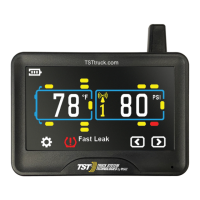
The display is equipped with a light sensor and a motion sensor. The backlight will
turn on when the vehicle is in motion and there is little ambient light. If the vehicle
has stopped for a while and the display is on the internal battery, the display will
"go to sleep" until the vehicle resumes motion.
Disconnecting and Reconnecting a Vehicle
When a towed vehicle is displayed on the screen and you want to temporarily
remove it (example: leaving a trailer at a campground), momentarily press the
"GO" and (-) buttons, the trailer section of the display will disappear, the sensors
on the trailer will not be read. To add the trailer back onto the display, again,
momentarily push the "GO" and (-) buttons and the towed vehicle will reappear.
Charging the Display
The display is powered by a non-replaceable, lithium-ion battery. A battery level
indicator is located on the left side of the display. When the indicator shows one
bar, it is recommended you charge the display as soon as possible to avoid
disruption when in use. It will take approximately four (4) hours to fully charge.
Display run time is 5-7 days on a full charge.
Do not keep a fully charged display plugged in constantly.
Trailer Selection
Four different trailers with sensors can be programmed into the display and each
trailer can be selected to be viewed on the screen and designated by numbers 1
to 4. On the Main Screen, press the "GO" button to select different trailers and
trailer wheel groups you have programmed sensors to. Note that when in the
High or Low Pressure areas, pushing the "GO" button will move you through the
four main axles, the front spare tire, the trailer 1 front - 3 axle group, the trailer 1
- rear axle group and spare, then to trailer 2, 3 and 4 with the same pattern. After
trailer 4, the front steer axles will again highlight. Each flashing tire group on the
trailer can have its own High or Low Pressure setting.
When a towing vehicle is displayed on the screen and you want to temporarily
remove it (example: leaving a truck or car at a campground and using another
vehicle to move the RV), momentarily press the "GO" and (+) buttons, the truck
(towing) section of the display will disappear, the sensors on the towing vehicle
will not be read. To add the truck (towing) section back onto the display, again,
momentarily push the "GO" and (+) buttons and the towing vehicle will reappear.



 To Next Page