ENGLISH
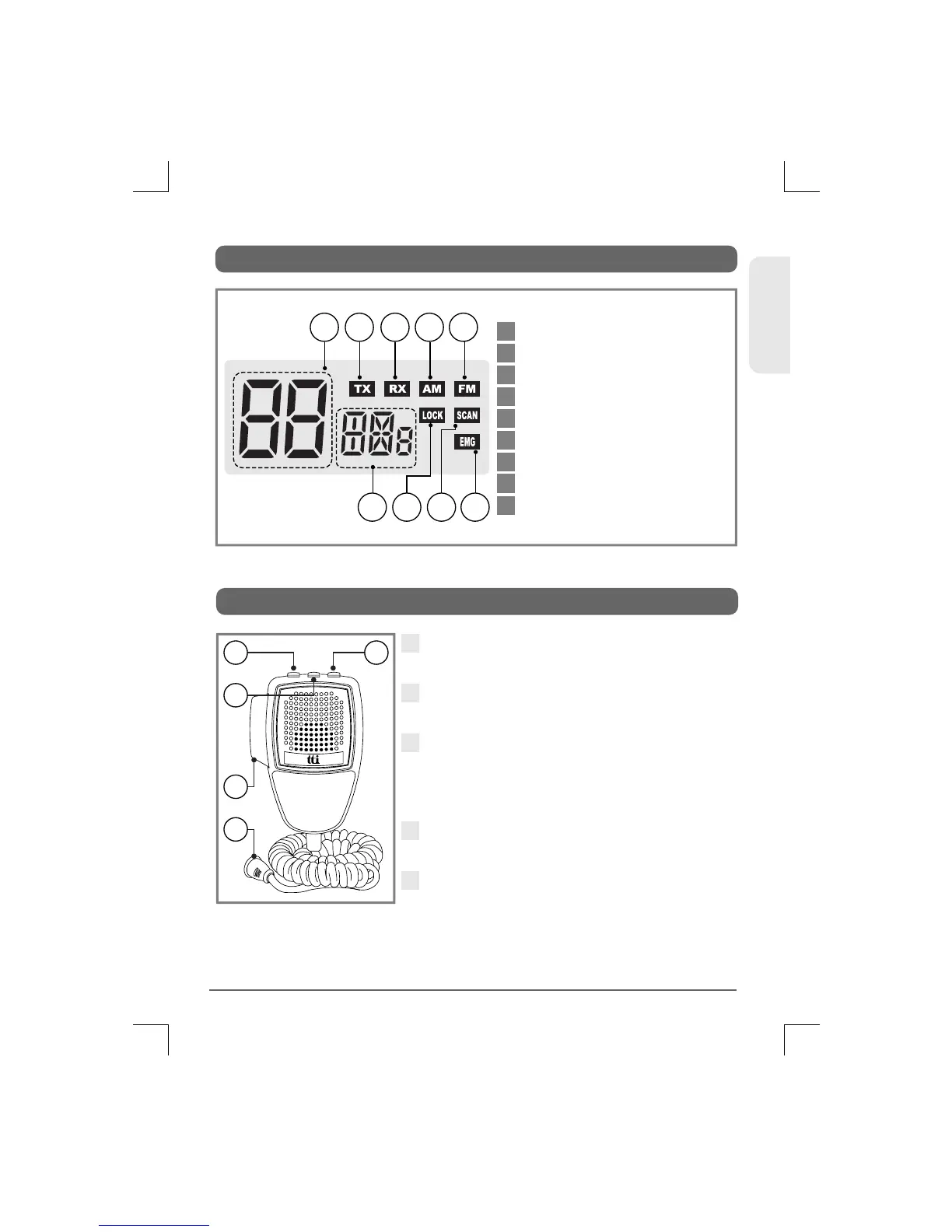
5. LCD Display
1 2 3 5
9876
4
1
2
3
4
5
6
7
8
9
Channel Display
Transmit
Receive
AM Mode
FM Mode
Selected Frequency Band
Keypad Lock
Scan
Emergency Channel Display
9
TCB-660
6. Microphone
1
2
4
5
3
2
3
4
5
1
Up Button : Use this button to change
the channels upward.
Down Button : Use this button to
change the channels downward.
Lock Button : This locks the up button
and down button of the microphone.
Also, this lock works same as the lock
button on the transceiver front panel.
PTT Button : While pressing this
button, you can transmit.
6 Pin Microphone Connector :
Connect this to the microphone jack
on the front panel of the transceiver.


 To Next Page