EasyManua.ls Logo

TTI TX-446 - User Manual

TTI TX-446
15 pages
Print Icon
To Next Page IconTo Next Page
Loading...
TTI TECH CO., LTD.
Eundo Bldg, 737-19, Banpo-1dong,
Seocho-ku, Seoul, Korea, 137-041
http://www.ttikorea.co.kr
Instruction Manual
Tech
Private Mobile Radio (PMR)446MHz
Model: TX-446
Question and Answer IconNeed help?

Do you have a question about the TTI TX-446 and is the answer not in the manual?

Summary

Introduction to TX-446 Radio

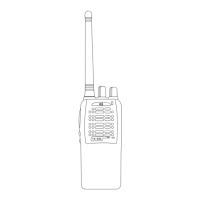
Transceiver Component Details

Detailed overview of the radio's physical components and their functions.

LED Status Indicator

Explanation of the LED indicator, its colors, and status indications.

Microphone Operation

Instructions for proper use of the built-in microphone for clear communication.

PTT Button Usage

Guide on how to use the PTT button to transmit and receive messages.

Programmable Side Buttons

Explanation of programmable side buttons and their short/long press operations.

Accessory Connector Access

Instructions on how to access the radio's accessory connector.

Beep Sound Meanings

Description of various beep sounds and their corresponding meanings.

Getting Started with Your Radio

Battery Information and Care

Guidelines for proper battery usage, charging, and storage for optimal performance.

Side Button Beep Feedback

Details on beep sounds associated with programmed side button features.

Installing the Battery Pack

Step-by-step instructions for correctly installing the battery pack onto the radio.

Removing the Battery Pack

Procedure for safely detaching and removing the battery pack from the radio.

Attaching the Belt Clip

Instructions on how to align and slide the belt clip onto the radio.

Removing the Belt Clip

Steps to release and slide the belt clip upwards from the radio.

Basic Radio Operations

Powering the Radio On and Off

Procedure for turning the radio on and off using the power/volume knob.

Adjusting Audio Volume

How to adjust the audio volume level using the power/volume knob.

Selecting Radio Channels

Guide to choosing and setting different radio channels via the selection knob.

Transmitting a Message

Steps for clear voice transmission, including microphone distance and PTT button usage.

Receiving a Message

How to receive incoming messages, adjust volume, and select the correct channel.

Advanced Radio Features

Repeater and Talk-around Modes

Explanation of using repeater and talk-around functions for communication.

Setting the Squelch Level

How to adjust squelch for filtering unwanted noise and signals.

Handsfree Transmission (VOX)

Instructions for activating and using the VOX feature for handsfree communication.

VOX Sensitivity Adjustment

Steps to change the VOX sensitivity between low and high settings.

Channel Scanning Operation

How to initiate and stop channel scanning for monitoring signals.

Talkback Communication

Using the talkback feature to communicate after scanning a channel.

Deleting Nuisance Channels

Procedure to temporarily remove unwanted channels from the scan list.

Busy Channel Lock Out (BCLO)

Feature to inhibit transmission on occupied channels to avoid interference.

Time-out Timer (TOT)

Timer to prevent continuous transmission and conserve battery life.

Priority Channel Function

How the priority function prioritizes channels during scanning.

Call Ringer Selection

Selecting and assigning call ringer sounds for incoming calls.

Radio Specifications and Compliance

General Technical Specifications

Technical details including frequency, channels, power, and dimensions.

Transmitter Specifications

Detailed technical parameters for the radio's transmitter.

Receiver Specifications

Detailed technical parameters for the radio's receiver.

CE Declaration

Declaration of compliance with European Radio and Telecommunication Terminal Directive.

Safety Requirements and Warnings

Important safety information regarding charging and potential licensing.
Summary

Introduction to TX-446 Radio

Transceiver Component Details

Detailed overview of the radio's physical components and their functions.

LED Status Indicator

Explanation of the LED indicator, its colors, and status indications.

Microphone Operation

Instructions for proper use of the built-in microphone for clear communication.

PTT Button Usage

Guide on how to use the PTT button to transmit and receive messages.

Programmable Side Buttons

Explanation of programmable side buttons and their short/long press operations.

Accessory Connector Access

Instructions on how to access the radio's accessory connector.

Beep Sound Meanings

Description of various beep sounds and their corresponding meanings.

Getting Started with Your Radio

Battery Information and Care

Guidelines for proper battery usage, charging, and storage for optimal performance.

Side Button Beep Feedback

Details on beep sounds associated with programmed side button features.

Installing the Battery Pack

Step-by-step instructions for correctly installing the battery pack onto the radio.

Removing the Battery Pack

Procedure for safely detaching and removing the battery pack from the radio.

Attaching the Belt Clip

Instructions on how to align and slide the belt clip onto the radio.

Removing the Belt Clip

Steps to release and slide the belt clip upwards from the radio.

Basic Radio Operations

Powering the Radio On and Off

Procedure for turning the radio on and off using the power/volume knob.

Adjusting Audio Volume

How to adjust the audio volume level using the power/volume knob.

Selecting Radio Channels

Guide to choosing and setting different radio channels via the selection knob.

Transmitting a Message

Steps for clear voice transmission, including microphone distance and PTT button usage.

Receiving a Message

How to receive incoming messages, adjust volume, and select the correct channel.

Advanced Radio Features

Repeater and Talk-around Modes

Explanation of using repeater and talk-around functions for communication.

Setting the Squelch Level

How to adjust squelch for filtering unwanted noise and signals.

Handsfree Transmission (VOX)

Instructions for activating and using the VOX feature for handsfree communication.

VOX Sensitivity Adjustment

Steps to change the VOX sensitivity between low and high settings.

Channel Scanning Operation

How to initiate and stop channel scanning for monitoring signals.

Talkback Communication

Using the talkback feature to communicate after scanning a channel.

Deleting Nuisance Channels

Procedure to temporarily remove unwanted channels from the scan list.

Busy Channel Lock Out (BCLO)

Feature to inhibit transmission on occupied channels to avoid interference.

Time-out Timer (TOT)

Timer to prevent continuous transmission and conserve battery life.

Priority Channel Function

How the priority function prioritizes channels during scanning.

Call Ringer Selection

Selecting and assigning call ringer sounds for incoming calls.

Radio Specifications and Compliance

General Technical Specifications

Technical details including frequency, channels, power, and dimensions.

Transmitter Specifications

Detailed technical parameters for the radio's transmitter.

Receiver Specifications

Detailed technical parameters for the radio's receiver.

CE Declaration

Declaration of compliance with European Radio and Telecommunication Terminal Directive.

Safety Requirements and Warnings

Important safety information regarding charging and potential licensing.

TTI TX-446 Specifications

General IconGeneral
BrandTTI
ModelTX-446
CategoryRadio
LanguageEnglish

Related product manuals