Need help?
Do you have a question about the Tunstall Vi and is the answer not in the manual?
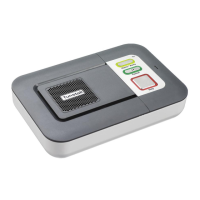
Overview of the Home Console Unit's front panel controls and indicators.
Details of the Home Console Unit's back panel connections and features.
Describes the connections available on the end view of the Home Console Unit.
Details crucial wiring information for broadband/cable phone users for system operation.
Guide to connecting the power and telephone line cords to the Home Console Unit.
Procedure for performing the initial system test with the Help Activator.
Instructions on how to test the range of the Help Activator and Home Console Unit.
Instructions on how to initiate a call to the Response Center.
How to cancel an accidental help call activation.
Information on the functionality of the Customer Care button.
Using the Help Activator to answer incoming telephone calls remotely.
Explains warnings and messages related to telephone line status.
Details warnings and messages concerning power backup and outages.
Status indicators for the Customer Care button.
Meaning of the Green/Red status LED on the Home Console Unit.
Status indicators for the red Alarm button.
Description of the indicator lights on the Help Activator.
Instructions for safely disconnecting the PERS system.
Guidance on handling accidental help call activations.
Steps to resolve issues if the home console unit does not work.
Instructions for cleaning the Home Console Unit and Help Activator.
Advice on positioning the unit regarding water and moisture exposure.
Information regarding battery replacement and care.
Regulatory information and compliance statements from the FCC.
Details on the USOC code and connection requirements.
Information regarding the Ringer Equivalence Number and device limits.
Specifications for weight, dimensions, power, and battery backup.
Technical details on radio frequency, range, and REN.
Information on the external connection types and options available.
Operating and storage conditions for temperature and humidity.
List of relevant US and Canadian standards and certifications.
 General
| Brand | Tunstall |
|---|---|
| Model | Vi |
| Category | Personal Care Products |
| Language | English |

 To Next Page