5
Installation Advice
The initial set-up of your PERS is important in providing a safe and reliable
service. Please carefully read the “Do’s and Don’ts” section prior to connecting
your system. If you have any questions, please contact your Service Provider.
Do’s
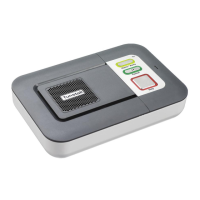
• Do: Place the Home Console Unit on a flat, sturdy, non-metallic surface
near a modular phone jack and electrical power outlet that is powered at
all times.
• Do: Place the Home Console Unit in a central location in the home to
optimize voice and Help Activator range.
• Do: If you have a cordless telephone, attach the base station directly to the
jack labeled ℡ on the rear of the Home Console Unit
• Do: Update your information with the Response Center if your household
or responder information changes or you move to a new or secondary
home.
• Do: Contact your Service Provider if the Red or Orange LED on your Help
Activator flashes or does not illuminate when pressed or if you lose any
part of your system.
• Do: Regularly test the system using the Help Activator to ensure you are
comfortable with the service and accustomed to speaking with the
Response Center.
Don’ts
• Do not: Expose the Home Console Unit to water or other liquids.
• Do not: Connect cables other than those supplied with the unit.
• Do not: Place your Home Console Unit next to something that makes a lot
of noise, such as a television, radio, air conditioner or washing machine.
• Do not: Put your Home Console Unit next to your stove or close to any
other heat source.
• Do not: Put your Home Console Unit in a place where it will get damp, such
as a bathroom, or near house plants that are sprayed at any time.
• Do not: Place the Home Console Unit close to any large metal objects,
such as refrigerators or microwave ovens, as large pieces of metal can
inhibit the range of the Help Activator.
• Do not: Place items on top of the Home Console Unit.
• Do not: Place your Home Console Unit closer than four feet to something
that may emit electromagnetic interference, such as a cordless telephone,
CD, video player or personal computer, as this may inhibit the range of
your Help Activator.
If you have broadband/cable phone service


 To Next Page