20
English
Power supply (Fig. E)
The trainer is powered by an external power supply� Refer to the
illustration to locate the trainer power input�
‼ NOTE
• Connect the power supply with the trainer before connecting it
to the wall outlet�
• Always remove power cord when machine is not in use�
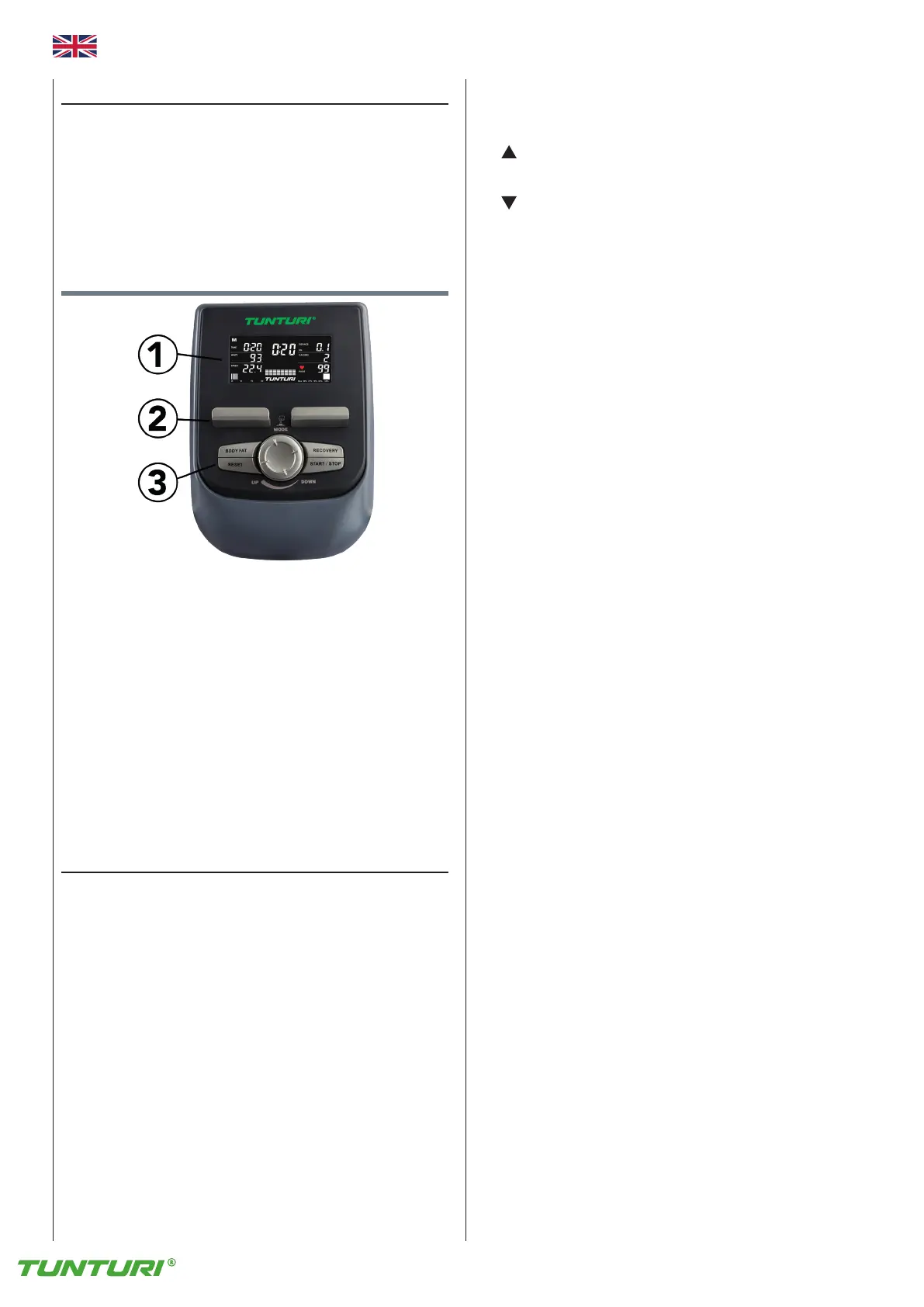
Console (fig F)
1� Display
2. Tablet/ book support
3� Buttons
⚠ CAUTION
• Keep the console away from direct sunlight�
• Dry the surface of the console when it is covered with drops of
sweat�
• Do not lean on the console�
• Only touch the display with the tip of your finger� Make sure that
your nails or sharp objects do not touch the display�
‼ NOTE
• The console switches to standby mode when the equipment is
not used for 4 minutes�
Explanation Display functions
Time
- Without setting the target value, time will count up�
- When setting the target value, time will count down from your
target time to 0 and alarm will sound or flash�
- Range 0:00~99:59
Speed
- Displays current training speed�
Maximum speed is 99.9 KM/H or ML/H.
- Without any signal being transmitted into the monitor for 4
seconds during workout, SPEED will display “0�0”
RPM
- Displays the Rotation Per Minute�
Display range 0~15~999
- Without any signal being transmitted into the monitor for 4
seconds during workout, RPM will display “0”
Watt
- Display current workout watts�
- Range 0 ~ 999
• Symbol is displayed in Watt window when set target Watt is
lower than current workout watt output�
You pedal too fast, or set target is too low�
• Symbol is displayed in Watt window when set target Watt is
higher than current workout watt output�
You pedal too slow, or set target is too high�
Level
- Shows tension level setting, when adjusting resistance, for 3
seconds�
Distance
- Without setting the target value, distance will count up�
- When setting the target value, distance will count down from your
target distance to 0 with an alarm sound or flash�
- Range 0.00~99.99
Calories
- Without setting the target value, calorie will count up�
- When setting the target value, calories will count down from your
target calorie to 0 with an alarm sound or flash�
- Range 0~999.
‼ NOTE
• This data is a rough guide for comparison of different exercise
sessions which cannot be used in medical treatment
Pulse
- Current pulse will display after 6 seconds when detected by the
console�
- Without any pulse signal for 6 seconds, console will display “P”�
- Pulse alarm will sound when current pulse is over the target pulse�
- Range 0-30~230 BPM
BAI ™
- Display BAI consumption BAI value during workout�
- Display range 0~999
‼ NOTE
• BAI (Body Activity Index) is the sum up of effective training
volume�
• Training volume = Training Intensity x Training time.
BAI calculates effective training volume based on your heart rate,
age, gender and duration�
During the workout, you can see BAI accumulates� As soon as you
complete a workout session, you can obtain a total BAI point of this
session, which is the total effective training volume of this session�
If you train harder, higher heart rate zone, you get BAI points faster� If
you train less hard, lower heart rate zone, you get BAI points slow�
We recommend to workout by accumulating 100 BAI points every
week to enhance your cardio capability�
Centre display
- Top digits shows workout parameters in larger font� When display is
in Scan mode, each parameter will be displayed for a few seconds�
Displayed value name will blink in dedicated window�
- Lower Dot display will show the program profile intensity curve
graphically�
* In tension control: Each dot represents 2 tension levels�
* In HRC mode: Each dot represents a tension level as if it was
tension controlled�
* In Watt mode: Each dot represents a tension level as if it was
tension controlled�



 To Next Page