10
Go to Table of Contents
Xbox One Setup
B
A
B D
Required
Left Earcup
A
D
*If the on-screen notification indicates the headset has been assigned to the incorrect User,
go to Settings > Devices & Accessories to assign the headset to the correct user.
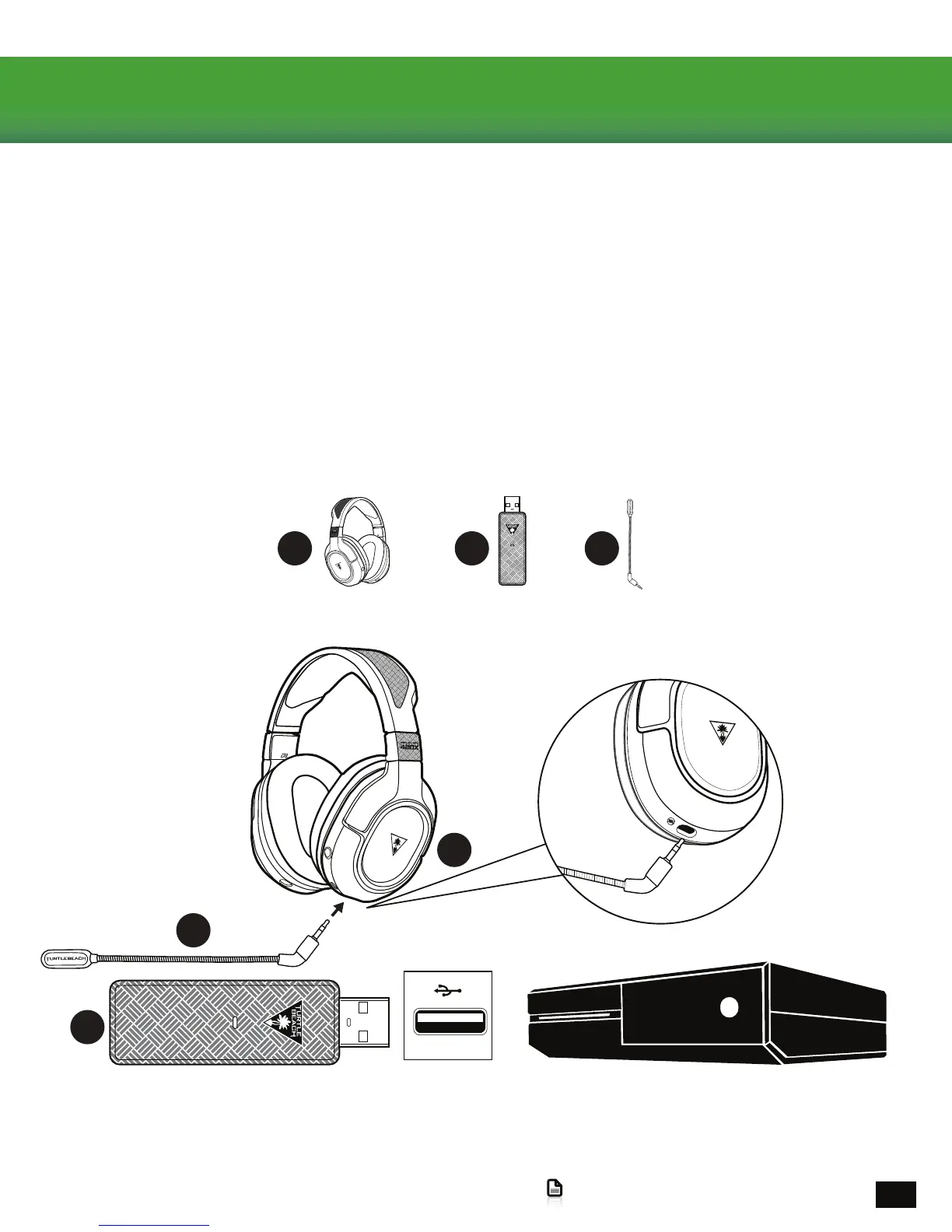
TheEarForceStealth420XheadsetisdesignedforusewithallXboxOneConsoles.
1.PowerONtheXboxOneandlog-intoyourXboxLiveAccount.
2.ConnecttheEarForceStealth420XWirelessTransmittertoanavailableUSBPortontheXbox
OneConsole.
3.PowerONtheEarForceStealth420XGamingHeadsetbyholdingdowntheTreeLogoonthe
RightEarcupforabout1Second.AvoicepromptwillplaytoindicatetheHeadsetispowering
on.
4.AfterafewsecondsthePowerLEDontheheadsetwillturnSolidtoindicateithaspairedtothe
transmitter.
5.AnoticationshouldappearonyourTVstatingtheXboxOnehasdetectedaheadsetand
assignedittoyourXboxLiveAccount.*














 To Next Page