27
7. Driving Mode Menu
Once all TPMS hardware installation is complete and the receiver is turned on, the receiver will
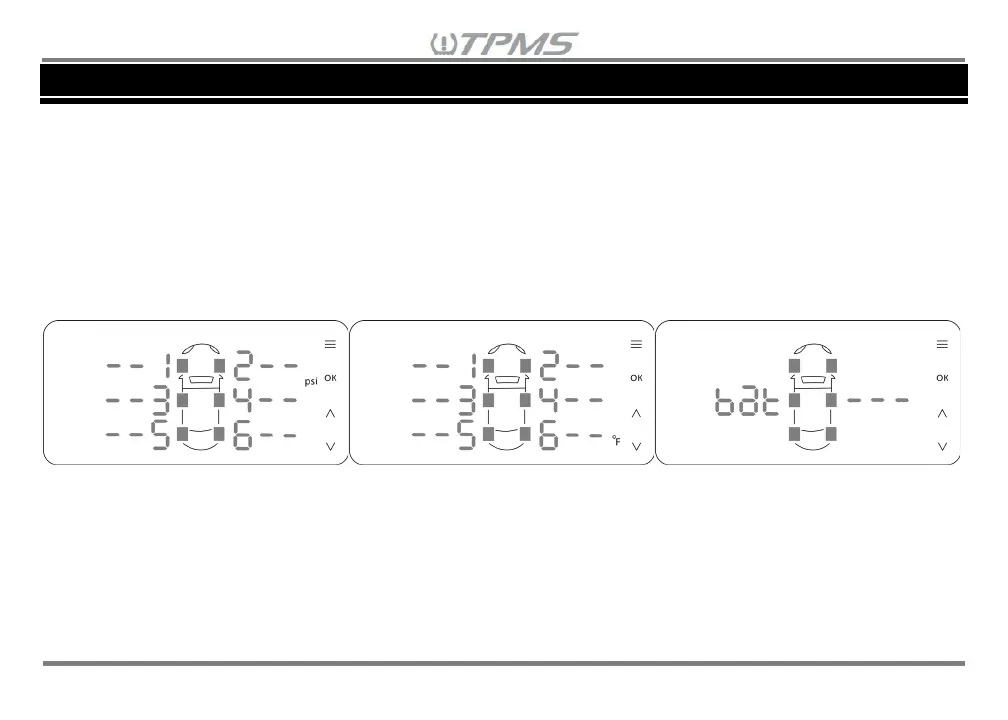
automatically display in Driving Mode for the default vehicle selection: CAR 1. The Driving Mode cycles
between tire pressure, tire temperature and vehicle/trailer battery voltage display screens in a rotating
sequence and will show green dash lines “- -“ and corresponding wheel number or “---” for battery voltage
(See Figure 7.1). The green dash lines will remain until the sensor senses that the wheel speed is over
12 mph/20 kph or pressure is being added/released from the tire. Sensors may take a few minutes to
wake-up. Once the sensors wake-up, the sensor will continue to transmit data to the receiver every
minute while moving.
Figure 7.1 Tire Pressure / Tire Temperature / Vehicle/Trailer Battery Voltage Display Screens
There are different display modes with different vehicle configurations, see the Table 7.1 below. Please
pay attention to the white number on the actual vehicle tire location and how it refers to the red number
tire location on the display on Table 7.1. There may be other custom vehicle configurations in which
Table 7.1 does not cover, but the table can be used as a reference on how the tire location on the display
will correlate with the actual tire location on a vehicle.


 To Next Page