56
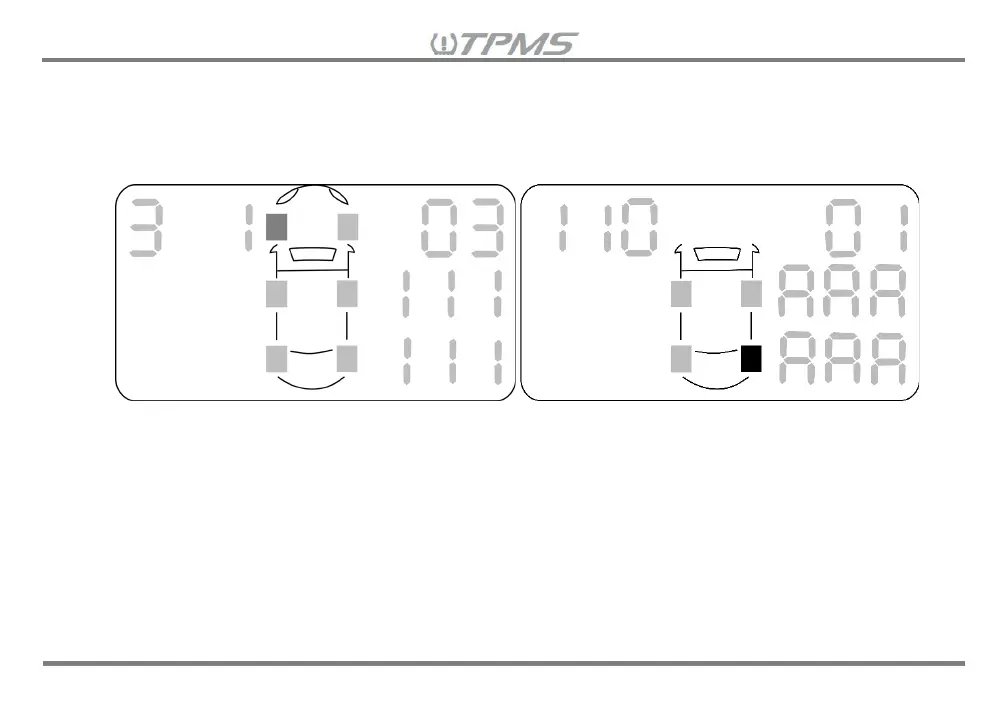
If a sensor did not properly pair to the receiver, then instead of seeing the sensor ID# on the right
side of the screen, you will see a “
0” followed by the vehicle selection# and the tire location#
repeated on both the second and third row (Note: For tire location 10, “
A” will be repeated in
second and third row).
If after performing the sensor ID# review, you noticed that some sensor ID#s were reversed and
in the incorrect tire location (i.e. paired sensor ID with wheel orientation mark □
5
in tire location 6
on receiver, but sensor is actually installed in tire location 5 and vice versa), then return to the
Settings Mode Menu and go to Setting 8.6 Setting the Tire Position on the Receiver to swap the
tire position to show the correct sensor ID in the right tire location on the receiver.
After you finish reviewing and confirming the paired sensor ID#s to each vehicle selection &
wheel location and everything is correct, you are all set and ready to use the Tuson TPMS
Retrofit Kit. Congratulations!


 To Next Page