- 7 -
Note: When you unlock the lock with password, please press # after entering the password.
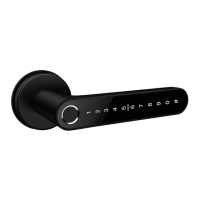
1.Member Management
There are Family Member and Other Member in Member Management. You (Administrator)
can add users as family members or other members. When adding user as family member,
the user needs a Tuya account. For other member, the user does not need a Tuya account.
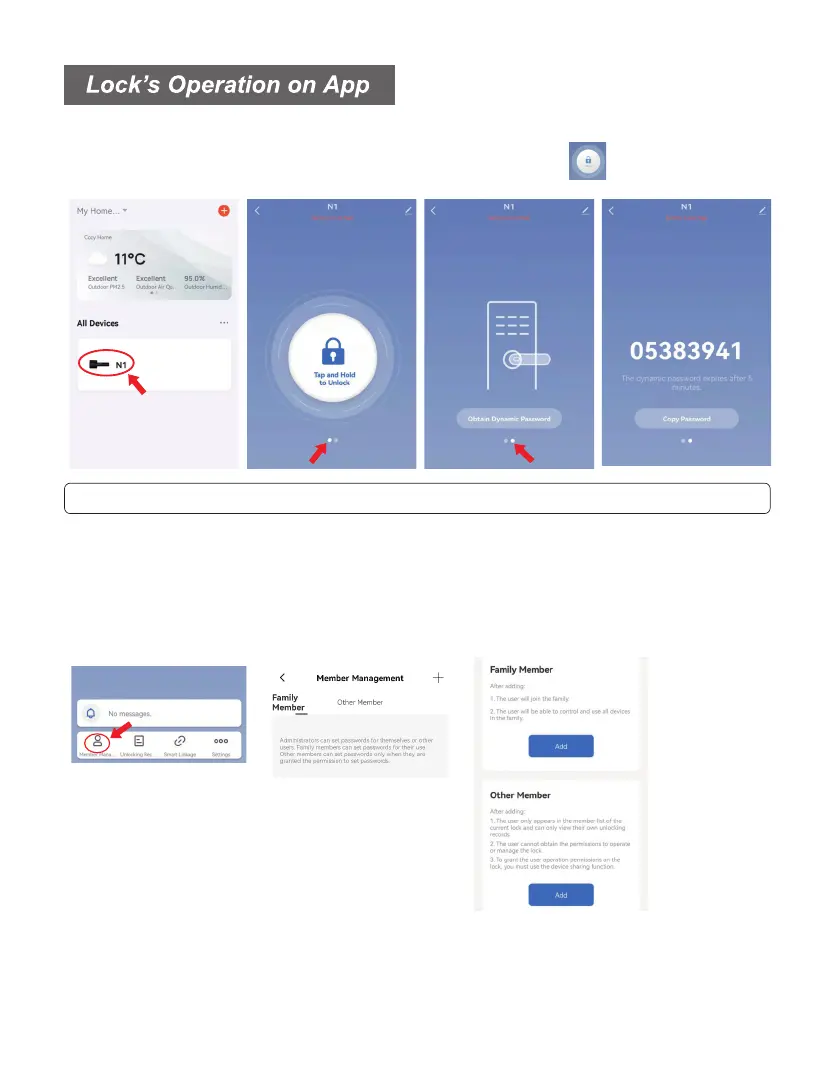
After pairing the lock with App, you can find the lock on the home page of App. Click the
lock N1 to enter operation page of lock.You can press the icon or input Dynamic
Password on the lock to unlock.
(You can skip this setting first and directly set up fingerprint / password on App.)
- Administrators can set passwords for themselves or Family / Other users.
- Family members can set passwords for their use.
- Other members can set passwords only when they are granted the permission to set.



 To Next Page