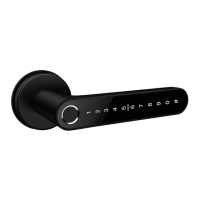
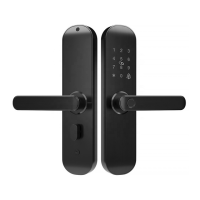
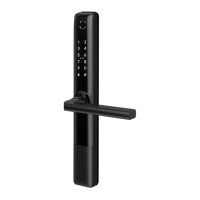
This document outlines the features, installation, and operation of the N1TY Tuya Smart Lock, a versatile smart lock designed for various residential and commercial settings. The lock offers multiple access methods and smart functionalities through a mobile application, enhancing convenience and security for users.
Function Description
The N1TY Tuya Smart Lock is an advanced door locking system that integrates modern technology with traditional security. Its primary function is to secure a door while providing flexible and convenient access options. The lock can be controlled remotely via a mobile application, making it suitable for homes, apartments, offices, Airbnbs, motels, and holiday homes.
The core functionality revolves around its multiple unlocking methods:
- App Access: Users can unlock the door directly through the Tuya Smart App on their smartphone, leveraging Bluetooth connectivity. This allows for remote unlocking within Bluetooth range.
- Fingerprint Recognition: The lock features a fingerprint sensor, allowing authorized users to unlock the door with a simple touch. This provides quick and secure access without the need for keys or codes.
- Password Entry: Users can set up 6-10 digit passwords for unlocking the door. The app allows for the creation of customized or random passwords, including one-time, periodic, and time-limited options, catering to different access needs.
- Mechanical Key: For traditional backup or in case of electronic failure, the lock is equipped with mechanical keys, ensuring that access is always possible. Users are advised to keep these keys in a safe, accessible location.
Beyond basic unlocking, the N1TY Tuya Smart Lock offers several smart features that enhance its utility:
- Member Management: The administrator (the first user to pair the lock with the app) can add other users as "Family Members" or "Other Members." Family Members, who require a Tuya account, have permanent access permissions and can control all devices in the family. Other Members can be granted temporary or permanent access, with customizable unlock method permissions. This hierarchical management system is ideal for managing access for tenants, guests, or service providers.
- Unlocking Records: The lock maintains a real-time log of all unlocking events, which can be viewed through the Tuya Smart App. This feature provides an audit trail, allowing users to monitor who accessed the door and when.
- Smart Linkage: The lock can be integrated into broader smart home automation scenarios. For instance, it can trigger actions like "Family Go Home" when a family member unlocks the door, or activate an alarm linkage if the door lock detects an alarm event.
- Passage Mode: This mode allows the door to remain unlocked after entry, preventing automatic re-locking. It can be activated or deactivated via the app or directly on the lock using specific key combinations or fingerprints. This is useful for periods when the door needs to be frequently opened and closed, such as during a party or moving furniture.
- Emergency Power Supply: In case of battery depletion, the lock includes an emergency power supply interface on the front handle. This allows users to temporarily power the lock using a backup battery connected via a USB cable, enabling access to replace the main batteries.
Usage Features
The N1TY Tuya Smart Lock is designed for ease of use and flexibility, offering several features that enhance the user experience:
- App-Centric Control: The Tuya Smart App serves as the central hub for managing the lock. From pairing the device to setting up users, passwords, and fingerprints, most configurations are done through the intuitive app interface. The app also allows users to check the lock's battery level, ensuring they are aware of when to replace batteries.
- Idling Lock Handle Design: When the door is locked, the front handle will turn freely without engaging the latch. This "idling" design prevents forced entry attempts by making it impossible to apply leverage to the handle to break the locking mechanism. The door remains securely locked even if the handle is turned.
- Customizable Passwords: The ability to create one-time, periodic, and time-limited passwords is a significant advantage for various scenarios. One-time passwords are ideal for single-use access, while periodic passwords can be set for recurring access (e.g., a cleaner who comes every Tuesday). Time-limited passwords are useful for guests or contractors who need access for a specific duration.
- Quick Fingerprint Setup: The process for adding fingerprints is straightforward, requiring multiple placements of the finger on the sensor to ensure accurate recognition. This ensures reliable and fast unlocking for authorized users.
- Door Open Direction Check: The installation instructions emphasize checking the door's open direction (left inward, left outward, right inward, right outward) to ensure correct orientation and functionality of the lock. This attention to detail during setup is crucial for optimal performance.
- Bluetooth Connectivity: The lock uses Bluetooth for communication with the Tuya Smart App, enabling convenient control within range. For certain advanced features like setting online temporary passwords, Bluetooth must be active on the user's phone.
- Third-Party Voice Service Integration: The lock supports integration with popular voice assistants like Alexa and Google Assistant, provided a gateway and a 2.4 GHz Wi-Fi connection are available. This allows for voice-activated control, further enhancing convenience.
Maintenance Features
Maintaining the N1TY Tuya Smart Lock is designed to be simple and user-friendly, with built-in features to ensure longevity and consistent performance:
- Battery Dead Alarm: The lock provides audible prompts when its batteries are running low, alerting users to replace them before the lock becomes inoperable. This proactive warning system helps prevent unexpected lockouts. The battery level can also be monitored via the mobile app.
- Standard Battery Type: The lock operates on 4 x AAA Alkaline batteries (not included), which are readily available, making battery replacement convenient.
- Rugged Construction: Made from zinc alloy, the lock body and handle are designed to be robust, resisting forcible entry attempts and ensuring durability over time.
- Waterproof Rating: With an IP45 waterproof rating, the lock is suitable for both outdoor and indoor use, offering protection against dust and water splashes. This makes it resilient in various environmental conditions.
- Reset Options: The lock offers two methods for resetting to factory settings:
- Physical Reset: By removing the battery cover and pressing a reset button for about 6 seconds, users can restore the lock to its initial state. This is useful for troubleshooting or preparing the lock for a new administrator.
- App-Based Reset: The lock can also be removed from the Tuya Smart App, which effectively resets its configuration. This method is convenient for administrators who wish to transfer ownership or completely disassociate the lock from their account.
- Cleanliness Recommendation: Users are advised to keep their fingers clean when using the lock, particularly the fingerprint sensor, to ensure optimal performance and accuracy of the recognition system. This simple maintenance tip helps prevent sensor malfunctions.
- Firmware Updates: While not explicitly detailed, smart locks typically receive firmware updates through the companion app, which can introduce new features, improve performance, and address security vulnerabilities, ensuring the lock remains up-to-date.
In summary, the N1TY Tuya Smart Lock is a comprehensive and user-friendly security solution that combines multiple access methods with smart home integration and practical maintenance features, making it a reliable choice for modern living.

 Need help?
 General

 To Next Page