7. Other Functions
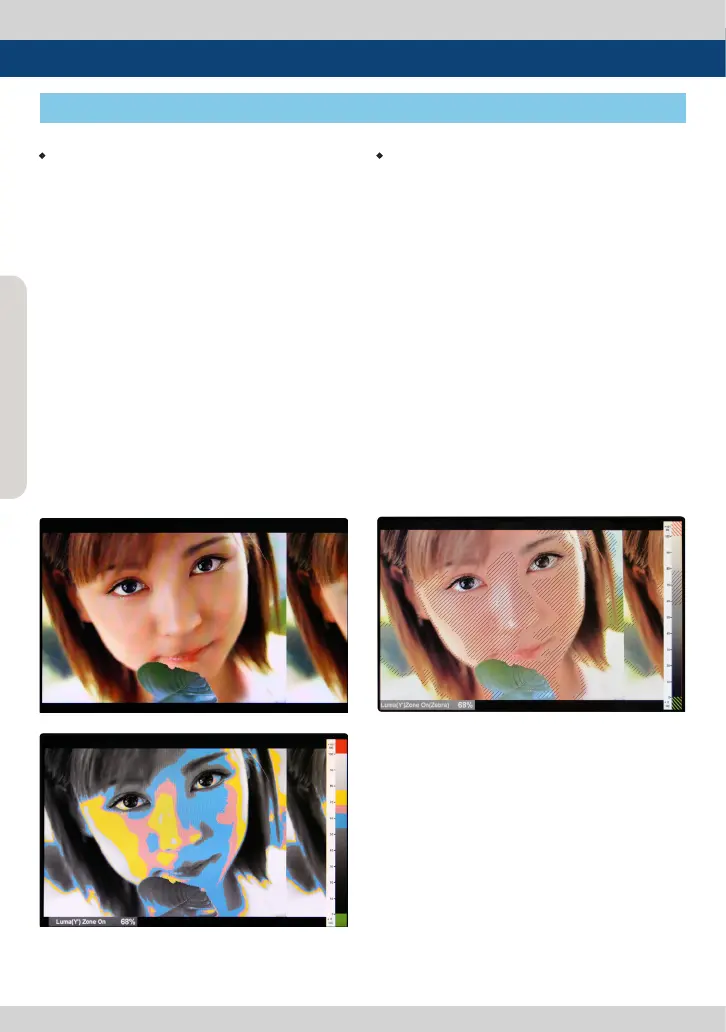
[5] Luma(Y’) Zone Check
• Color Pattern Type
- Displays the Luma(Y’) level of the input image
in colors.
- Y’ ≥ 100% : Pixels with higher Y’ level than 100
turn to red.
- Y’ ≤ 0% : Pixels with lower Y’ level than 0 turn
to green.
- Pixels with Y’ levels designated by the user are
displayed in following colors - yellow, pink,
cyan.
- Factory Default Y’ (Border line between pink
and yellow) level is 75% and the pink color is
assigned to pixels with Y’ level from 70% to
75%.
- Yellow color is assigned to pixels with Y’ level
from 75% to 85%, and Cyan from 60% to 70%.
- This function is designed for a better
performance in setting the exposure when
shooting with vDSLR cameras.
• Zebra Pattern Type
- Displays the pixels with designated Luma(Y’)
levels with zebra pattern.
- Y’ ≥ 100%: Pixels with Y’ level over 100% turn
to red diagonal stripes.
- Y’ ≤ 0% : Pixels with Y’ level under 0% turn to
green diagonal stripes.
- User dened Y’ levels are displayed as black
diagonal stripes.
- Factory Default Y’ level is 70% and the pixels
with Y’ level from 65% to 75% is displayed with
zebra pattern.
- Pixels with 10% of Y’ level is displayed as black
diagonal stripes.
- This function is designed for a better
performance in setting the exposure when
shooting with vDSLR cameras.
<Luma Zone Check OFF>
<Luma Zone Check ON_Color Pattern Type>
<Luma Zone Check ON_Zebra Pattern Type>



 To Next Page