KNOW YOUR TVS HLX PLUS
KNOW YOUR TVS HLX PLUS
20
Caution
Never sit on the vehicle when it is supported by side stand.
Always park the vehicle on a flat, firm surface.
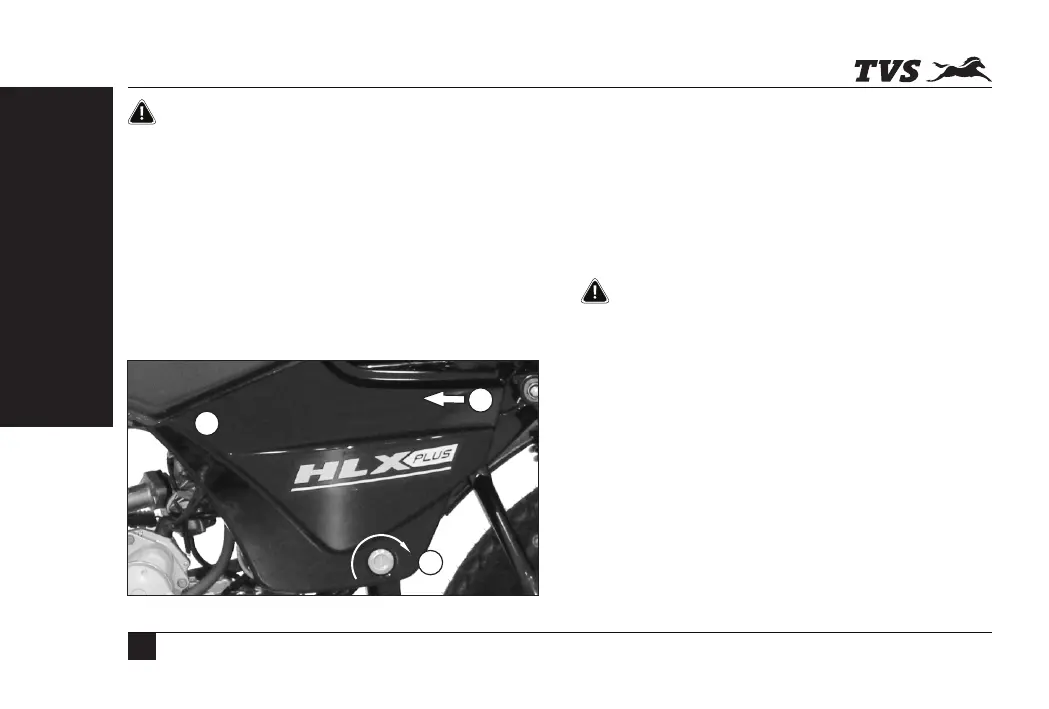
COVER FRAME L
TVS HLX PLUS is provided with lockable cover frame on the
left side. Open the cover frame to access tool kit, first aid kit
and battery assembly.
1. Insert the key in the cover frame at lock (1) and rotate it
in clockwise direction.
2. Pull out the cover frame gently at (2), slide it forward at
(3) and take out.
2
3
1
Reassembly
1. Assemble the cover frame by carefully sliding the rear
portion (3) on to the hook on the frame while ensuring
the availability of rubber cushion on the hook.
2. Locate its lug (2) on the hole provided in the fuel tank
while ensuring the availability of rubber cushion on the
hole, gently press and lock with the key by rotating in
anti-clockwise direction.
While reassembling the cover frames, ensure that the
rubber cushions provided for the cover lugs are in place.
Caution
COVER FRAME R
Cover frame R can be removed by removing the mounting
screw. Follow the procedure of cover frame L for removal
and reassembly.



 To Next Page