HANDLE BAR LEFT SIDE
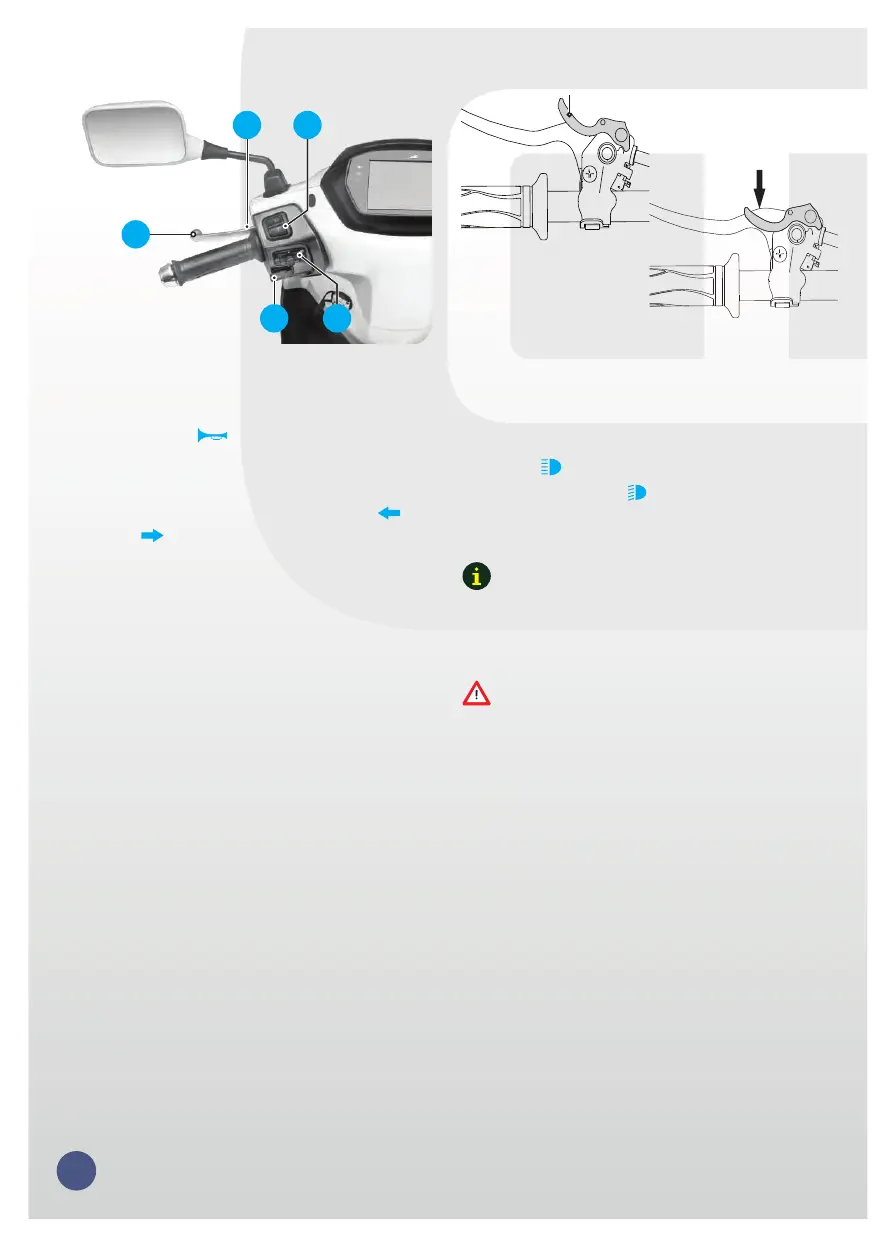
11. Horn switch
Press the switch ‘ ’ to operate the horn.
12. Turn signal lamp switch
Slide the turn signal lamp switch to left ‘ ’ or
right side ‘ ’ to operate respective turn signal
lamps (LH / RH). Press the center button of the
switch to turn ‘OFF’.
13. Left hand brake lever
The rear brake is applied by squeezing the rear
brake lever gently towards the handle grip. The
brake lamp glows on application of rear brake .
14. Left hand brake lock lever
Left hand brake lock is useful when your
scooter is parked with side stand on a slope to
avoid falling.
To apply the left hand brake lock, squeeze the
left hand brake lock lever fully towards the grip.
Hold the brake lever at the same position, press
and hold the left hand brake lock lever. Now
release the brake lever and ensure that the
brake is locked properly.
To release the left hand brake lock, squeeze the
left hand brake lock lever further in and the lock
will release automatically, release the brake
lever upon releasing the brake lock.
15. High/low beam switch
With the head lamp ‘ON’, press the switch
towards ‘ ’ to operate head lamp high beam
or press it towards ‘ ’ to operate head lamp
low beam.
Press
Locked
Lever
Unlocked
Use appropriate head lamp beam 'high / low' as
per the traffic and road conditions for your
safety and avoid inconvenience to other riders.
15
11
14
12
13
15
Ensure that the brake lock lever is released (if
applied) before start riding the vehicle.
Note
Caution


 To Next Page