13
8-3. Software installation
Android devices
Applicable Application Software (app)
"NFC Reader"
* If an NFC tag reader app is already installed on the Android devices, this app can be used.
Laptop or PC + USB NFC Reader/Writer
Data history can be exported to Microsoft(R) Excel (R)(for Windows(R)) using a NFC
software "ATAGO Logger (NFC)."
* The app "ATAGO Logger (NFC)" is available for download :
http://www.atago.net/ur/
Example of data history read out
LLL : Lower limit error.
HHH : Upper limit error.
OOO : Zero setting complete.
AAA : Zero setting error.
nnn : External light error.
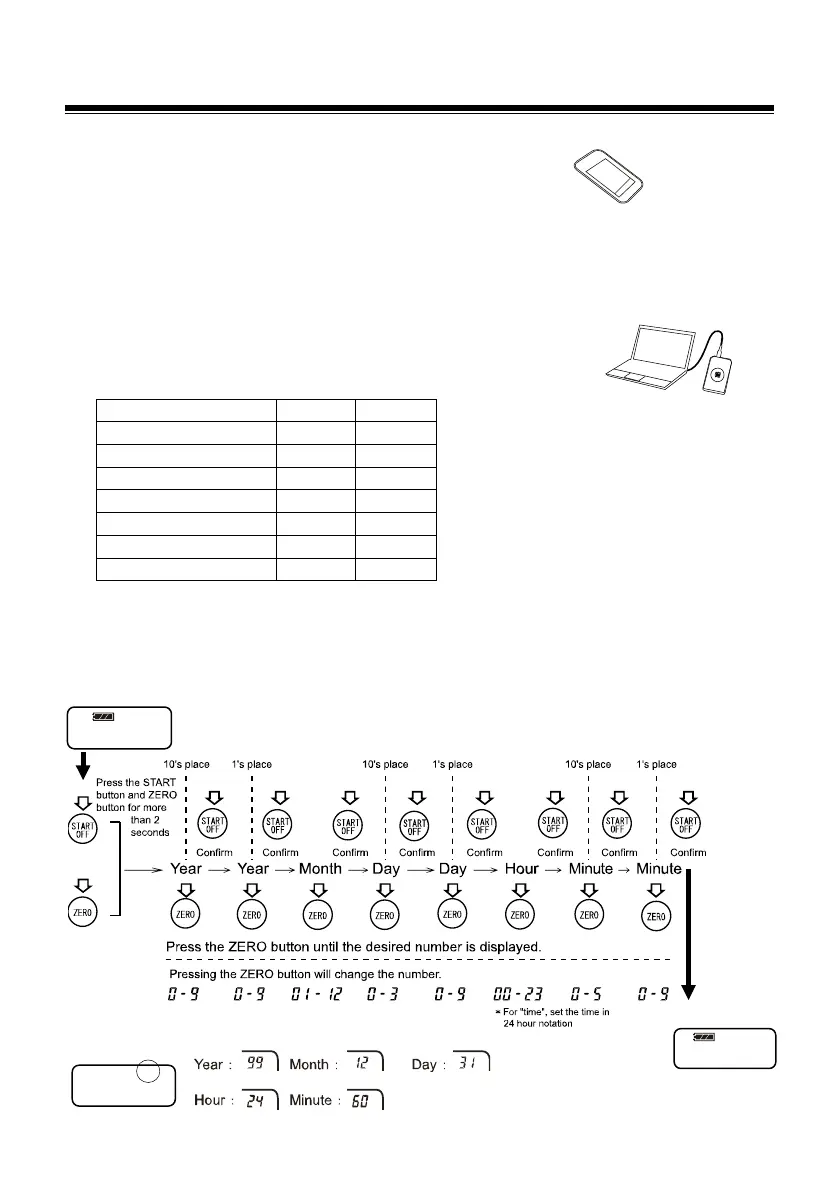
8-4. Date and time setting
Set the date and time (year [the last two digits of the western calendar], month, date, time and
minute) prior to data history readout.
Reset the date and time when batteries are removed for 24hours or more.
While powered on…(Example image)
Top right screen display during date and time set up
(Seconds : Fixed 00)
20.4℃
dat
99


 To Next Page
 Loading...