19
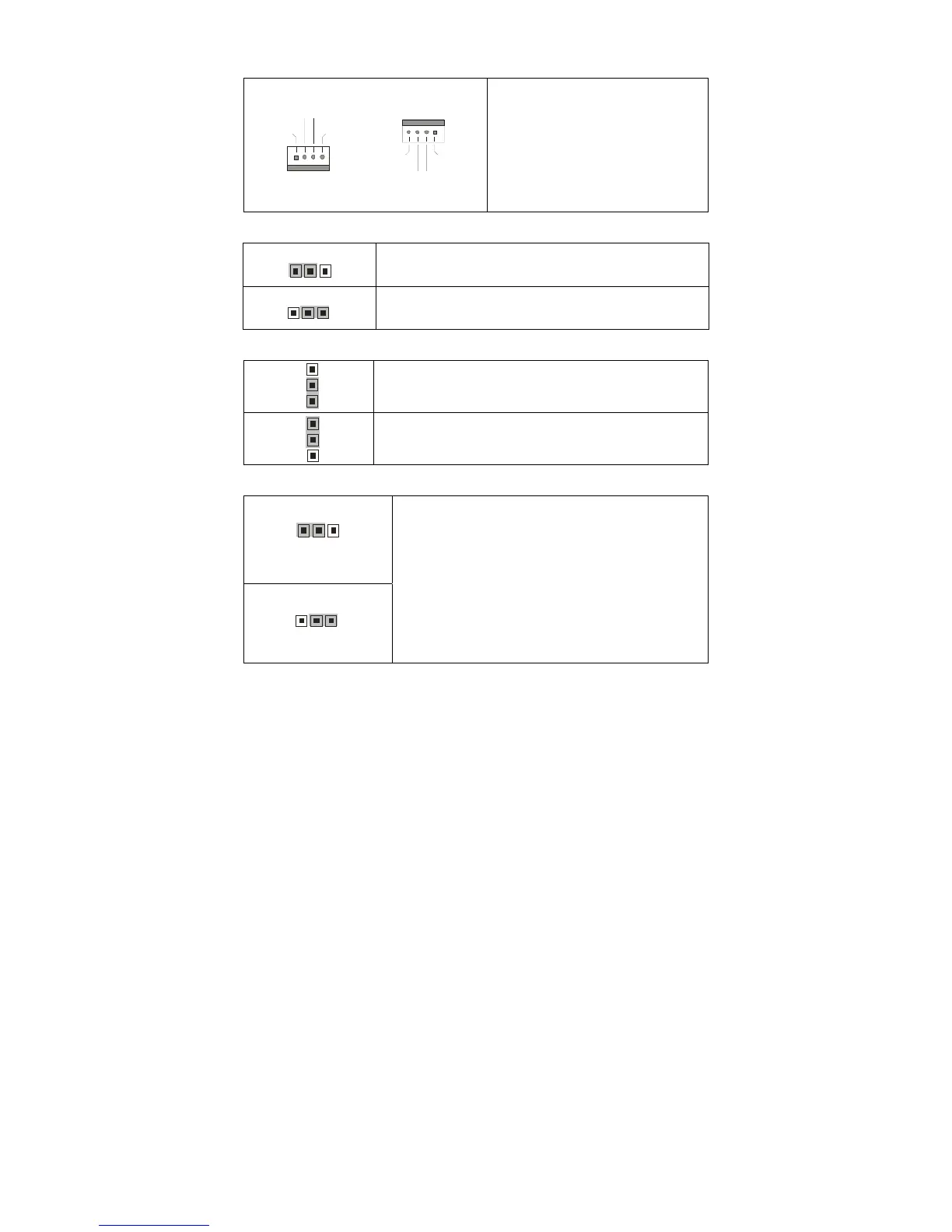
FAN1/FAN2/FAN3/CPUFAN1/CPUFAN2: 4-pin Fan Header
+1 2V
PWM
GN D
Tachometer
1
+12V
PWM
GND
Ta c h o m et e r
1
Use this header to connect the
cooling fan to your motherboard to
keep the system at optimum
performance levels.
JP1: SAS 1068E Device ID Change Jumper
3
1
Pin 1-2 Closed: Device ID 58 (LSI IR RAID setting,
S5376WAG2NR only)
1
3
Pin 2-3 Closed: Device ID 59 (LSI Mega RAID setting,
S5376WAG2NR5 only)
JP2: VGA Enable/Disable Jumper
3
1
Pin 1-2 Closed: Enable (Default)
3
1
Pin 2-3 Closed: Disable
JP3: Clear CMOS Jumper
3
1
Normal
(Default)
1
3
Clear
Use this jumper when you forgot your system/setup
password or need to clear system BIOS setting.
How to clear the CMOS data
- Power off system and disconnect power
supply from AC source
- Use jumper cap to close Pin_2 and 3 for
several seconds to Clear CMOS
- Replace jumper cap to close Pin_1 and 2
Reconnect power supply to AC source
Power on system



 To Next Page