http://www.tyan.com
27
The types of processors supported by the S8050 are listed in the 1.2 Hardware
Specifications section on page 4. Check our website at http://www.tyan.com for
the latest list of validated AMD
®
processors for this specific motherboard.
NOTE: MiTAC is not liable for damage as a result of operating an
unsupported configuration.
Processor Installation (Single Socket / for AMD
®
EPYC™ 9004 Series CPU)
Follow the steps below to install the processors and heat sinks.
Please note that the illustrations are based on socket which may not look exactly
like the motherboard you purchased. Therefore, the illustrations should be held for
your reference only.
NOTE: Please save and replace the flip CPU protection cap when returning for
service.
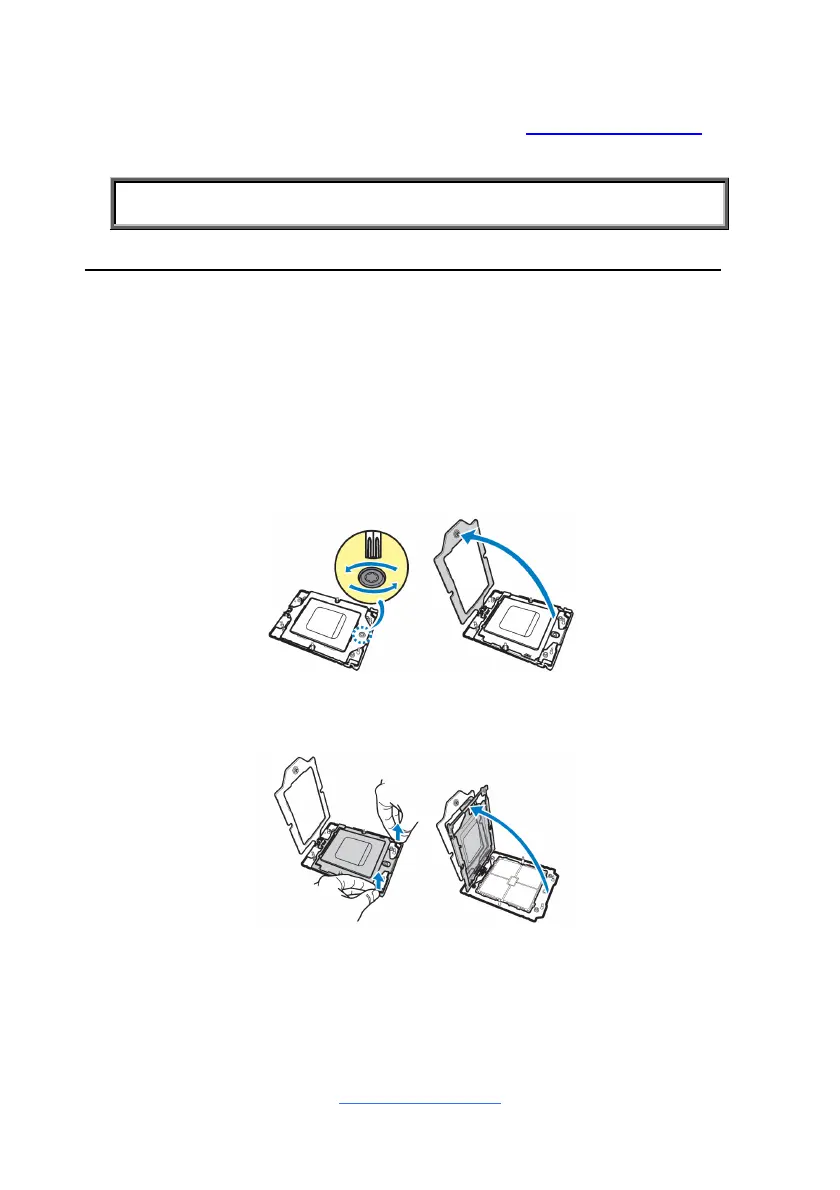
1. Use a T20 Torx screwdriver to loosen the screws securing the force frame.
NOTE: The force frame will automatically eject after the captive screws are
being released.
2. By placing your both index fingers on the sides on the metal handle, pull to
release the rail frame. Then lift the rail frame to its fully open position.
3. Remove the external cap from the rail frame.



 To Next Page