http://www.tyan.com
29
After installing the processor, you will need to proceed to install the heat sink. The
CPU heat sink will ensure that the processor do not overheat and continue to
operate at maximum performance for as long as you own them. An overheated
processor is dangerous to the motherboard. The processors will overheat within
seconds, enter thermal protection, and shut down if heatsinks are not installed.
Caution:Take caution of the air flow must be in the direction which paralleled with
memories.
For the safest method of installation and information on choosing the appropriate
heat sink, using heat sinks validated by AMD
®
. Please refer to the AMD
®
website:
http://www.amd.com
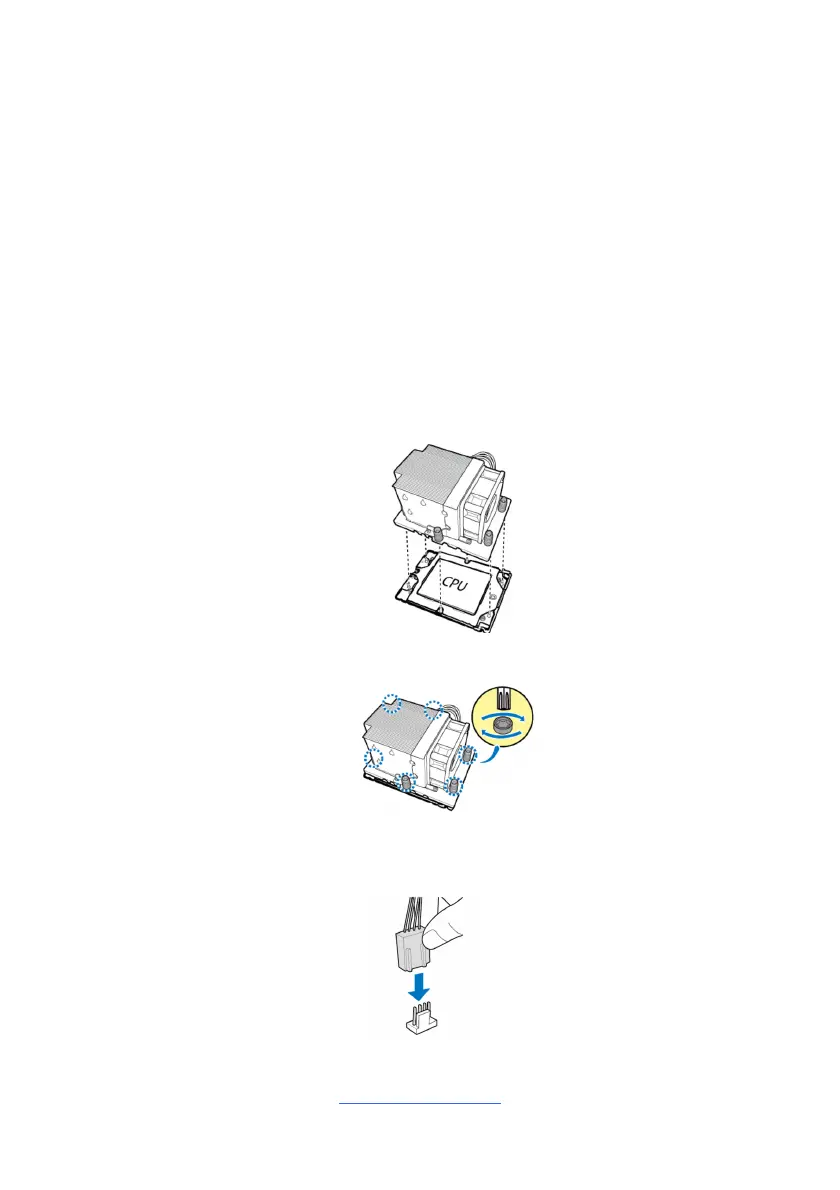
The following diagram illustrates how to install the heatsink on the AMD
®
CPU
Socket:
1. Align and install the CPU heatsink onto the top of the CPU socket.
2. Use a T20 Torx screwdriver to tighten the heatsink screws.
3. Connect the heatsink power cable to the mainboard connector.



 To Next Page