
 To Next Page

B
Ben JonesOct 16, 2026
How do I address the 3rd ACM in my panel

How do I address the 3rd ACM in my panel
Details the General Controller Module (GCM) as a general purpose module running on a Linux operating system.
Describes the Access Control Module (ACM) for inputs, outputs, reader interfaces, and AUX outputs for the GCM.
Explains the IP-ACM module's role in connecting and managing access control for two readers.
Details environmental operating conditions and electrical input/output for GCM, ACM, readers, locks, and relay ports.
Covers electrical output specifications for RS485, Wiegand, Auxiliary ports, and relay ports.
Ensures fail-safe mechanism override at each card reader exit for emergency egress.
Guidelines for handling internal components to prevent static discharge damage during installation.
Details UL compliance for installation within protected premises and use of tamper switches.
Specifies approved power supplies, PoE requirements, and proper grounding procedures.
Details wiring specifications for Ethernet, RS-485, inputs, and TLS encryption standards.
Covers power wiring, PoE module jumper settings, and related UL compliance notes.
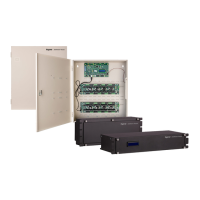
Step-by-step guide for mounting the iSTAR Ultra G2 enclosure directly to a wall.
Steps for mounting the iSTAR Ultra G2 unit within a standard 19-inch rack system.
Identifies and describes key components and features of the iSTAR Ultra G2 enclosure via callouts.
Diagram and explanation of the components on the General Control Module (GCM) board.
Diagram and identification of components on the right-hand side of the Access Control Module (ACM).
Diagram and identification of components on the left-hand side of the Access Control Module (ACM).
Illustrates direct Wiegand signaling read head connections for readers.
Shows full duplex and half duplex reader connections for RS485 readers.
 General
| Model | iSTAR Ultra G2 |
|---|---|
| Humidity | 0% to 95% non-condensing |
| Encryption | AES-256 |
| Operating System | Linux |
| Type | Controller |
| Communication | Ethernet |
| Power Supply | 12V DC |
| Input Voltage | 12V DC |
| Operating Temperature | -40°C to +70°C |
| Inputs | 16 |
| Memory | 512 MB |
| Storage | 4 GB |
| Processor | ARM Cortex-A9 |
| Network Interfaces | Ethernet |
| USB Ports | 1 |
| Serial Ports | RS-485 |