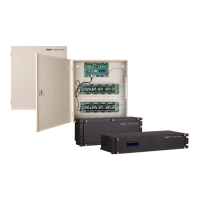
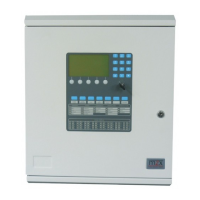
The iSTAR Ultra G2 SE is a network-ready door controller designed to support both hard-wired and wireless locks. It operates using a Linux operating system and is compatible with C•CURE 9000 v2.90 SP4 (and later, with firmware version 6.8.6 and higher) or C•CURE 9000 v2.50 (and later) for Ultra mode only.
Components:
The iSTAR Ultra G2 SE system comprises the following hardware components:
- General Controller Module (GCM): This is the central processing unit, a general-purpose module running a Linux operating system.
- Access Control Modules (ACM-SE): Up to four ACM-SE modules can be connected. These are special-purpose modules providing inputs, outputs, and reader interfaces for the GCM.
- IP-ACM Ethernet Door Modules: Alternatively, up to 32 IP-ACM Ethernet Door Modules can be used. Each IP-ACM module facilitates the connection and management of access control for two readers.
Important Technical Specifications:
Environmental:
- Operational Temperature: 32°F (0°C) to 120°F (49°C).
Electrical (GCM):
- Electrical Input: 12 VDC (3 A) or 24 VDC (1.5 A).
Electrical (ACM-SE):
- VIN Electrical Input: Up to 12 VDC (9 A) or 24 VDC (3 A).
- RS485 Electrical Output: 12 VDC (1.2 A) per port.
- Wiegand Electrical Output: 12 VDC (0.8 A) per port.
- Relay Ports (Dry - Primary) Electrical Output: Primary: 30 V AC/DC (5 A maximum).
- Voltage Tolerances: 85% - 100% of listed specifications.
Wiring Specifications and Components:
The iSTAR Ultra G2 SE supports various wiring connections with specific requirements:
- RS-485 Comm, Data two wire: From iSTAR Ultra G2 SE to RM and I/O Modules. AWG 22, Shielded (Yes), Max Length 4000 ft (1212m).
- Power: From iSTAR Ultra G2 SE to RM and I/O Modules. AWG 22/18, Unshielded (No), Max Length 600 ft to 1500 ft (depending on AWG used).
- RJ-45-Ethernet: From iSTAR Ultra G2 SE to Hub, Host. Cat 5e or better, N/A, Max Length 328 ft (100m).
- Supervised Input: From iSTAR Ultra G2 SE to Input. AWG 22/18, Unshielded (No), Max Length 2000 ft (606m).
- Request-to-exit (REX or RTE): From iSTAR Ultra G2 SE to Switch. AWG 22/18, Unshielded (No), Max Length 2000 ft (606m).
- Door Contact/Door State Monitor (DSM): From iSTAR Ultra G2 SE to Contact. AWG 22/18, Unshielded (No), Max Length 2000 ft (606m).
- Supervised Input: From iSTAR Ultra G2 SE to Input. AWG 22, Shielded (Yes), Max Length 2000 ft (606m).
- Reader Input (Proximity/Wiegand signaling read head): From iSTAR Ultra G2 SE. AWG 22 (200 ft / 60.96m), AWG 20 (300 ft / 91.4m), AWG 18 (500 ft / 152.4m). All reader inputs are shielded (Yes).
Power and Ethernet:
- The iSTAR Ultra G2 SE is powered by a UL 603 or UL 2610 listed External Power Supply.
- A Software House apS or a Power over Ethernet (PoE++) injector with a UL listed surge protector (evaluated to UL 1449) can be used as an External Power Supply.
- PoE++ modules can be used with UL 294, UL 603, and UL 2610 listed injectors.
- The device features two onboard Ethernet ports supporting 10/100/1000 Base-T Ethernet connections. Built-in LEDs indicate Ethernet Link and Receive Data signals.
Encryption:
- Supports TLS v1.3 encryption in Ultra G2 or Edge G2 mode.
- Supports TLS v1.2 encryption and an unencrypted option in Ultra mode.
Reader Compatibility:
The iSTAR Ultra G2 SE is compatible with Wiegand readers, RS485 readers, and TST-100 readers.
- Wiegand Readers: Direct connect readers with connections for +12V, D0, D1, Red, Yellow, Green, BPR, Power, Wiegand Data, and LED and Beep.
- RS485 Readers: Supports both full duplex and half duplex connections. Half duplex includes +12V, TR+, TR-, R+, R-. Full duplex (TST-100) includes +12V, D+, D-, FD+, FD-.
- TST-100 Readers: For smart-mode, wire using RS485 full-duplex connections. For RM-mode, wire using RS485 half-duplex connections.
Usage Features:
Installation:
The iSTAR Ultra G2 SE enclosure can be installed on a wall or a uni-strut system using user-supplied hardware. Alternatively, the GCM and ACM-SE modules can be installed in a standard 19-inch rack system.
- Wall Installation: Requires verifying mounting points can sustain a 75 lb (34 kg) load, removing knockouts for wiring, removing the enclosure door, aligning keyhole mounting slots, installing bottom mounting screws, attaching conduit couplings, and reattaching the door.
- Rack System Installation: Requires adequate airflow (ambient temperature below 120°F/49°C), mounting with 10/32 or 10/24 hardware, routing and labeling GCM and ACM cabling, connecting Ethernet cabling, and securing power inputs with zip-ties.
- PoE Module Jumpers: The PoE module has two jumpers: one to select PoE or PoE Plus (+), and another to configure the voltage to 24 VDC for the Ultra G2. PoE++ does not require jumpers.
General Control Module (GCM) Rotary Switch Positions (SW1):
The rotary switch on the GCM allows for various configurations and diagnostics:
- 0 (ICU BLOCK OFF): Read/write/update, general messages.
- 1 (DISP. CARD DATA FROM LAST CARD READ): 7 sec LCD disp.
- 2 (DISP. CARD DATA FROM LAST CARD READ): 2 sec LCD disp.
- 3 (DISP. INPUT CHANGES): 2 sec LCD disp.
- 4 (DISP. INPUT CHANGES): 1 sec LCD disp.
- 5 (DISP. MANUAL OUTPUT CHANGES): (Includes RM4/RM4E/R/8 boards) 2 sec LCD disp.
- 6 (DISP. MANUAL OUTPUT CHANGES): (Includes RM4/RM4E/R/8 boards) 1 sec LCD disp.
- 7 (RESERVED)
- 8 (SOFTWARE HOUSE USE ONLY)
- 9 (RESERVED)
- A (ERASE DB FILES FROM FLASH): Press S5 GCM soft reset, wait for LCD instructions (set rotary switch to 0 or F + press S5). Note: Similar to D, but basic comm. and IP is unchanged.
- B (SOFTWARE HOUSE USE ONLY)
- C (SOFTWARE HOUSE USE ONLY)
- D (RESTORE FACTORY DEFAULT): Erase data backups comm. parameters from flash. Press S5, soft reset, wait for LCD instructions (set rotary switch to 0 or F, and press S5 again).
- E (BOOT TO PREVIOUS IMAGE): (Activate with technical support only.)
- F (ICU BLOCK ON): Read only, general messages.
Access Control Module (ACM-SE) Configuration:
- SW1 - ACM ID: Sets the module ID (1-4) using four positions (OFF/ON).
- S3 - LED CFG: Configures LED behavior (External Bi-Color, 3-Wire (R,G,Y), 1-Wire (A,B,C)).
- S3 - Beep CFG: Configures beep on card read (DO NOT Beep on card read, Beep on card read).
- S2 - Enable RM STARn Ports: Default is OFF (Use Wiegand Ports). RM Reader Number determined by RM/RM-4E rotary switch. Direct Wiegand Reader Number determined by Port Number.
Maintenance Features:
- Life Safety Requirement: A fail-safe mechanism override must be installed at each card reader exit to allow people to leave the secure area in case of electromechanical device failure.
- Power Disconnection: Disconnect all power before modifying any jumper settings or wiring to, or within, the iSTAR Ultra G2 SE.
- Static Electricity Precautions: Discharge static electricity by touching a grounded surface, wear a grounding wrist strap, stand on a grounded static protection mat, limit movement during installation, and transport components in static-shielded containers.
Compliance:
- The iSTAR Ultra G2 SE must be installed within protected premises.
- When purchased separately, iSTAR Ultra G2 SE modules must be installed in an enclosure with an electrically supervised tamper switch to maintain UL compliance.
- For Proprietary Burglar Alarm installations, the iSTAR Ultra G2 SE must be installed in accordance with UL 681 - Standard for Installation and Classification of Burglar and Hold-Up Alarm Systems.
- All controllers and networking equipment in a cluster must be UL listed to qualify as UL Listed Products. USB has not been evaluated by UL.
- The iSTAR Ultra G2 SE must be permanently wired to mains electricity without switches that could interrupt the supply.
- Power-limited PoE injectors, which are UL 294, UL 603, and UL 2610 listed, can be used with PoE++ modules. IEEE 802.3 (AT or AF) compliance was not verified to UL294. PoE installations are UL listed for Mode B only.
- The system must be installed indoors within a protected premises in accordance with the National Electrical Code (NFPA70) and relevant local authority regulations.
Grounding:
- Ensure the iSTAR Ultra G2 SE controller is properly connected to an earth ground at any of the ground studs.
- Ensure shield wires (including ACM-SE and GCM) are grounded to the nearest ground connection at one end of the cable.
Monitoring:
- The Tamper, Battery Low, and AC Power Fail inputs must be enabled and connected to report to comply with UL requirements.
- AC fail, low battery, and USB cabling must be shielded.
- Supervised Inputs must use shielded, 22 AWG (minimum) stranded, twisted-pair cable, such as Belden 9462 or equivalent, for monitor points, DSMs, and REXs.
- Wiring methods must be in accordance with the National Electrical Code, ANSI/NFPA 70.
- Connections between PSE or power injector and the PD must use 26 AWG (0.13mm2) for patch cords and 24 AWG (0.21mm2) for horizontal or riser cables connected through standard 8-pin RJ-45 connectors.
- The USTAR-GCM AC Fail and COMM, USTAR-GCM, and USTAR-ACM Tamper, USTAR-GCM power, USTAR-ACM power (Reader), USTAR-ACM connections must remain within 25 feet (7.6 meters) of the control unit.

 Need help?
 General

 To Next Page