Under Counter Extreme
36
37
System Setup Method
System Setup Method
3
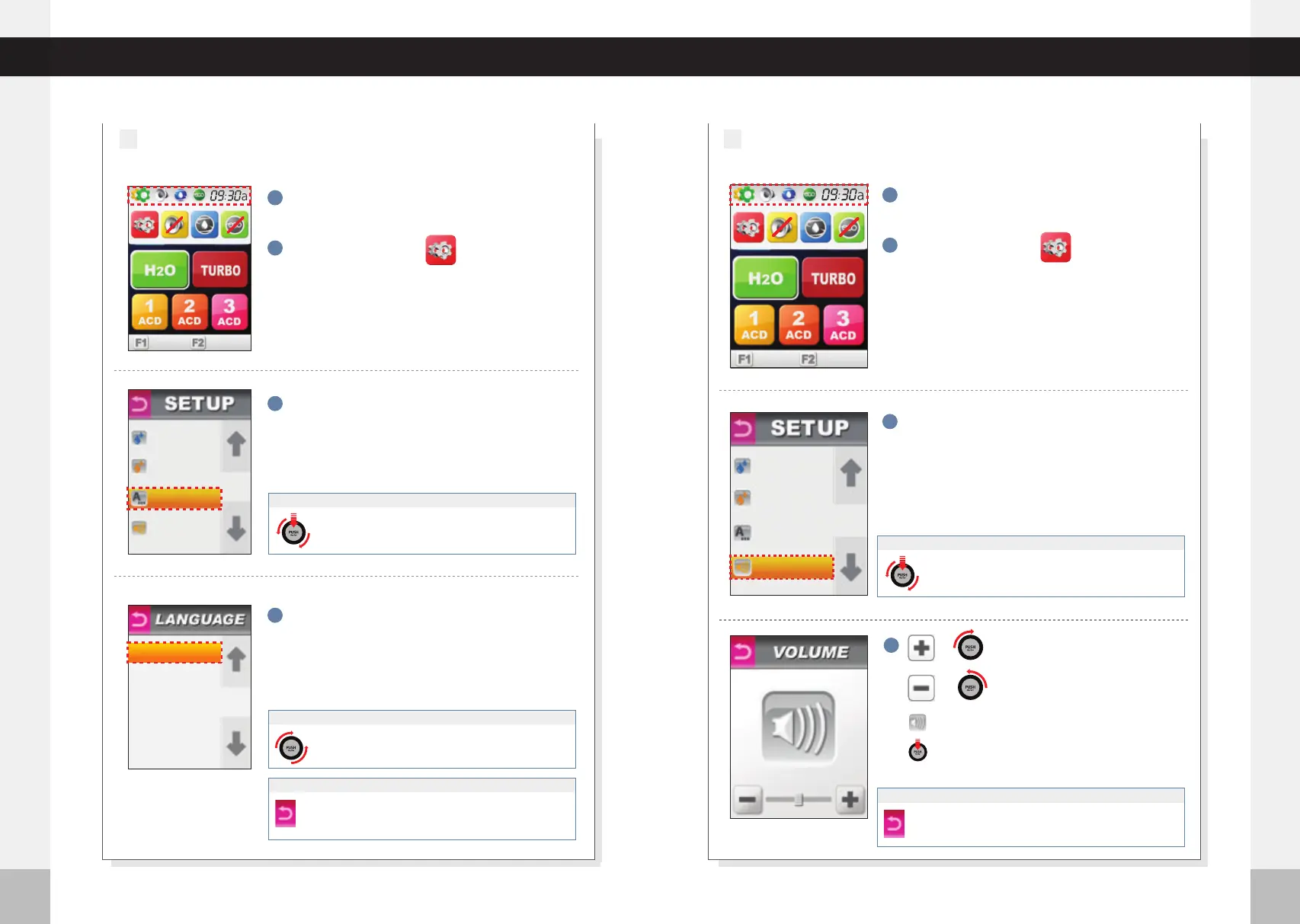
Press“VOLUME”
4
Volume Level Adjustment
4
Press desired language.
4
1
Press the setup icon.
2
Press the top left corner of screen. MENU options
will fall below upper part of the screen.
1
Press the setup icon.
2
Press the top left corner of the screen. MENU
options will fall below upper part of screen.
LANGUAGE MODE
3
3
Press“LANGUAGE”
◀
J
O
G
D
I
A
L
▶
◀
J
O
G
D
I
A
L
▶
◀
J
O
G
D
I
A
L
▶
Turn the Jog Dial clockwise (or counter-clockwise) to
select your desired language.
: Volume up (0-10 step)
◀
J
O
G
D
I
A
L
▶
◀
J
O
G
D
I
A
L
▶
◀
J
O
G
D
I
A
L
▶
or
: Volume down (0- 10 step)
or
◀
J
O
G
D
I
A
L
▶
◀
J
O
G
D
I
A
L
▶
◀
J
O
G
D
I
A
L
▶
◀
J
O
G
D
I
A
L
▶
◀
J
O
G
D
I
A
L
▶
◀
J
O
G
D
I
A
L
▶
Pressing this icon will let you hear the current volume.
Pressing the Push On/Off button on jog dial will let you
hear the current volume.
Push RETURN icon for previous menu screen. Voice says :“Applied”
Push RETURN icon again to complete set up.
Voice says :“Set up was completed”
If UP/DOWN Icon is pushed, digital number moves by one step.
Turn the Jog Dial clockwise (or counter- clockwise) to
select “LANGUAGE”. Press the PUSH On/Off button of
the jog dial to make your selection.
When using the Jog Dial
◀
J
O
G
D
I
A
L
▶
◀
J
O
G
D
I
A
L
▶
◀
J
O
G
D
I
A
L
▶
When using the Jog Dial
Turn the Jog Dial clockwise (or counter- clockwise) to
select “VOLUME”. Press the PUSH On/Off button of the
jog dial to make your selection.
When using the Jog Dial
◀
J
O
G
D
I
A
L
▶
◀
J
O
G
D
I
A
L
▶
◀
J
O
G
D
I
A
L
▶
Push RETURN icon for previous menu screen. Voice says :“Applied”
Push RETURN icon again to complete set up.
Voice says :“Set up was completed”
If UP/DOWN Icon is pushed, digital number moves by one step.
ALKALI pH
ACIDIC pH
LANGUAGE
VOLUME
ALKALI pH
ACIDIC pH
LANGUAGE
VOLUME
5
1. ENGLISH
2. SPANISH
3. CHINESE
4. GERMAN
%
50
%
50
%
50
%
50



 To Next Page