21
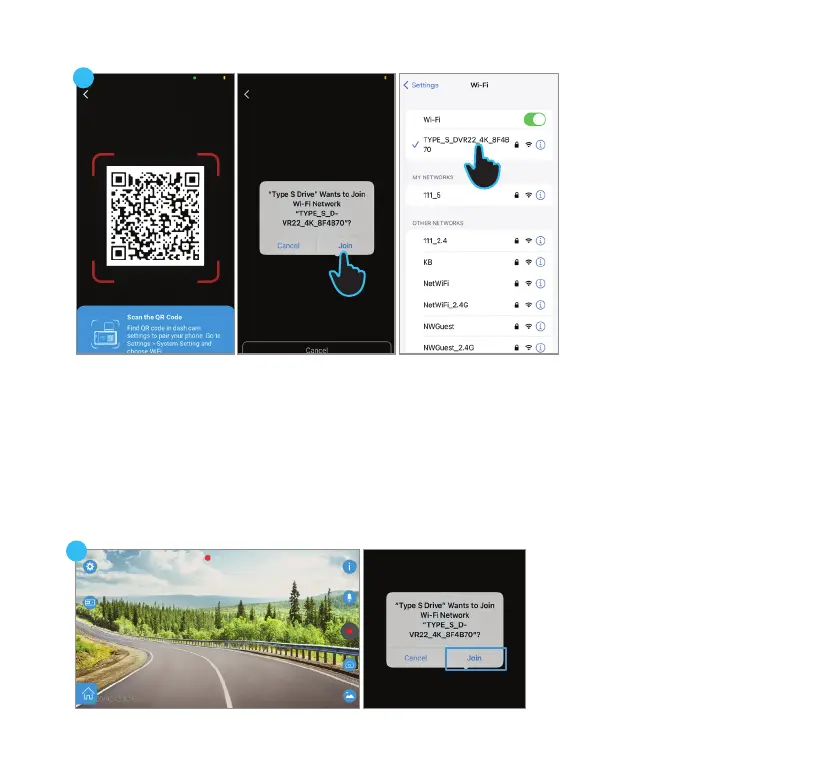
NOTE: After the initial
connection, the App retains
your camera's network
information. Simply click
Join to reconnect.
8
7
6
6. Scan the QR code on the camera.
7. Click Join in the pop-up message when prompted to connect to the camera’s WiFi network.
8. (Optional) If there is any issue with the auto pairing, exit the App and navigate to the WiFi setting
page on your device. Connect to “TYPE_S_DVR22_4K_xxxxxx” with the default password
“12345678”, then return to the App.
9. After establishing the connection, you will have the ability to view the live feed from the camera
through the App.
9



 To Next Page