EasyManua.ls Logo

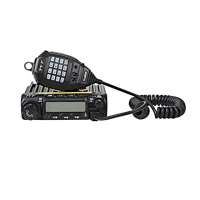
TYT TH-9000D - User Manual

TYT TH-9000D
38 pages
Print Icon
To Next Page IconTo Next Page
Loading...
Thank you very much for using two-way radios.
This product has a newly developed function menu
and humanism operation design, making it easy to use.
It will meet your requirement by the compact size and
reasonable price.
To customers
User Manual
TYT Electronics Co.,Ltd.
TH-9000D
TH-9000DU
(Only IC UHF Version)

Table of Contents

Questions and Answers

  • L
    Linda HendersonJul 25, 2025
    What to do if rotating dial will not change memory channel on TYT TH-9000D Two-Way Radio?
    • J
      James SummersJul 25, 2025
      If the rotating dial on your TYT Two-Way Radio isn't changing the memory channel, the transceiver might be in CALL mode. Press the VFO or memory mode to resolve this.
  • C
    Courtney HughesJul 29, 2025
    What to do if display is too dim on TYT Two-Way Radio?
    • E
      esalasJul 29, 2025
      If the display on your TYT Two-Way Radio is too dim, adjust the dimmer setting to "LAMP-H."
  • S
    Stephanie ThomasAug 2, 2025
    What to do if no sound comes from TYT TH-9000D speaker?
    • E
      Erik MyersAug 2, 2025
      If you can't hear any sound from the speaker of your TYT Two-Way Radio, there are a couple of potential causes: * The squelch might be muted. Try decreasing the squelch level. * Tone or CTCSS/DCS squelch could be active. In this case, turn CTCSS or DCS squelch off.
  • P
    Patrick BrownAug 7, 2025
    What to do if PTT key is pressed but transmission does not occur on TYT TH-9000D Two-Way Radio?
    • A
      Alyssa WoodsAug 7, 2025
      If pressing the PTT key on your TYT Two-Way Radio doesn't initiate a transmission, check the following: 1. Ensure the microphone is properly connected. 2. Verify the antenna is correctly connected.
  • J
    Joyce ShieldsAug 11, 2025
    Why key and dial do not function on TYT TH-9000D?
    • J
      Joshua HowardAug 11, 2025
      If the key and dial on your TYT Two-Way Radio are not working, it's possible that the key-lock function is activated. To resolve this, cancel the key-lock function.
  • A
    andersonlisaAug 16, 2025
    What to do if TYT TH-9000D Two-Way Radio fuse is blown?
    • B
      bergjeremyAug 16, 2025
      Check and solve the underlying problem that caused the fuse to blow, then replace the blown fuse with a new one.
  • S
    Samuel SmithAug 20, 2025
    How to fix if power is on, nothing appears on TYT TH-9000D Two-Way Radio display?
    • C
      Colleen Garcia DDSAug 20, 2025
      If the power is on but nothing appears on the display of your TYT Two-Way Radio, the + and - polarities of the power connection might be reversed. Connect the red lead to the plus terminal and the black lead to the minus terminal of the DC power supply.

Summary

Precautions

Initial Installation

Mobile installation

Instructions for safely mounting the transceiver inside a vehicle.

DC Power Cable Connection

Details on connecting the transceiver to a DC power source for mobile operation.

Fixed Station Operation

Antenna Connection

Getting Acquainted

Basic Operations

Switching The Power On;Off

Instructions for powering the transceiver on and off.

Adjusting The Volume

How to control the audio output level of the transceiver.

Receiving

Transmitting

Shortcut Operations

CTCSS;DCS Encode and Decode Setup

Configuring CTCSS/DCS tones for selective communication.

CTCSS Scan

DCS Scan

Voice Compander

Offset Direction and offset frequency setup

Keypad Lockout

Auto-Dialer Setup

General Setting

Sending 5-Tone Call

Sending DTMF call

Signaling Combination setup

Band-width Selection

Busy Channel Lockout

Editing Channel NAME

8 Groups of Scrambler (Encryption)

TOT (Time-out timer)

APO (Auto power off)

Scan Stop Time Setup

Display Mode Setup

Power On Password Setup

Factory Default

Microphone Operation

Long-distance Anti-theft Alarm

Cable Clone

Programming Software Installing and Starting (in windows XP system)

Maintenance

Trouble Shooting

Common problems and their potential solutions.

Specifications

General

General technical specifications of the transceiver.

Receiver (ETSI EN 300 086 standard testing)

Receiver performance metrics according to ETSI standards.

Transmitter (ETSI EN 300 086 standard testing)

Transmitter performance metrics according to ETSI standards.

FCC Warning

TYT TH-9000D Specifications

General IconGeneral
Operating Voltage13.8V DC ± 15%
Antenna Impedance50Ω
Weight1.2 kg
Frequency Range136-174 MHz (VHF), 400- MHz (UHF)
Output Power60W/25W/10W (VHF) / 45W/25W/10W (UHF)
Channel Capacity200 channels
Channel Spacing12.5/25 kHz
SquelchCarrier/CTCSS/DCS
ModulationFM
Operating Temperature-20°C to +60°C

Related product manuals