EasyManua.ls Logo

U-Line H-9180 - User Manual

U-Line H-9180
18 pages
Print Icon
To Next Page IconTo Next Page
Loading...
PAGE 1 OF 18 1022 IH-9179
DOWNTOWN
ADJUSTABLE
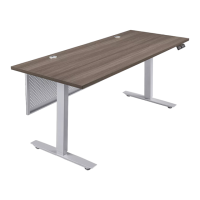
HEIGHT DESK
1-800-295-5510
uline.com
π
H-9179, H-9180
TOOLS NEEDED
Drill 4 mm Hex Wrench
(Included)
5 mm Hex Wrench
(Included)
PARTS
# DESCRIPTION QTY.
1 Desktop 1
2
Adjustable Frame with
Lifting Columns
1
3 Foot with Leveling Glides 2
4 Top Support Bracket 2
5 Control Box 1
6 Programmable Handset 1
7 Cable Management Tray 2
8 Power Cord 1
9 M6 x 33 mm Machine Screw 4
10
M6 x 15 mm Machine Screw with
Lock Washer and Flat Washer
16
11 5 x 20 mm Wood Screw 14
12 M6 x 12 mm Machine Screw 4
13 Metal Modesty Panel 1
14 Modesty Panel Bracket 2
Programmable
Handset x 1
Cable
Management
Tray x 2
Power Cord x 1
M6 x 33 mm
Machine Screw x 4
Top Support
Bracket x 2
Control Box x 1
Desktop x 1
Adjustable Frame
with Lifting Columns x 1
Foot with Leveling
Glides x 2
M6 x 15 mm Machine
Screw with Lock
Washer and Flat
Washer x 16
5 mm x 20 mm
Wood Screw x 10
M6 x 12 mm
Machine Screw x 4
Modesty Panel
Bracket x 2
Metal Modesty Panel x 1
Two Person Assembly
(Recommended)
5 mm x 20 mm
Wood Screw x 4
MODESTY PANEL HARDWARE
Para Español, vea páginas 7-12.
Pour le français, consulter les pages 13-18.

Questions and Answers

  • K
    Kayla SmithAug 18, 2025
    Why is my U-Line H-9180 desk unusually noisy?
    • M
      melinda31Aug 18, 2025
      Your U-Line desk might be unusually noisy because it has two-stage legs, which can produce noise when one leg extends into the other. To reduce this noise, try applying silicon lubricant to the legs. Also, try stopping adjusting desk height for 20 minutes to let desk cool down.
  • D
    Dennis GarciaNov 3, 2025
    What to do if U-Line H-9180 desk does not go up or down?
    • A
      amitchellNov 3, 2025
      First, check all connections to ensure the power cord is properly connected to both the control box and a power outlet. If connections are good, unplug the power cord for one minute, then plug it back in. Next, reset the desk: press and hold the down button until the desk reaches its lowest height, slightly rises, and then stops. Release the down button; the desk should now be ready for use. If this doesn't work, press and hold the setting button until 'SET' appears on the handset. While still pressing the setting button, press the fourth preset position button 'IV' until 'rSt' is displayed. Press and hold the down button until the desk reaches its lowest height. If the problem continues, switch the motor cables at the control box and try another reset. If the issue persists after these st...

Summary

Tools Needed

Parts List

Assembly Instructions

Operation Controls Overview

Height Adjustment

Instructions for raising and lowering the desk, and stopping movement.

Programming Preset Heights

Guide on saving and recalling specific desk height positions.

Programming Height Limits

Setting upper and lower limits to prevent collisions.

Switching Units

How to change measurement units between inches and centimeters.

Anti-Collision Sensitivity

Adjusting the sensitivity of the desk's collision detection feature.

Troubleshooting Desk Issues

Desk Not Moving or Uneven

Resolving issues with desk movement and column synchronization.

Reset and Error Codes

Troubleshooting reset failures and error displays like 'rSt' or 'OH'.

Desk Noise and Overheating

Addressing unusual noises and overheating warnings.

U-Line H-9180 Specifications

General IconGeneral
CategoryIndoor Furnishing
Storage Capacity30 lbs
Ice ShapeCrescent
RefrigerantR-134a
Voltage115V
Depth24 in
FinishStainless Steel

Related product manuals