Ubee Interactive Using the Port Triggers Option
Ubee DDW365 Advanced Wireless Gateway Subscriber User Guide • February 2014 51
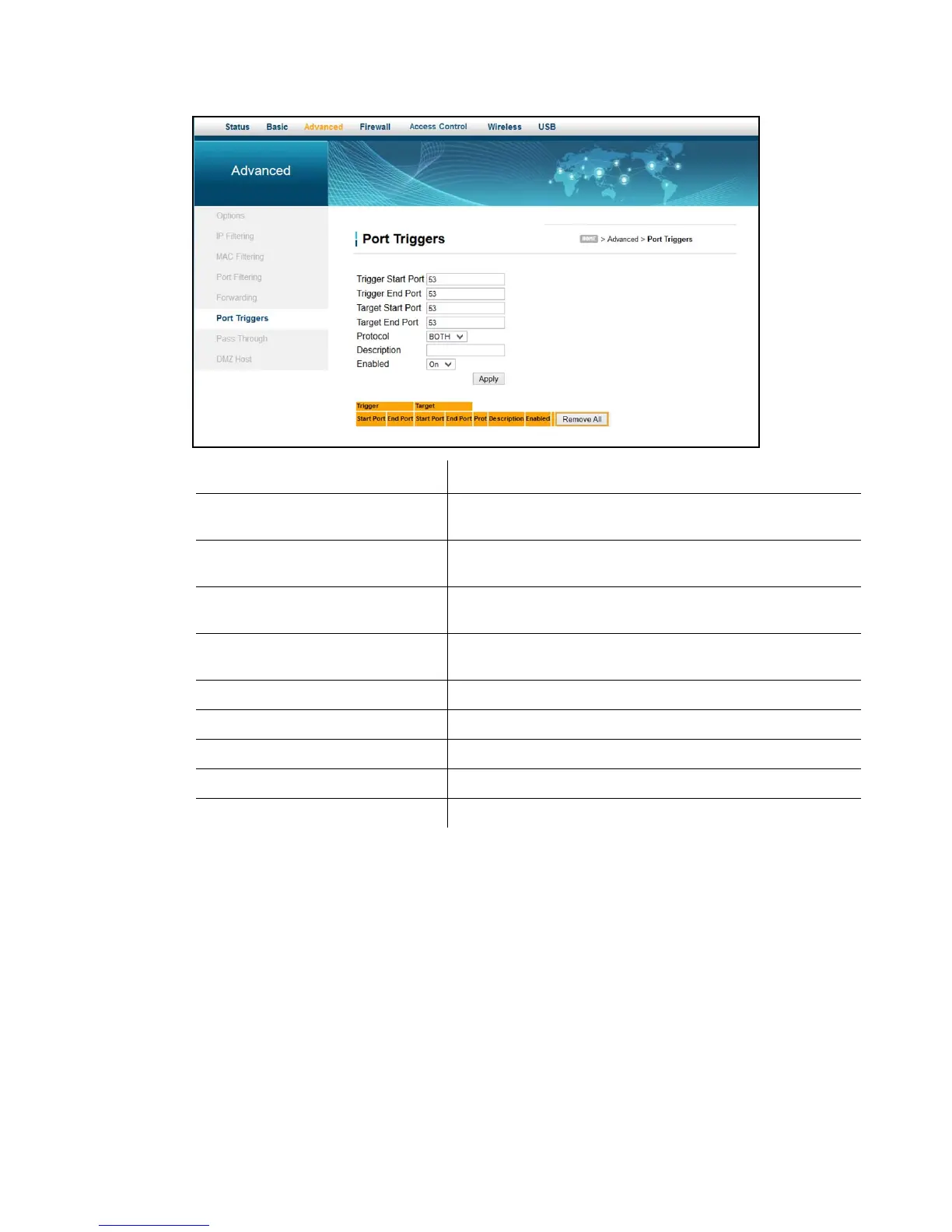
5. Click Apply. The port trigger rule is created and displayed in the table. Additional field
descriptions are listed below the screen example.
Label Description
Trigger Start Port Defines a port number or the starting port number in a range
of trigger port numbers.
Trigger End Port Defines a port number or the ending port number in a range of
trigger port numbers.
Target Start Port Defines a port number or the starting port number in a range
of target port numbers.
Target End Port Defines a port number or the ending port number in a range of
target port numbers.
Protocol Defines the protocol type for this rule, UDP, TCP, or Both.
Description Names the triggering rule.
Enabled Enables (on) or disables (off) the triggering rule.
Apply Saves changes.
Clear All Removes all of the input host’s MAC addresses.


 To Next Page