Ubee Interactive Using the Advanced Option
Ubee DDW365 Advanced Wireless Gateway Subscriber User Guide • February 2014 73
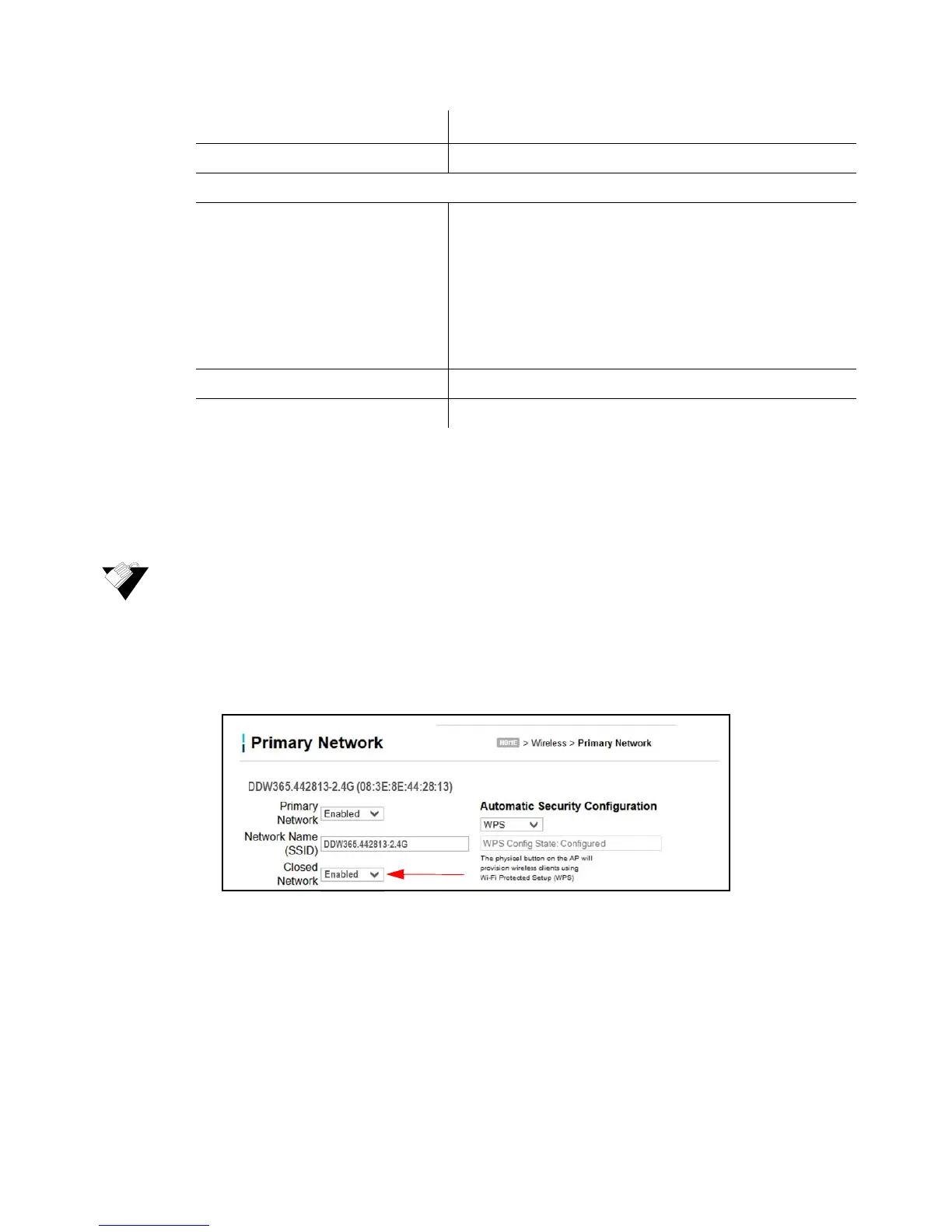
9.2.1 Enabling a Closed Network on the Primary Network
You can enable the Closed Network option so the SSID cannot be broadcast or seen by
others.
To enable a closed network:
1. Access the pull down menu for the Closed Network.
2. Choose Enabled to enable a closed network. Automatic Security Configuration is
disabled.
9.3 Using the Advanced Option
Use the Advanced option to configure data rates and Wi-Fi thresholds.
1. Click Wireless from the main menu.
2. Click Advanced from the left side menu. Field descriptions are listed below the screen
example.
Generate AP PIN Creates a new PIN for this access point.
WPS Add Client
Add a client Activates wireless protected setup (WPS) security on the
device.
To add a client:
1. Click Add a client. The WPS Add Client screen is
displayed.
2. Click PUSH on the WPS Add Client screen.The WPS
button is activated on the device, indicated by a flashing
white light on top of the unit.
3. Press the WPS button on the device.
Client PIN Defines a PIN number for client access.
Authorized Client MAC Defines the MAC address of the authorized client.
Label Description


 To Next Page