10 UCOM Twintalker 4700
UCOM Twintalker 4700
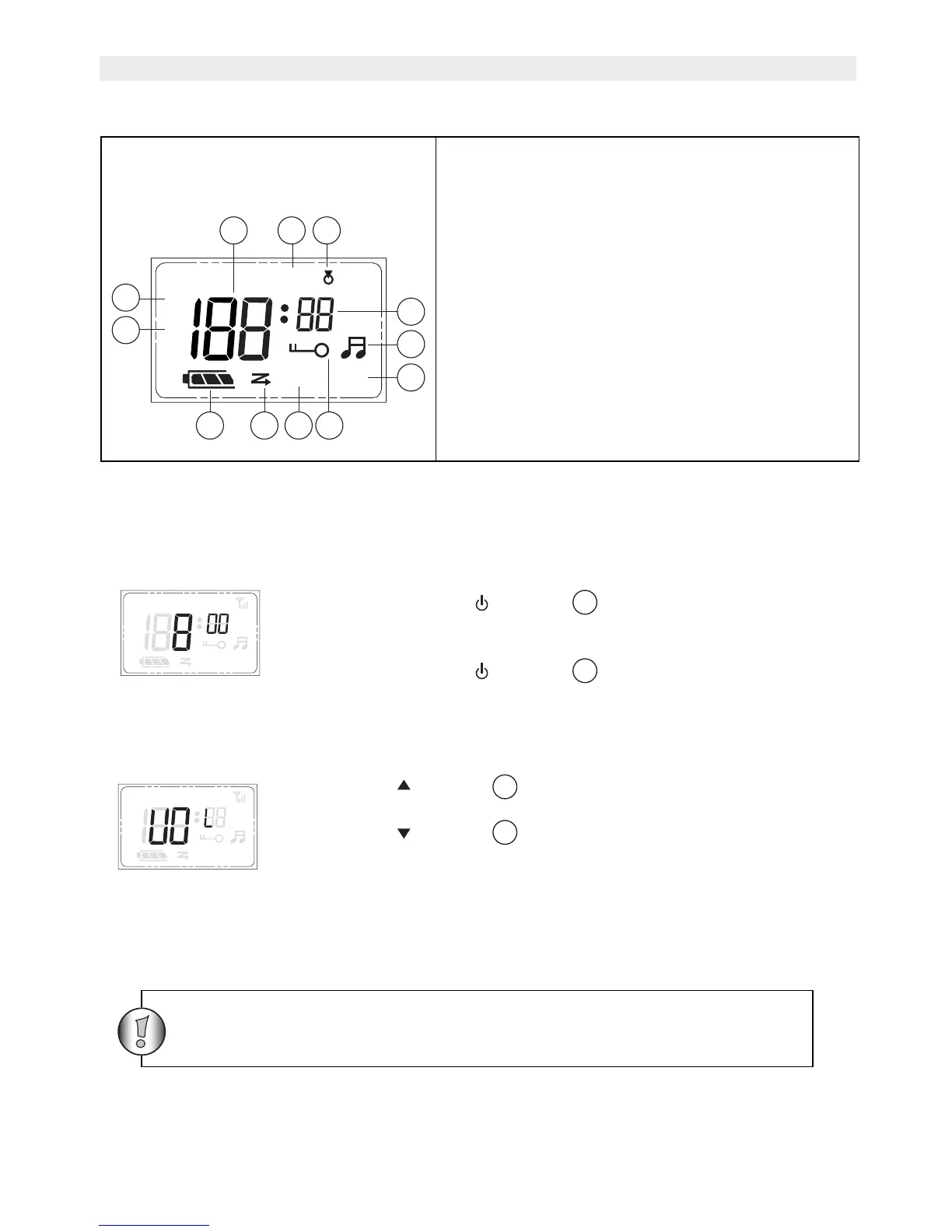
12 LCD Display information
13 Using the Twintalker 4700
13.1 Turning the Unit ON/OFF
13.2 Adjusting Speaker Volume
13.3 Receiving a Signal
The unit is continuously in the RECEIVE mode when the unit is switched ON and not
transmitting.
15. Channel number / Volume level indication
16. Monitor icon
17. Roger Beep icon
18. CTCSS code
19. Call Tone icon. Displayed when sending a
call tone
20. VOX icon
21. Key pad lock icon
22. Auto Power Off icon
23. Scan icon. Displayed during the CHANNEL
SCAN mode.
24. Battery level indication
25. RX icon. Displayed when receiving
26. TX icon. Displayed when transmitting
To turn ON:
• Press and hold the - button . The unit will “beep” and the
LCD display will display the current channel.
To switch OFF
• Press and hold the - button . The unit will “beep” and the
LCD display will turn blank.
• Press the - button in stand-by-mode to increase the
speaker volume. The volume level is displayed.
• Press the - button
to decrease the speaker volume.
+
APO VOX
10
5
In order for other people to receive your transmission, they must
also be on the same channel and have set the same CTCSS code.
(See 13.5)


 To Next Page