9
Initial Setup
The time you switch the set on, the Initial setup wizard
opens, which guides you through the initial setup
process.
Perform the following steps before you press on the
remote control.
• Insert the batteries into the remote control.
• Connect the antenna cable to the TV.
• Plug in the AC cord to the AC outlet.
• Connect your TV to a network.
Make sure that the television is switched on and follow all
the steps in turn hereafter.
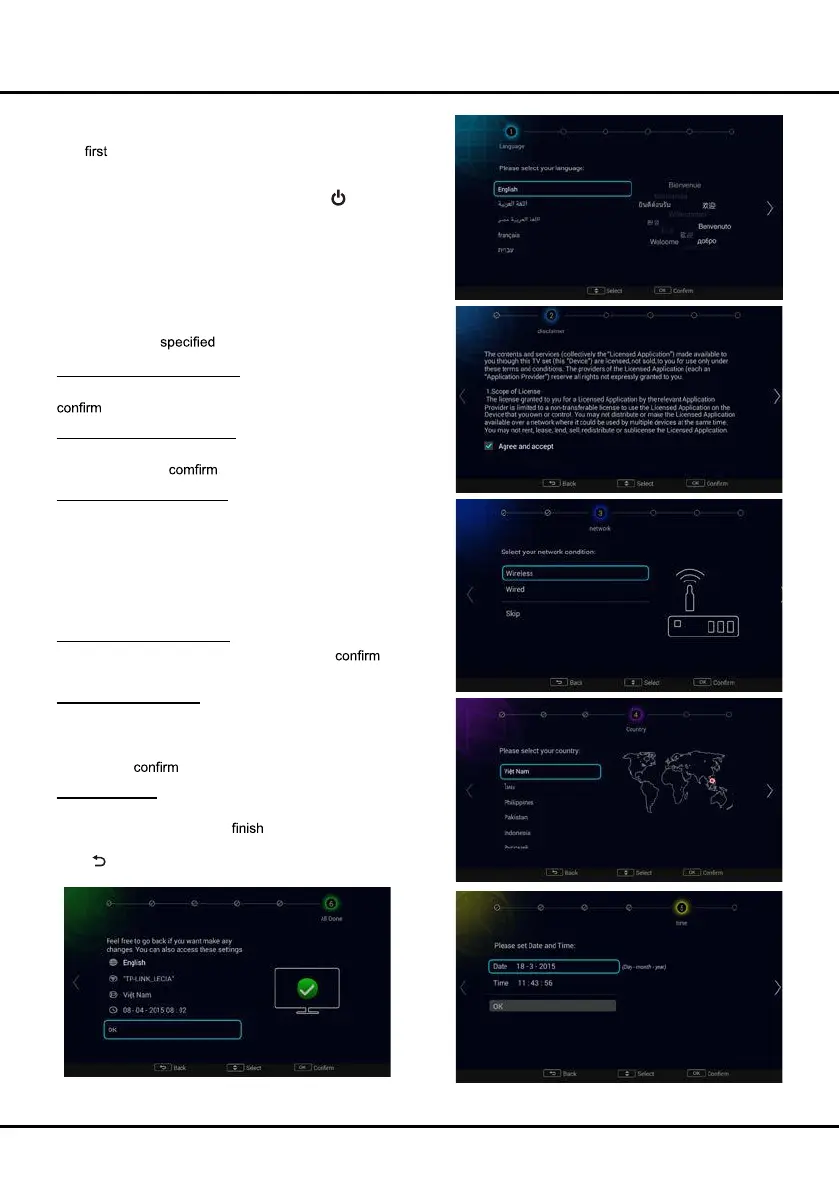
Step 1 Select your language
Use ▲/▼ to select your desired language. Press OK to
and move to next step.
Step 2 Agree the disclaimer
Use ▲/▼ to select [Agree and accept]. Press OK to tick.
Then press OK to and move to next step.
Step 3 Set up the network
Android-based TV requires Internet service to access the
web and Smart TV applications. Connect Internet using your
existing wireless home network or Ethernet cable, and follow
the guides on the screen. Select [Wireless] or [Wired] and
press OK to proceed to the next screen.You can also skip this
step by selecting [Skip], and connect to the internet later. For
details, please see "Network Connection" & "Network Setup".
Step 4 Select your country
Use ▲/▼ to select your country. Press OK to and
move to next step.
Step 5 Set up the time
Use ▲/▼ to move your cursor to the Date or Time, press
OK to enter the submenu. Use ▲/▼ to scroll between the
numbers and select the correct date and time. Select OK and
press OK to and move to next step.
Step 6 All Done
When all setup is done, the [All Done] interface displays on
the screen, and press OK to the initial setup. You can
also go back to former step and make any changes by using
◄ or
.
Chapter 2 General Operation



 To Next Page